ESX Stehender HUD
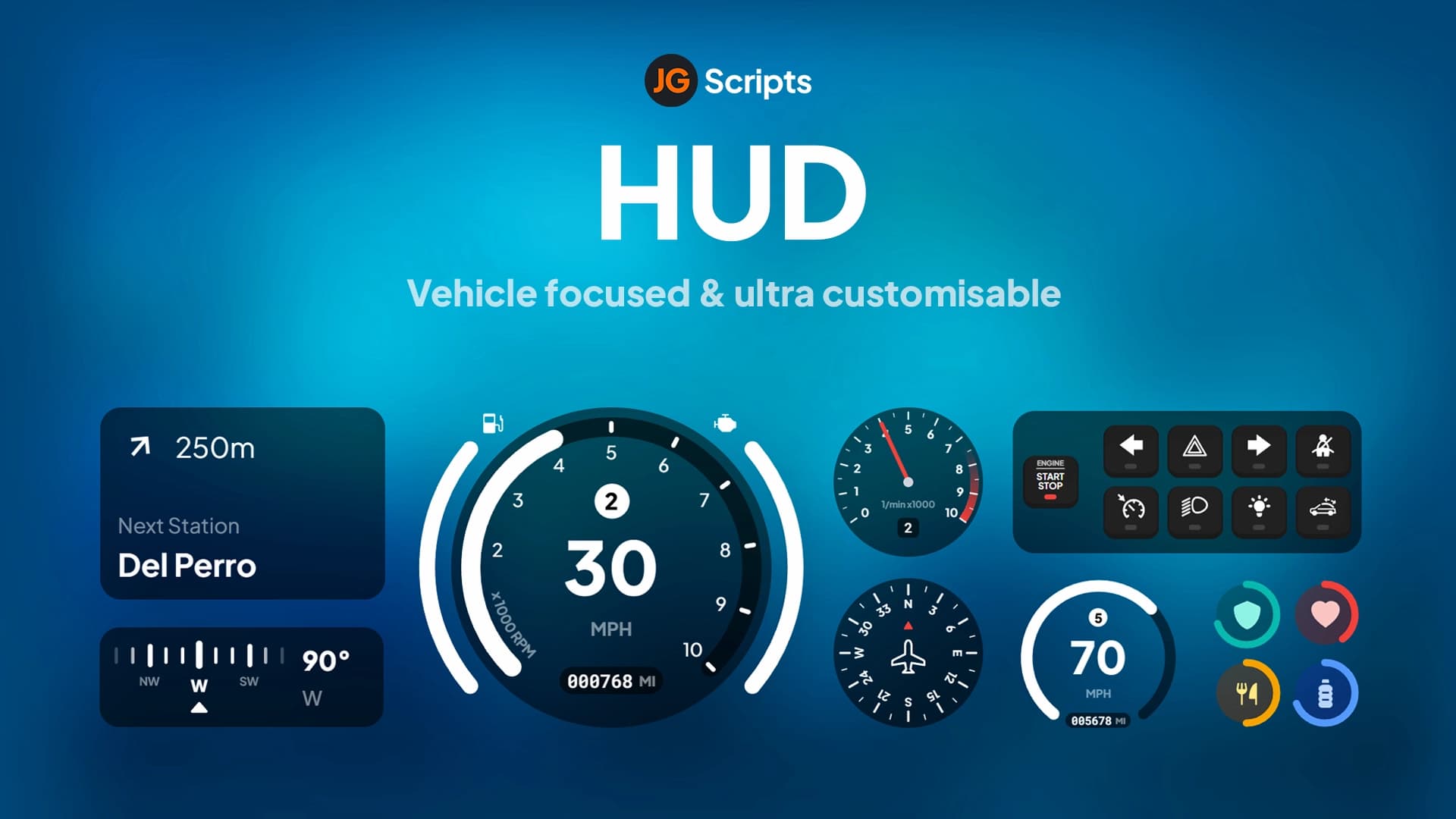
ESX Standing HUD erhöht die Realität mit einem modernen Display für Charakterinformationen.
ESX Standing HUD - Immersive Spieler Statusanzeige
Verbessere den Realismus deines FiveM Servers mit dem ESX Standing HUD, einer modernen und intuitiven Heads-up-Anzeige, die Spieler über die wichtigsten Statistiken ihres Charakters informiert. Dieses leichtgewichtige und dennoch funktionsreiche Script liefert wichtige Informationen, ohne den Bildschirm zu überladen, und wahrt so das perfekte Gleichgewicht zwischen Funktionalität und Immersion. Es wurde speziell für das ESX Framework entwickelt und lässt sich nahtlos in die Systeme esx_status und esx_basicneeds integrieren.
Wesentliche Informationen auf einen Blick
- Gesundheits- & Panzerungsanzeigen - Dynamische visuelle Balken mit flüssigen Animationen und farbcodierten Statuswarnungen (grün für gesund, gelb für verletzt, rot für kritisch)
- Hunger- & Durstsystem - Echtzeitüberwachung mit progressiven Effekten und anpassbaren Verbrauchsraten, die die Spielerleistung beeinflussen
- Ausdauerverfolgung - Visuelle Darstellung der Spielerausdauer mit Sprint- und Aktivitätserkennung, die Erholungsraten anzeigt
- Sprachreichweitenanzeige - Deutliche Anzeige der aktuellen Voice-Chat-Reichweite (Flüstern, Normal, Schreien) mit schnellen Anpassungsoptionen
- Statussymbole - Kontextbezogene Symbole für verschiedene Spielerzustände, einschließlich Verletzungen, Stress, Buffs, Debuffs und besondere Bedingungen
- Geldanzeige - Optionale Bargeld- und Bankguthabenanzeigen mit animierten Aktualisierungen
- Job Informationen - Aktuelle Job- und Ranganzeige mit anpassbarer Positionierung
Intelligente Designmerkmale
Das HUD passt sich intelligent an verschiedene Gameplay-Szenarien an. Es wird automatisch während Zwischensequenzen und filmischen Momenten ausgeblendet, passt die Deckkraft beim Zielen über Kimme und Korn für eine klarere Zielerfassung an, blendet sich während Menüinteraktionen aus, um Unordnung zu reduzieren, und kann basierend auf den Spielerpräferenzen mithilfe konfigurierbarer Tastenbelegungen ein- und ausgeschaltet werden. Das minimalistische Design sorgt für maximale Sichtbarkeit und liefert gleichzeitig alle notwendigen Informationen zum richtigen Zeitpunkt.
Visuelle Anpassungsoptionen
- Mehrere voreingestellte Designs - Wähle zwischen hellen, dunklen, transparenten und kontrastreichen Modi
- Anpassbare Positionierung - Drag-and-Drop-Oberfläche zum Neupositionieren aller HUD-Elemente oder Verwendung eines Koordinatensystems
- Skalierbare UI-Elemente - Ändere die Größe einzelner Komponenten, um sie an verschiedene Bildschirmauflösungen anzupassen (1080p, 1440p, 4K getestet)
- Farbanpassung - Ändere die Farben für alle Statusleisten, Symbole und Hintergründe mithilfe von RGB- oder Hex-Werten
- Einzelne Elemente umschalten - Aktiviere/deaktiviere bestimmte HUD-Komponenten basierend auf den Serveranforderungen und den Spielerpräferenzen
- Animationsgeschwindigkeitssteuerung - Passe die Übergangsgeschwindigkeiten für Balkenaktualisierungen und Statusänderungen an
- Symbolpakete - Mehrere Symbolstiloptionen, einschließlich minimalistischer, realistischer und stilisierter Sets
Performance Exzellenz
Entwickelt mit Blick auf Optimierung durch effiziente Aktualisierungszyklen und minimalen Ressourcenverbrauch. Das Script läuft im Leerlauf mit weniger als 0.01ms und erreicht Spitzenwerte von nur 0.03ms bei aktiven Aktualisierungen (Gesundheitsänderungen, Ausdauerverlust), wodurch sichergestellt wird, dass die Gameplay-Performance auch auf leistungsschwächeren Systemen nicht beeinträchtigt wird. Verwendet clientseitiges Caching, um den Netzwerkverkehr zu reduzieren, und implementiert Delta-Updates, um nur geänderte Werte zu aktualisieren.
Erweiterte Funktionen
- Stress System Integration - Visuelle Stressanzeige, die Bildschirmeffekte und Spieleraktionen beeinflusst
- Temperaturüberwachung - Körpertemperaturanzeige für Survival-Server mit Wettereffekten
- Sauerstoffgehalt - Unterwasser-Atemanzeige mit anpassbaren Verbrauchsraten
- Richtungskompass - Optionaler Kompass, der Himmelsrichtungen und Straßennamen anzeigt
- Fahrzeugstatus - Geschwindigkeit, Kraftstoff, Motorzustand in Fahrzeugen (kann deaktiviert werden)
- Spieler in der Nähe - Zähler, der Spieler in der Nähe im Radius anzeigt (nützlich für soziale Zonen)
- Serverzeit Anzeige - In-Game-Zeit und Datum mit 12/24-Stunden-Formatoptionen
Integrationskompatibilität
Funktioniert nahtlos mit beliebten ESX Ressourcen, einschließlich esx_status (erforderlich), esx_basicneeds für Hunger/Durst, esx_ambulancejob für Verletzungszustände, pma-voice oder saltychat für Sprachindikatoren und benutzerdefinierten Statusskripten über Exportfunktionen. Unterstützt sowohl alte ESX 1.2 als auch neue ESX Legacy Frameworks.
Konfigurationssystem
Die umfassende config.lua Datei ermöglicht es Serverbesitzern, jeden Aspekt des HUD anzupassen. Lege Aktualisierungsintervalle für jeden Statustyp fest, konfiguriere Farbschemata und Schwellenwerte (wann sich Balken gelb/rot färben), definiere, welche Elemente standardmäßig sichtbar sind, lege Positionierungskoordinaten für alle Komponenten fest, passe Animationstimings und -effekte an und konfiguriere die Integration mit bestimmten ESX Ressourcen.
Responsives Verhalten
- Kampfmodus - Das HUD passt sich im Kampf an, hebt Gesundheit und Panzerung hervor und dimmt unwesentliche Informationen
- Fahrzeugmodus - Zeigt automatisch fahrzeugspezifische Informationen beim Einsteigen in Autos an
- Schleichmodus - Reduziert die HUD-Sichtbarkeit beim Ducken oder in Schleichszenarien
- Soziale Zonen - Kann bestimmte Elemente in Sicherheitszonen oder sozialen Bereichen ausblenden
- Aktivitätserkennung - Die Ausdauerleiste erscheint nur beim Laufen, Schwimmen oder Klettern
Sprachunterstützung
Enthält Übersetzungsdateien für mehrere Sprachen und ist somit perfekt für internationale Communities. Vorkonfigurierte Sprachen sind Englisch, Spanisch, Französisch, Deutsch, Portugiesisch, Polnisch, Russisch und mehr. Einfaches Hinzufügen benutzerdefinierter Übersetzungen über eine einfache JSON-Struktur.
Installation & Einrichtung
Einfache Installation mit detaillierter Konfigurationsdatei. Lade die Datei herunter und entpacke sie in den Ressourcenordner, importiere die SQL Datei, falls eine Datenbankspeicherung erforderlich ist, konfiguriere die Einstellungen in config.lua, passe die Positionierung und Farben an dein Serverdesign an, füge sie zu server.cfg hinzu und starte den Server neu. Keine zusätzlichen Abhängigkeiten über das ESX Framework und esx_status hinaus.
Perfekt für
- Roleplay Server, die immersive, unaufdringliche Statusanzeigen wünschen
- Survival Server, die eine detaillierte Überwachung der Spielerbedingungen erfordern
- Server, die performanceoptimierte HUD-Ersetzungen suchen
- Communities, die eine anpassbare UI wünschen, die zum Server-Branding passt
- Hardcore Server, die detaillierte Statusinformationen für Gameplay-Mechaniken benötigen
Framework Kompatibilität
- ✅ ESX Legacy - Volle Kompatibilität mit dem modernen ESX Framework
- ✅ ESX 1.2 - Funktioniert mit klassischen ESX Versionen
- ✅ esx_status - Erforderliche Abhängigkeit für die Statusverfolgung
- ✅ esx_basicneeds - Empfohlen für Hunger/Durst-Funktionalität
- ❌ QBCore - Nur ESX, nicht kompatibel mit dem QBCore Framework
Status Effekt System
Das HUD zeigt verschiedene Statuseffekte mit einzigartigen Symbolen und Farben an. Zeige an, wenn der Spieler betrunken ist, mit einer Anzeige für verschwommene Sicht, zeige den Blutungsstatus mit einem rot pulsierenden Symbol an, zeige Frakturen oder Verletzungen an, die die Bewegung beeinträchtigen, zeige positive Buffs durch Verbrauchsgüter oder Fähigkeiten an und zeige Umgebungseffekte wie Kälte, Hitze oder Strahlung an.
Administrative Kontrollen
Serverbesitzer können bestimmte HUD-Einstellungen serverweit erzwingen, bestimmte Elemente vor der Spieleranpassung sperren, Mindest-/Maximalgrößen für die UI-Skalierung festlegen, Farboptionen einschränken, um die Markenkonsistenz zu gewährleisten, und die HUD-Performance über alle verbundenen Spieler hinweg über Debug-Befehle überwachen.
Entwicklerfreundlich
Sauberer, gut dokumentierter Code mit Exportfunktionen zur Integration mit benutzerdefinierten Skripten. Löse benutzerdefinierte Statusanzeigen aus, füge programmgesteuert neue Statusleisten hinzu, ändere Farben und Positionen über Ereignisse und erstelle benutzerdefinierte HUD-Elemente, die sich in das bestehende Framework integrieren. Enthält Beispielskripte und Integrationsanleitungen.
Updates & Benachrichtigungen
Visuelle Benachrichtigungen für Statusänderungen - Warnung, wenn Hunger/Durst kritische Werte erreichen, Warnungen, wenn die Gesundheit unter einen Schwellenwert fällt, Benachrichtigungen, wenn Buffs gewonnen oder verloren werden, und anpassbare Nachrichten für serverspezifische Ereignisse. Alle Benachrichtigungen respektieren die minimalistische Designphilosophie.