ESX Bewegliche Premium HUD
Modernes, anpassbares HUD-Interface für ESX-Server mit hoher Anpassungsfähigkeit und Optimierung.
Video-Vorschau
Click to load video from YouTube. By watching, you agree to their privacy policy.
ESX Moveable Premium HUD - Anpassbares DRC HUD für FiveM ESX Server
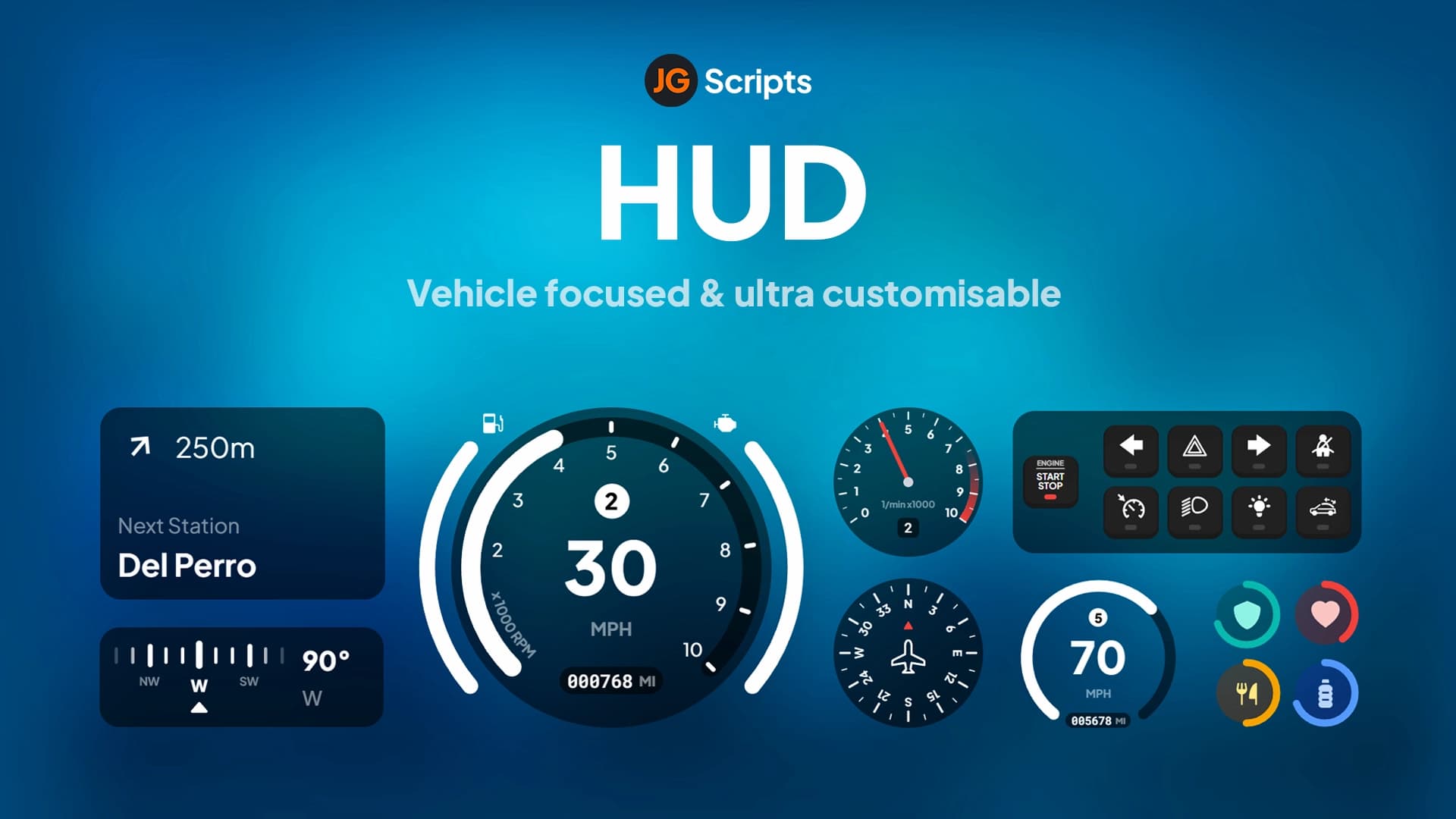
Das ESX Moveable Premium HUD (DRC HUD) bietet ein modernes, vollständig anpassbares Heads-up-Display-System, das Spieler überall auf ihrem Bildschirm positionieren können. Dieses Premium HUD Script kombiniert essentielle Informationsanzeigen wie Gesundheit, Panzerung, Hunger, Durst, Geld und Fahrzeugstatistiken in einer schlanken, performance-optimierten Oberfläche. Im Gegensatz zu statischen HUDs, die Spieler zu einem einzigen Layout zwingen, ermöglicht dieses bewegliche System jedem Spieler, sein ideales Bildschirm-Setup für maximalen Komfort und Sichtbarkeit zu konfigurieren.
Das DRC HUD wurde speziell für ESX Framework Server entwickelt und integriert sich nahtlos in die Wirtschafts-, Status- und Fahrzeugsysteme von ESX. Die Farbwechselfunktion ermöglicht es den Spielern, das Aussehen ihres HUDs mit benutzerdefinierten Farbschemata zu personalisieren, während die optimierte Codebasis eine minimale Auswirkung auf die Performance auch auf leistungsschwächeren Systemen gewährleistet. Egal, ob du zu Fuß unterwegs bist und die Bedürfnisse deines Charakters verwaltest oder fährst und Fahrzeugstatistiken überwachst, dieses HUD bietet alle wichtigen Informationen auf einen Blick, ohne den Bildschirm zu überladen.
Was ist enthalten?
Du erhältst das komplette DRC HUD-Paket mit beweglichen UI-Elementen, In-Game-Einstellungsmenü, Farbanpassungssystem, ESX-Integrationsskripten und umfassenden Konfigurationsdateien. Das Paket enthält sowohl HUD-Anzeigen für Fußgänger (Gesundheit, Panzerung, Hunger, Durst, Geld) als auch Fahrzeug-HUD-Komponenten (Geschwindigkeit, Treibstoff, Drehzahl, Gang), die automatisch basierend auf dem Spielerkontext aktiviert werden. Alle UI-Elemente sind per Drag-and-Drop verschiebbar, wobei die Position pro Spieler gespeichert wird.
Hauptmerkmale
- Vollständig bewegliche Oberfläche - Ziehe jedes HUD-Element per Drag & Drop an deine bevorzugte Bildschirmposition mit automatischer Positionsspeicherung
- Farbanpassung - Ändere die HUD-Farben passend zu deinen Vorlieben oder dem Server-Theme mit RGB-Farbauswahl
- In-Game-Einstellungsmenü - Greife auf umfassende Einstellungen zu, ohne config Dateien zu bearbeiten, passe sie im laufenden Betrieb an
- Multi-Geldanzeige - Zeigt Bankguthaben, Bargeld und Gesellschafts-/Job-Geld separat an, um einen vollständigen finanziellen Überblick zu erhalten
- Hunger- & Durstbalken - Visuelle Statusanzeigen für das ESX-Bedürfnissystem mit farbcodierten Warnungen
- Gesundheits- & Panzerungs-Tracking - Präzise numerische und Balkenanzeigen für aktuelle Gesundheits- und Panzerungslevel
- Dynamisches Auto-HUD - Tachometer, Tankanzeige, Drehzahlmesser und Ganganzeige, die beim Betreten von Fahrzeugen erscheinen
- Performance-optimiert - Effizientes Rendering mit 60+ FPS mit minimaler resmon-Auswirkung (typischerweise 0,02-0,05ms)
- Auto-Hide-Funktionen - HUD-Elemente werden während Zwischensequenzen, Pausenmenüs oder bei Nichtgebrauch intelligent ausgeblendet
- Profilspeicherung - Das benutzerdefinierte Layout und Farbschema jedes Spielers wird automatisch über Sitzungen hinweg gespeichert
Perfekt für
- ESX Roleplay Server, die ein modernes, professionelles HUD-Design wünschen
- Server, bei denen Spieleranpassung und Lebensqualität Priorität haben
- Communities, die von veralteten oder statischen HUD-Skripten upgraden
- Streamer, die HUD-Elemente um ihre Facecam und Overlays positionieren müssen
- Multi-Framework Server, die auf ESX für HUD-Konsistenz standardisieren
- Server mit vielfältigen Spielerbasen (unterschiedliche Bildschirmgrößen und Auflösungen)
Wie die Beweglichkeit funktioniert
Spieler aktivieren den Bearbeitungsmodus über eine konfigurierbare Tastenkombination (Standard oft F10 oder ähnlich), wodurch alle HUD-Elemente verschiebbar werden. Klicke und halte ein beliebiges Element, um es an einer beliebigen Stelle auf dem Bildschirm neu zu positionieren, und lasse es los, um es zu fixieren. Das System speichert Positionen in der Datenbank oder im Client-seitigen Speicher (abhängig von der Konfiguration), wodurch sichergestellt wird, dass dein benutzerdefiniertes Layout Server-Neustarts und Neuverbindungen überdauert. Dies ist besonders wertvoll für Spieler mit nicht standardmäßigen Bildschirmauflösungen oder solche, die Streaming-Overlays verwenden.
Farbanpassungssystem
Die Farbwechselfunktion geht über einfache Voreinstellungen hinaus. Spieler können auf eine RGB-Farbauswahl zugreifen, um genaue Farbtöne für verschiedene HUD-Elemente auszuwählen, oder aus vorkonfigurierten Designs wählen, die zu beliebten Server-Farbschemata passen. Du kannst verschiedene Farben für Gesundheitsbalken, Panzerung, Hunger/Durst, Geldanzeigen und Fahrzeug-HUD-Komponenten unabhängig voneinander festlegen. Serverbesitzer können Farboptionen einschränken oder Server-gebrandete Voreinstellungen bereitstellen, falls gewünscht.
Installation
- Entpacke den drc-hud oder moveable-hud Ordner in dein Server-Ressourcenverzeichnis
- Stelle sicher, dass du das ESX Framework ordnungsgemäß installiert hast und es läuft
- Füge ensure [hud-folder-name] zu deiner server.cfg Datei hinzu
- Importiere alle enthaltenen SQL Dateien für die Speicherung der Spielereinstellungen (falls datenbankbasierte Speicherung)
- Konfiguriere die Einstellungen in config.lua (Standardfarben, Tastenkombinationen, Einheiten usw.)
- Starte deinen Server neu und drücke die Taste für den Bearbeitungsmodus, um die Positionierung zu testen
Framework-Kompatibilität
- ✅ ESX Legacy - Volle Kompatibilität mit ESX Legacy (1.10.x+) mit allen Geld-, Status- und Fahrzeugfunktionen
- ✅ ESX 1.9.x und früher - Funktioniert mit es_extended final und älteren Versionen mit der richtigen Konfiguration
- ⚠️ QBCore - Speziell für das ESX Framework entwickelt, erfordert erhebliche Änderungen für die QBCore-Kompatibilität
- ❌ Standalone - Benötigt das ESX Framework für Geld- und Statusdaten, nicht standalone-fähig
Was es auszeichnet
Die Kombination aus Beweglichkeit und Farbanpassung unterscheidet das DRC HUD von starren Alternativen. Viele HUD-Skripte erzwingen allen Spielern eine einzige Designvorstellung, aber dieses System respektiert individuelle Vorlieben und Bedürfnisse. Die saubere, moderne Ästhetik vermeidet das übermäßig verspielte Aussehen einiger HUDs und bietet dennoch alle notwendigen Informationen klar und deutlich. Die Performance-Optimierung stellt sicher, dass selbst Server mit 64+ Spielern und hoher Ressourcenlast dieses HUD ohne FPS-Bedenken verwenden können.
Fahrzeug-HUD-Details
Beim Betreten eines Fahrzeugs wird das Auto-HUD automatisch aktiviert und zeigt die Geschwindigkeit (in MPH oder KPH basierend auf der config), den Kraftstoffstand mit Reichweitenschätzung, den Drehzahlmesser und den aktuellen Gang an. Der Tachometer wird flüssig aktualisiert, ohne ruckartige Zahlenänderungen, und die Tankanzeige ist farblich nach dem verbleibenden Kraftstoff codiert (grün, gelb, rot). Das Fahrzeug-HUD unterstützt auch Elektrofahrzeuge mit entsprechenden Batterieanzeigen anstelle von Kraftstoff und kann Schadenszustände für mechanische Roleplay Server anzeigen.
Geldanzeige-Aufschlüsselung
Das dreistufige Geldsystem zeigt dein Bargeld, dein Bankkontoguthaben und das Gesellschafts-/Jobgeld an, wenn du angestellt bist. Dies ist besonders nützlich für Geschäftsinhaber, Polizeibeamte mit Abteilungsgeldern oder Gangmitglieder mit gemeinsamem Geld. Jeder Geldtyp wird mit eindeutigen Symbolen angezeigt und in Echtzeit aktualisiert, wenn Transaktionen stattfinden. Serverbesitzer können konfigurieren, welche Geldtypen angezeigt werden und ob genaue Beträge oder gerundete Werte für eine sauberere UI angezeigt werden sollen.
Konfigurationsoptionen
Serverbesitzer haben über die config Datei umfangreiche Kontrolle über das HUD-Verhalten. Lege Standardpositionen und -farben fest, konfiguriere, welche Elemente angezeigt werden, passe die Aktualisierungsfrequenzen an (zur Performance-Optimierung), aktiviere oder deaktiviere die Beweglichkeit vollständig, lege minimale/maximale Farbwerte fest, konfiguriere die Formatierung der Geldanzeige, passe die Hunger-/Durstschwellenwerte an und passe die Auslösebedingungen für das Fahrzeug-HUD an. Du kannst auch Job-spezifische HUD-Variationen oder VIP-exklusive Anpassungsfunktionen festlegen.
Performance-Spezifikationen
Das DRC HUD bietet eine außergewöhnliche Performance mit typischen resmon-Werten zwischen 0,02-0,05ms im aktiven Zustand. Das Skript verwendet effiziente Rendering-Techniken mit minimalen Draw Calls und optimierten Aktualisierungsfrequenzen. Statusbalken werden nur aktualisiert, wenn sich Werte ändern, anstatt in jedem Frame, und das Fahrzeug-HUD wird nur bei Bedarf aktiviert. Selbst auf Servern mit 20+ aktiven Ressourcen berichten Spieler von stabilen 60+ FPS mit aktiviertem HUD.
Updates und Support
Das bewegliche HUD erhält regelmäßige Updates für die Kompatibilität mit neuen ESX-Versionen und Fehlerbehebungen. Die saubere Codebasis erleichtert die Integration mit benutzerdefinierten Skripten oder die Änderung des Verhaltens, um es an spezifische Serveranforderungen anzupassen. Die Dokumentation enthält in der Regel Konfigurationsbeispiele, Integrationsanleitungen für benutzerdefinierte Status-Skripte und Fehlerbehebung für häufige Probleme.