FiveM Server Thread Hitch Warning: How to Fix
FiveM Thread Hitch Warning – How To Fix
What is a FiveM Thread Hitch Warning?
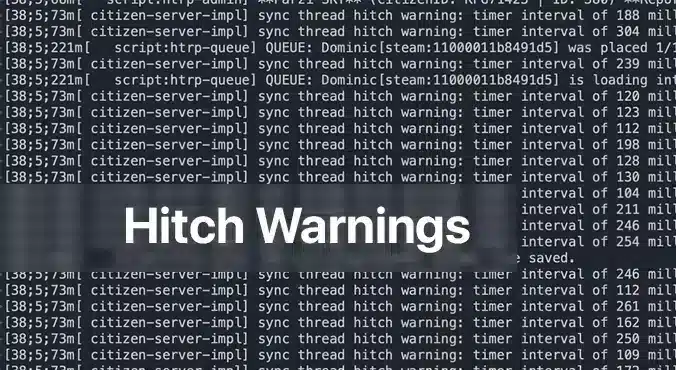
A FiveM thread hitch warning appears as a sticky message in your server console, warning you that one or more scripts are using too much processing time. It’s the server’s way of saying, “Hey, something is taking longer than it should, and it’s going to feel like a lag spike to your players.” For anyone running a FiveM server, these warnings are an immediate sign that the experience could suffer. Understanding the cause and fixing it not only smooths gameplay but also keeps your community happy.
Why Do Thread Hitch Warnings Pop Up?
The most common culprit is an unoptimized script. In FiveM, scripts run on the server’s CPU to handle everything from NPC behavior to custom vehicle logic. When a script contains inefficient loops, heavy database calls, or repeatedly checks conditions that never change, it can stall the server thread. The server queue then gets stuck, leading to the dreaded hitch warning. Another, less common reason is inadequate hardware: a low‑end CPU or insufficient RAM can’t keep up with a busy server, forcing every script to compete for limited resources.
Step‑by‑Step Fixes for Thread Hitch Warnings
1. Verify Your Server Hardware
Even the best‑optimized script can choke if your hardware is underpowered. Below is a quick hardware checklist rated by player count.
– CPU: FiveM is CPU‑bound; higher clock speeds improve single‑thread performance, which is more critical than extra cores.
– RAM: More memory means the server can cache more assets and handle more connections without swapping to disk.
– Storage: SSD or NVMe drives cut loading times dramatically; HDDs become a bottleneck.
– Bandwidth: Higher upload speeds ensure packets reach the server fast, especially with larger player counts.
– OS: Linux distributions offer lower overhead and better stability for game servers.
If you’re running on a shared host or a virtual private server, confirm these specs with your provider. Upgrade when you hit consistent hitch warnings and notice performance lag.
2. Identify Faulty Scripts With Server Profiling
The built‑in profiling tools in txAdmin or the FiveM server console let you pinpoint which script is causing the hitch.
1. Open a console or txAdmin in Administrator mode.
2. Type: `profiler record 500`
(This records 500 milliseconds of execution data.)
3. Wait for the recording to finish, then run: `profiler save myprofile`.
A file will be generated.
4. Finally, `profiler view myprofile` will open a link in your browser.
If you’re not on the same machine, you may need to use `export profilers` to send the file elsewhere.
In the profiler report, look for functions or scripts that consistently consume a large portion of the measured time. Pay attention to:
– Long loops that run every tick
– Database queries or file reads that
– External API calls or network requests that block the thread
Once you’ve located the problematic parts, you have two options: optimize or remove.
3. Optimize or Disable Problematic Scripts
Optimize
If the script is essential to your server’s unique gameplay, try the following:
– Refactor loops: Replace `for {}` loops that run per tick with event‑driven logic or reduce the frequency.
– Cache results: Store expensive calculations or database results in memory, updating only when necessary.
– Use native functions: Where possible, replace custom code with FiveM’s built‑in natives, which are usually more efficient.
– Async calls: Switch blocking operations to asynchronous patterns if the API supports them.
After modifications, run the profiler again to verify the improvement.
Disable
If optimization isn’t feasible or the script is cosmetic, disable it safely:
1. Edit `server.cfg`.
2. Comment out or delete any lines that load the script, e.g. `ensure faulty_script`.
3. Restart the server to confirm the hitch warning disappears.
You can always re‑enable it later if you find a workaround or external optimization support.
4. Keep the Server Up To Date
Older versions of FiveM or its dependencies may contain performance regressions. Ensure you’re running the latest stable server files:
“`
cd /root/fivem
git pull
sh ctl restart
“`
Also keep the operating system updated with the latest patches; this can prevent unknown bottlenecks.
When Lags Persist After Fixing Warnings
If a hitch warning has been addressed but lag continues, consider:
– Increasing tick rate: Lowering TPS (ticks per second) reduces CPU demand but can feel less responsive. Balance it by only adjusting if other solutions fail.
– Disabling unnecessary resources: Many servers enable mods that provide little value but consume resources. Remove or replace them.
– Monitoring system metrics: Use tools like `htop`, `nvme-cli`, or `iftop` to watch CPU, RAM, disk, and network usage in real time.
A persistent lag can also stem from network issues outside the server’s control. Ask your players to test latency with `ping` or `traceroute` and confirm they’re in the same region as your server.
Final Thoughts
A FiveM thread hitch warning is a clear signal that something in your server environment—whether a rogue script or insufficient hardware—needs attention. By systematically checking hardware, profiling scripts, and either optimizing or disabling problematic code, you can eliminate these warnings and deliver a smoother, more enjoyable experience to your community. Remember, the key to a stable FiveM server is proactive monitoring and regular updates. If you still hit roadblocks, the FiveM forums, Discord, and txAdmin resources are excellent places to get tailored advice. Happy hosting!
Bleib auf dem Laufenden
Erhalte die neuesten FiveM-Tutorials, Mod-Releases und exklusive Updates direkt in dein Postfach.
Kein Spam. Jederzeit abbestellbar.