ESX Standing HUD
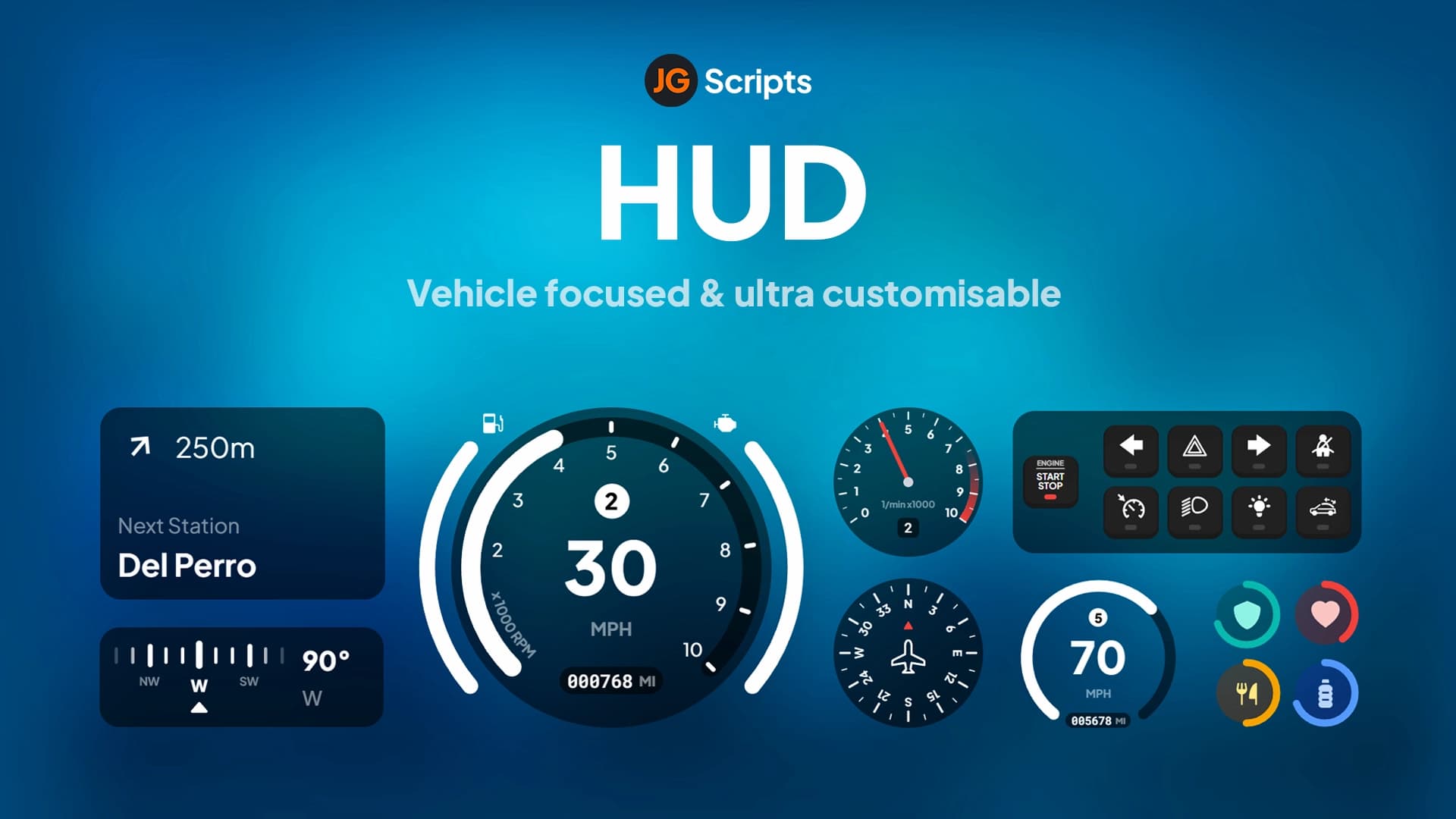
Enhance your FiveM server's realism with ESX Standing HUD, a modern and intuitive heads-up display that keeps players informed about their character's vital ...
ESX Standing HUD - Immersive Player Status Display
Enhance your FiveM server's realism with ESX Standing HUD, a modern and intuitive heads-up display that keeps players informed about their character's vital statistics. This lightweight yet feature-rich script provides essential information without cluttering the screen, maintaining the perfect balance between functionality and immersion. Built specifically for ESX framework, it integrates seamlessly with esx_status and esx_basicneeds systems.
Essential Information at a Glance
- Health & Armor Indicators - Dynamic visual bars with smooth animations and color-coded status warnings (green for healthy, yellow for injured, red for critical)
- Hunger & Thirst System - Real-time monitoring with progressive effects and customizable depletion rates that affect player performance
- Stamina Tracking - Visual representation of player stamina with sprint and activity detection, showing recovery rates
- Voice Range Indicator - Clear display of current voice chat range (whisper, normal, shouting) with quick adjustment options
- Status Icons - Contextual icons for various player states including injuries, stress, buffs, debuffs, and special conditions
- Money Display - Optional cash and bank balance indicators with animated updates
- Job Information - Current job and grade display with customizable positioning
Smart Design Features
The HUD intelligently adapts to different gameplay scenarios. It automatically hides during cutscenes and cinematic moments, adjusts opacity when aiming down sights for clearer targeting, fades out during menu interactions to reduce clutter, and can be toggled on/off based on player preference using configurable keybinds. The minimalist design ensures maximum visibility while providing all necessary information at the right time.
Visual Customization Options
- Multiple Preset Themes - Choose from light, dark, transparent, and high-contrast modes
- Adjustable Positioning - Drag-and-drop interface for repositioning all HUD elements or use coordinate system
- Scalable UI Elements - Resize individual components to match different screen resolutions (1080p, 1440p, 4K tested)
- Color Customization - Modify colors for all status bars, icons, and backgrounds using RGB or hex values
- Toggle Individual Elements - Enable/disable specific HUD components based on server needs and player preferences
- Animation Speed Control - Adjust transition speeds for bar updates and status changes
- Icon Packs - Multiple icon style options including minimalist, realistic, and stylized sets
Performance Excellence
Built with optimization in mind using efficient update cycles and minimal resource consumption. The script runs at less than 0.01ms in idle state and peaks at only 0.03ms during active updates (health changes, stamina depletion), ensuring zero impact on gameplay performance even on lower-end systems. Uses client-side caching to reduce network traffic and implements delta updates to only refresh changed values.
Advanced Features
- Stress System Integration - Visual stress indicator that affects screen effects and player actions
- Temperature Monitoring - Body temperature display for survival servers with weather effects
- Oxygen Level - Underwater breath meter with customizable depletion rates
- Direction Compass - Optional compass showing cardinal directions and street names
- Vehicle Status - Speed, fuel, engine health when in vehicles (can be disabled)
- Proximity Players - Counter showing nearby players in radius (useful for social zones)
- Server Time Display - In-game time and date with 12/24 hour format options
Integration Compatibility
Works seamlessly with popular ESX resources including esx_status (required), esx_basicneeds for hunger/thirst, esx_ambulancejob for injury states, pma-voice or saltychat for voice indicators, and custom status scripts through export functions. Supports both old ESX 1.2 and new ESX Legacy frameworks.
Configuration System
Comprehensive config.lua file allows server owners to customize every aspect of the HUD. Set update intervals for each status type, configure color schemes and thresholds (when bars turn yellow/red), define which elements are visible by default, set positioning coordinates for all components, customize animation timings and effects, and configure integration with specific ESX resources.
Responsive Behavior
- Combat Mode - HUD adjusts when in combat, highlighting health and armor while dimming non-essential info
- Vehicle Mode - Automatically shows vehicle-specific information when entering cars
- Stealth Mode - Reduces HUD visibility when crouching or in stealth scenarios
- Social Zones - Can hide certain elements in safe zones or social areas
- Activity Detection - Stamina bar only appears when running, swimming, or climbing
Locale Support
Includes translation files for multiple languages making it perfect for international communities. Pre-configured languages include English, Spanish, French, German, Portuguese, Polish, Russian, and more. Easy to add custom translations through simple JSON structure.
Installation & Setup
Simple installation with detailed configuration file. Download and extract to resources folder, import SQL file if database storage is needed, configure settings in config.lua, adjust positioning and colors to match your server theme, add to server.cfg, and restart server. No additional dependencies beyond ESX framework and esx_status.
Perfect For
- Roleplay servers wanting immersive, non-intrusive status displays
- Survival servers requiring detailed monitoring of player conditions
- Servers seeking performance-optimized HUD replacements
- Communities wanting customizable UI to match server branding
- Hardcore servers needing detailed status information for gameplay mechanics
Framework Compatibility
- ✅ ESX Legacy - Full compatibility with modern ESX framework
- ✅ ESX 1.2 - Works with classic ESX versions
- ✅ esx_status - Required dependency for status tracking
- ✅ esx_basicneeds - Recommended for hunger/thirst functionality
- ❌ QBCore - ESX only, not compatible with QBCore framework
Status Effect System
The HUD displays various status effects with unique icons and colors. Show when player is drunk with blurred vision indicator, display bleeding status with red pulsing icon, indicate fractures or injuries affecting movement, show positive buffs from consumables or abilities, and display environmental effects like cold, heat, or radiation.
Administrative Controls
Server owners can force certain HUD settings server-wide, lock specific elements from player customization, set minimum/maximum sizes for UI scaling, restrict color options to maintain branding consistency, and monitor HUD performance across all connected players through debug commands.
Developer Friendly
Clean, well-documented code with export functions for integration with custom scripts. Trigger custom status displays, add new status bars programmatically, modify colors and positions via events, and create custom HUD elements that integrate with the existing framework. Includes example scripts and integration guides.
Updates & Notifications
Visual notifications for status changes - warning when hunger/thirst reach critical levels, alerts when health drops below threshold, notifications when gaining or losing buffs, and customizable messages for server-specific events. All notifications respect the minimalist design philosophy.