MyCarDealer
ESX cardealer job script with up to 4 vehicle showrooms, order management system, test drive functionality, and vehicle stats display.
MyCarDealer - Realistic Roleplay Vehicle Dealership System
Welcome to MyCarDealer, a comprehensive solution for authentic roleplay car dealerships on your ESX server. With 129 servers already running this system, it's proven to create engaging car-buying experiences that go way beyond spawning vehicles from a menu. This script transforms vehicle sales into actual roleplay scenarios with vehicle ordering, manufacturing delays, showroom displays, test drives, and all the features you'd expect from a real dealership.
What's Included
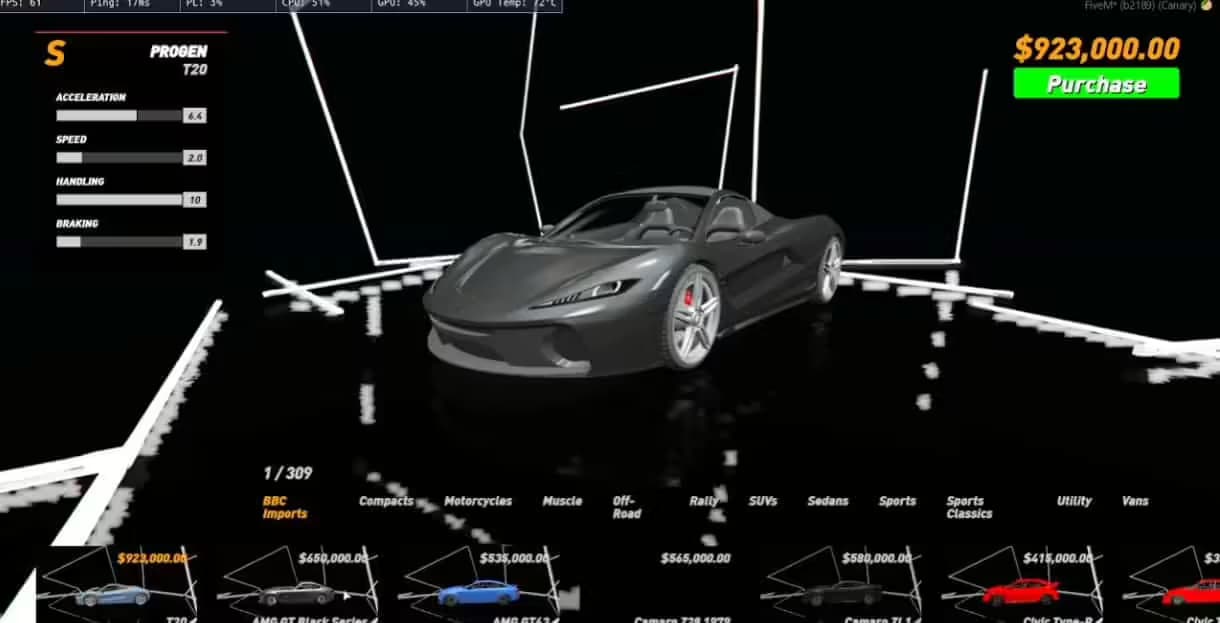
MyCarDealer gives you everything needed to run a professional car dealership as an actual business. You get support for up to four separate vehicle showrooms where you can display cars that are currently in stock and for sale. Players can browse available vehicles through an interactive menu showing detailed specs - performance stats, maximum speed, 0-100 acceleration times, modification potential, and fuel capacity. Dealership employees can change vehicle colors and spawn cars for test drives before purchase. The system includes realistic inventory management where vehicles must be ordered and manufactured before they can be sold, creating genuine scarcity and business management gameplay. All standard job features are integrated: wardrobe for employee uniforms, boss menu for business management, and a customer service bell to alert staff when someone needs assistance.
Key Features
- Four Showroom Displays - Set up to four vehicle showrooms to exhibit cars that are currently for sale, creating an authentic dealership environment
- Detailed Vehicle Information Menu - Players can open a menu at each showroom to view comprehensive vehicle stats including performance metrics, top speed, acceleration, modification capacity, and fuel tank size
- Color Customization & Test Drives - Dealership staff can change vehicle colors to customer preferences and spawn vehicles for test drives before purchase
- Realistic Inventory System - Vehicles must be ordered and manufactured before sale, preventing infinite stock and creating actual business management challenges
- Manufacturing & Delivery Process - Order vehicles from the dealership computer, wait for manufacturing time to complete, then schedule delivery (arrives at 6 PM in-game)
- Wardrobe System - Employee clothing storage for dealer uniforms and professional appearance
- Boss Menu Integration - Full ESX society boss menu for hiring, firing, managing salaries, and accessing business funds
- Customer Service Bell - Ring system to alert dealership employees when they're needed at the showroom
- Computer Tracking System - Monitor vehicle order status, manufacturing progress, and delivery scheduling from the dealership computer
- Fully Configurable - Add any vehicle you want to the dealership inventory through simple configuration
- Multi-Language Support - Language config included, English and German translations provided, easily add your own language
- Open Source - Not encrypted, fully editable code so you can customize functionality to your server's needs
Perfect For
- Roleplay servers wanting realistic vehicle purchasing instead of magic spawn menus
- Communities with dedicated business and economy systems where dealerships are actual jobs
- Servers looking to add scarcity and demand mechanics to vehicle sales (limited stock creates value)
- Server owners who want car dealers to actually have meaningful work and interaction with customers
- Communities wanting to reward players who invest time in running legitimate businesses
How the Ordering System Works
Here's what makes MyCarDealer special - the realistic ordering and delivery process:
- First, a dealer employee goes to the dealership computer and selects the vehicle model they want to stock
- They press Manufacture this vehicle which starts a manufacturing timer (configured in the database, typically several hours)
- When manufacturing completes, the vehicle is ready for delivery scheduling
- The dealer presses Bring car to the dealership and the vehicle will arrive at 6 PM game time
- Once delivered, the vehicle appears in the showroom and can be sold to customers
- Dealers can check manufacturing and delivery status anytime at the computer
This system creates real business management - dealers need to anticipate demand, order popular vehicles in advance, and maintain stock levels. It also creates roleplay opportunities when customers want a specific vehicle that's not in stock and need to wait for delivery.
Real-World Scenarios
Picture a player who saved up $50,000 for their first sports car. They visit the dealership, browse the showroom, and find a vehicle they like. A dealer greets them, explains the specs from the information menu (shows it does 0-100 in 4.2 seconds, has 120 modification slots), then offers a test drive. The player takes it for a spin, loves it, and buys it. The dealer processes the sale through the system and the player drives off happy. Another scenario: a customer wants a specific luxury vehicle that's not currently in stock. The dealer checks the computer, sees one is in manufacturing and will arrive tomorrow at 6 PM. The customer comes back the next evening, and the dealer has their car ready in the showroom with custom color options. Or imagine being the dealership owner - you check your computer and see the sports car inventory is low. You order three more, schedule manufacturing, and set a reminder to be online at 6 PM tomorrow when they deliver so you can update the showroom.
Installation & Setup
- Extract MyCarDealer to your server resources folder
- Import the included SQL file to your database to create necessary tables for vehicle tracking and inventory
- Install the required dependency NativeUI if you don't already have it on your server
- Open the configuration file and set showroom locations, computer locations, wardrobe positions, and boss menu coordinates
- Configure your vehicle list - add vehicle spawn names, display names, prices, and manufacturing times for each vehicle you want to sell
- Set up the cardealer job in your ESX jobs table if it doesn't exist (or the script may include this in the SQL)
- Add the resource to server.cfg and restart
- Test the ordering process, showroom displays, and customer purchase flow to ensure everything works correctly
Technical Details
- Framework Required: ESX (ES Extended framework)
- Dependencies: ESX framework, NativeUI for menu interface
- Database: MySQL required, includes SQL file for vehicle inventory and tracking tables
- Customization: Full config file for locations, vehicles, prices, manufacturing times, and job settings
- Code Access: Not encrypted, open source, fully editable Lua code
- Performance: Lightweight, minimal impact on server resources
- Language Support: Multi-language config with English and German included by default
Framework Compatibility
- ✅ ESX - Fully compatible with all ESX versions, designed specifically for ESX society and job systems
- ⚠️ QBCore/QBOX - Not compatible without framework conversion (requires ESX-specific society and job functions)
- ⚠️ Standalone - Requires ESX framework, depends heavily on ESX society system for business management
What Makes It Stand Out
Most vehicle shop scripts are just glorified spawn menus - click a car, pay money, it appears. MyCarDealer actually creates roleplay. The manufacturing and delivery system means dealers can't sell unlimited vehicles instantly - they need to plan ahead, manage inventory, and sometimes tell customers I can have that ready for you tomorrow. The test drive feature lets customers actually experience the vehicle before buying, not just hope it drives well. The detailed stats menu (acceleration, top speed, modification slots, fuel capacity) gives customers real information to make informed decisions. And the computer tracking system where dealers monitor order status, manufacturing progress, and delivery schedules adds business management depth. It transforms car dealer from a label into an actual job with real responsibilities and player interaction.
Configuration & Customization
The script comes with language configuration support, so you can run your dealership in any language - English and German are already configured, and you can easily add your own translations. Since the code is open source and not encrypted, you have complete freedom to modify functionality. Want to change how manufacturing times work? Edit it. Need to add custom vehicle categories or integrate with a specific garage script? You can do that. Want to add commission tracking for salespeople? The code is there to modify. This flexibility means MyCarDealer can adapt to your server's specific needs rather than forcing you to adapt to the script.
Showcase:
Related Products You Might Like
- FiveM Jobs Creator - Create unlimited custom jobs with 321+ sales
- Super ESX Server - Complete server foundation with 306+ servers using it
- Premium Inventory Script - Professional inventory system for your server
- Premium Vehicle HUD - Essential vehicle interface trusted by 429+ servers
![Car Music System V3 [Standalone]](/_next/image?url=https%3A%2F%2Fcdn.vertexmods.com%2Fwp-content%2Fuploads%2F2022%2F11%2Fchrome_HdfQtL2147-jpg.avif&w=2048&q=75)
![2NA Premium Garage [Manageable Garage System]](/_next/image?url=https%3A%2F%2Fcdn.vertexmods.com%2Fwp-content%2Fuploads%2F2023%2F07%2Fchrome_TOeK5NRdX4-jpg.avif&w=2048&q=75)