Chezza Inventory
Chezza Inventory - advanced inventory management for ESX servers Compatible with ESX framework. Fully customizable and optimized.
Aperçu vidéo
Click to load video from YouTube. By watching, you agree to their privacy policy.
Chezza Inventory - Modern ESX Inventory System
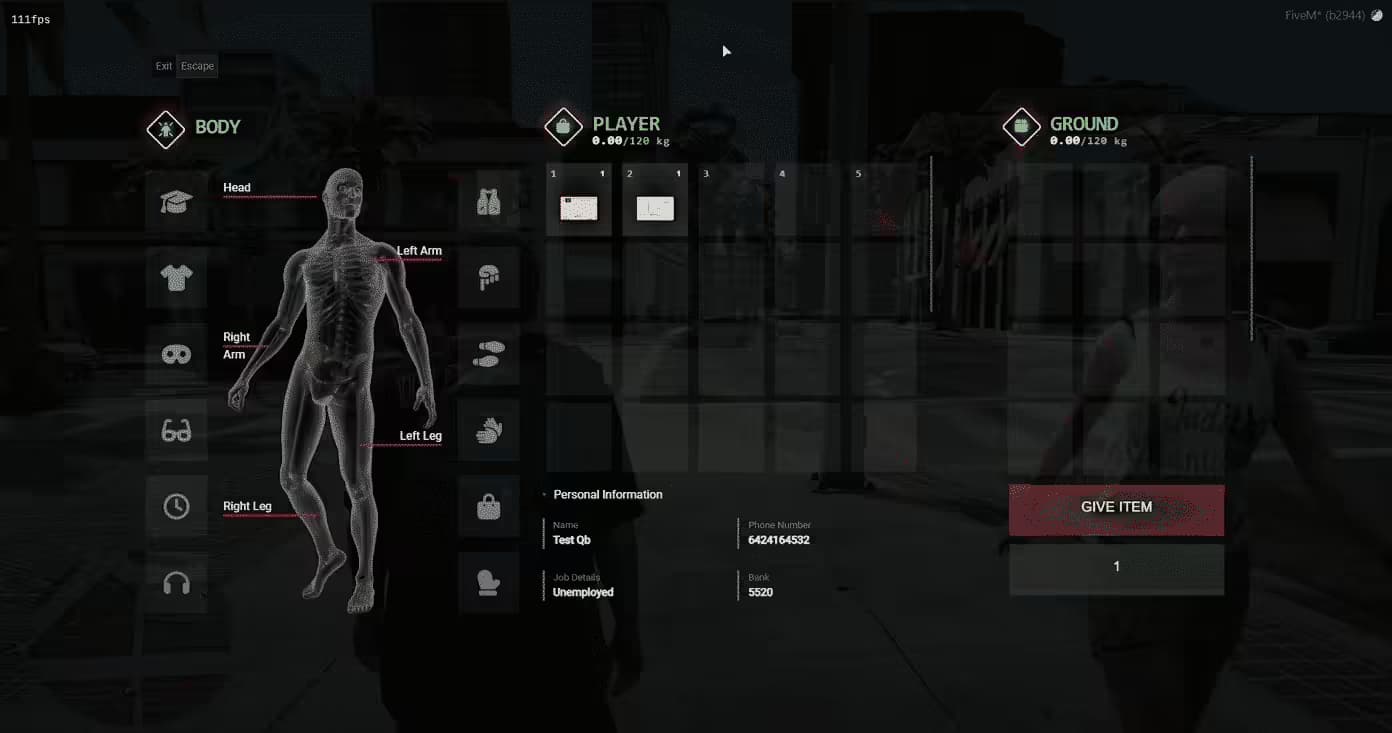
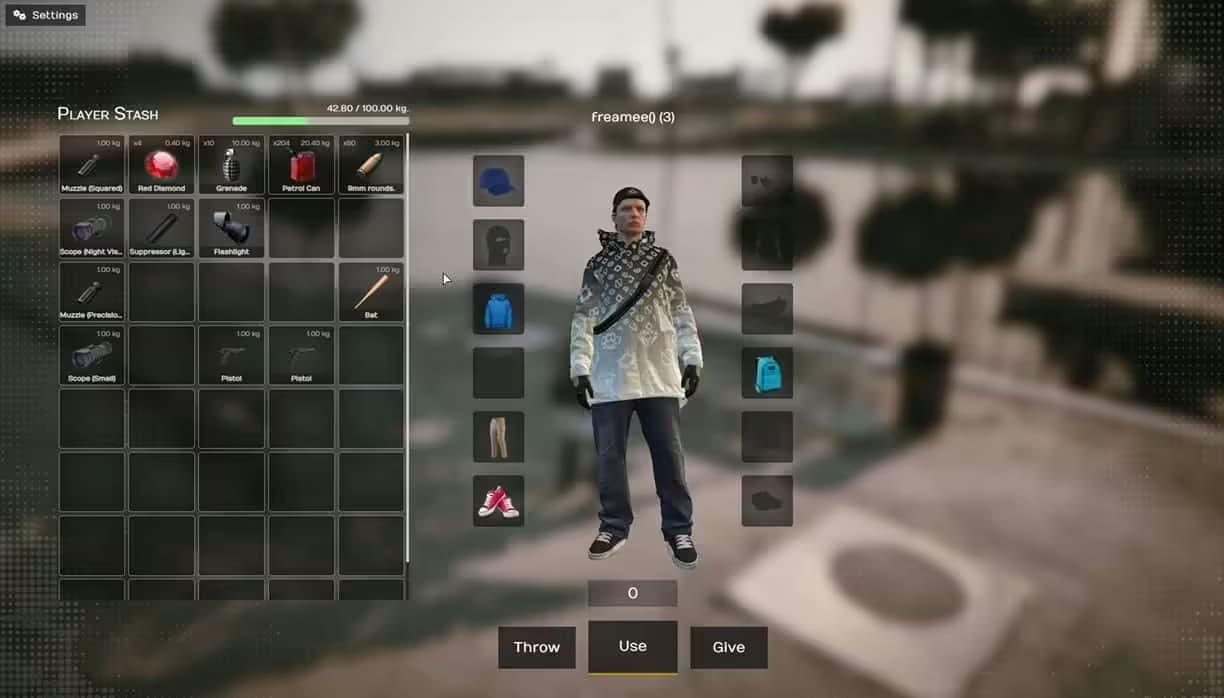
Upgrade your ESX server with Chezza's Inventory, a feature-rich inventory management system that's already powering 118 FiveM communities. If you're tired of the clunky default ESX inventory or want dynamic updates, built-in shops, vehicle storage, and player searching capabilities, this is the complete package. It transforms inventory interaction from tedious menu navigation into smooth, intuitive gameplay that keeps players focused on roleplay instead of fighting with UI.
What's Included
You're getting a complete inventory overhaul that replaces ESX's default system with dynamic, real-time inventory management. The package includes the core inventory script, pre-configured glovebox and trunk storage systems, player inventory search functionality, integrated shop system, hotbar for quick item access, notification framework, sound effects, and comprehensive configuration files. Everything works natively with ESX's existing item structure, so you're not rebuilding your economy from scratch - just upgrading how players interact with it.
Key Features
- Real-Time Dynamic Updates - All connected players see inventory changes instantly when items move or quantities change
- Multiple Inventory Types - Built-in support for glovebox and trunk storage, plus easy creation of custom secondary inventories
- Item Descriptions - Add detailed explanations for items and weapons so players understand what they do
- Player Inventory Search - Perfect for law enforcement - officers can search other players for contraband and illegal items
- Native ESX Integration - Use, drop, and give functionality works seamlessly with existing ESX framework
- Item Splitting - Split stacks between inventories for precise transfers and realistic distribution
- Right-Click Transfers - Quick-transfer all of an item type with a single right-click action
- Configurable Features - Toggle individual features on or off to match your server's needs
- Sound Effects - Audio feedback for drops and item interactions (can be disabled if preferred)
- Money Management - Handle cash and bank transactions directly through the inventory interface
- Hotbar System - Bind items and weapons to number keys for instant access during gameplay
- Built-In Notifications - Custom notification system for item actions, transfers, and errors
- Integrated Shops - Buy items from configured shops directly through the inventory UI
Perfect For
- ESX servers wanting a modern, responsive inventory system that feels professional
- Roleplay communities where inventory management happens frequently during player interactions
- Servers with law enforcement needing player search functionality for contraband checks
- Communities running vehicle-based gameplay (racing, trucking, criminal operations) who need vehicle storage
- Servers where item trading, sharing, and storage are core gameplay mechanics
- Communities frustrated with laggy, unresponsive default inventory systems
How It Works
Players open their inventory and see a clean, modern interface displaying items with descriptions and quantities. Drag items between player inventory, glovebox, trunk, or other players' inventories. Right-click for instant full-stack transfers. Click hotbar slots to bind frequently-used items - number keys then trigger those items during gameplay without opening inventory. Police officers use the search function to look through suspects' inventories during traffic stops or arrests. Shop interactions happen directly in the inventory UI - browse items, see prices, and purchase without separate shop menus.
Real-World Scenarios
Imagine a drug dealer storing product in their trunk, splitting stacks to distribute to buyers, and keeping personal carry amounts in their pocket inventory. A cop pulls them over, uses the search function, finds contraband, and confiscates it right from the inventory screen. Later, a medic opens their glovebox to grab bandages bound to their hotbar - one keypress and they're treating a patient. A shop owner stocks their store through the inventory interface, setting prices and quantities. These interactions are smooth, fast, and don't break immersion with clunky menu systems.
Installation & Setup
- Download Chezza Inventory from your FiveMX purchase confirmation
- Extract to your server's resources folder
- Import the included SQL file to add necessary database tables and item descriptions
- Configure inventory settings in config.lua (slot counts, weight limits, features toggles)
- Set up item descriptions for your server's custom items in the items config
- Configure shop locations, inventories, and prices if using the shop system
- Add start chezza_inventory to your server.cfg (check exact resource name)
- Remove or disable your previous inventory script to avoid conflicts
- Restart server and test inventory opening, transfers, vehicle storage, and searches
- Adjust hotbar bindings and sound effect preferences as needed
Technical Details
- Framework Required: ESX Framework (version 1.x - tested with Legacy and older versions)
- Dependencies: mysql-async (standard ESX requirement)
- Performance: Optimized queries and event handling for responsive inventory actions
- Customization: Extensive config options for slots, weights, features, shops, and sounds
- Compatibility: Works with most ESX item scripts if properly configured
- UI Framework: Custom interface design optimized for clarity and speed
Framework Compatibility
- ✅ ESX - Built specifically for ESX framework with native integration
- ⚠️ QBCore - Would require porting to QB framework structure (not included)
- ⚠️ QBOX - Designed for ESX, not compatible without conversion
- ❌ Standalone - Requires ESX framework dependencies and structure
Vehicle Storage System
The built-in glovebox and trunk inventories add realistic vehicle storage roleplay. Store weapons in your trunk to avoid being caught during traffic stops. Keep snacks and bandages in your glovebox for quick access. Each vehicle type can have different storage capacities (configure trunk sizes by vehicle class). When a vehicle is impounded or destroyed, stored items follow configured rules - they can be lost, transferred to police evidence, or moved to player inventory based on your settings.
Player Search Functionality
Law enforcement gets powerful search tools. Officers can open a nearby player's inventory to see what they're carrying - perfect for traffic stops, arrests, or security checkpoints. Configure permissions so only police jobs can search. Decide whether searched players get notifications or if searches are silent. Set up contraband lists that flag items during searches. This creates tense roleplay moments where criminals hide illegal goods in trunks or drop items before getting searched.
What Makes It Stand Out
Chezza Inventory isn't just a reskin of ESX's default system - it's a complete reimagining of how inventory should work. The real-time updates mean multiple players can interact with the same storage without sync issues. The hotbar eliminates the open inventory, scroll, use item, close inventory loop for frequently-used items. Right-click transfers speed up storage management massively. Item descriptions help new players understand your custom items without asking in Discord. It's these quality-of-life improvements that make players appreciate your server's attention to detail.
Why Servers Choose Chezza Inventory
The 118 communities running this inventory system report significant improvements in player satisfaction with inventory management. Players stop complaining about laggy, unresponsive menus. Law enforcement roleplay becomes more realistic with proper search mechanics. Criminals have interesting decisions about what to carry versus what to store. Shop interactions feel modern and intuitive. The configurability means you can disable features you don't need while keeping the core improvements that matter to your server's style.
Shop System Integration
The built-in shop functionality lets you create stores directly in the inventory interface. Configure shop locations, set inventories for each shop (general stores sell different items than weapon shops), define pricing, and optionally restrict purchases by job or license. Players browse shop inventories just like they browse their own - drag items to their inventory to purchase. This unified interface is cleaner than juggling multiple shop scripts with different UIs and controls.
Customization & Configuration
Tailor every aspect through config files: inventory slot counts (player, glovebox, trunk), weight limits, sound effect toggles, notification styles, shop locations and inventories, item descriptions, hotbar settings, and feature enables/disables. The extensive documentation explains each config option clearly, making customization accessible even if you're not deeply technical. Community support channels provide help if you're adapting the system to unique server setups.
Features
- Dynamic - refreshes for all users in the current inventory.
- Multiple Inventories - Comes with glovebox and trunk inventories built in, you can also create other/secondary inventories with ease.
- Item Descriptions - Apply item descriptions, to explain what the item/weapon does.
- Player Inventories - System in place to look into a other player's inventory, for example an officer could like into a player's inventory to search for illegals.
- Use, Drop & Give - Works natively from the ESX framework.
- Splitting - You can split your items between inventories.
- Right Click - Transfers all of the item's content upon right clicking.
- Configurable - You can easily toggle inventory features on & off.
- Sound Effects - On drop and item open, sound effects will be played (these can be toggled off).
- Money - Manage your money through the inventory.
- Hotbar - Bind items & weapons to your hotbar for quick use.
- Notifications - Built in notification system. (NEW)
- Shops - Buy items from the shops. (NEW)
Requirements
- ESX Framework (version 1), however the inventory can easily be ported onto other frameworks.
- All of the requirements for ESX (mysql-async).
Related Products You Might Like
- Premium Inventory Script - Alternative inventory system with drag-and-drop UI
- ESX Inventory HUD V16 - Modern inventory HUD design
- Premium Vehicle HUD - Professional speedometer trusted by 429+ servers
- Super ESX Server - Complete ESX server with inventory integration