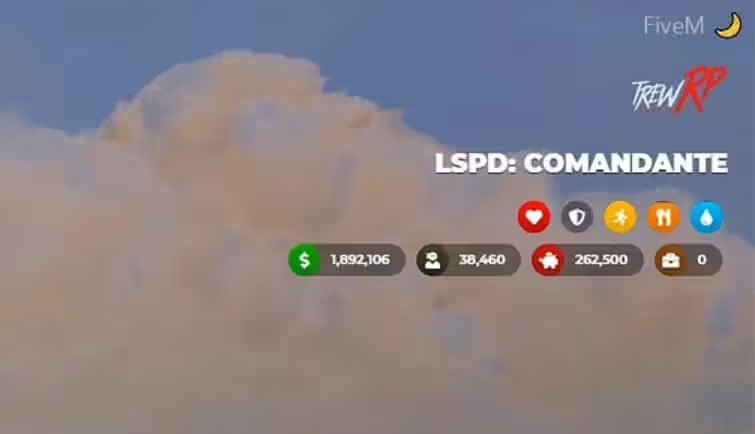
Description
It was a great experience playing GTA5 RP and learning LUA to code the Trew HUD UI. However, after numerous challenges with the FiveM community and the project itself, I have decided to discontinue further development. It’s been 6 months since I last played GTA5 RP, and continuing this project no longer makes sense.
Video Preview
Download Mirror
Features
- Server logo;
- Job and job grade;
- Money, dirty money, bank and society (this last one is for ESX only);
- Status like health, armor, stamina, hunger and thirst;
- Speedometer with seatbelt support, fuel detection, lights, gear changing, alerts and sirens (for emergency vehicles);
- Location and time;
- Voice controller (OneSync ready);
- User Interface for Weapons;
- Custom status inclusion.
Installation Instructions
- Extract the Files:
- Extract the
.zipfile or open it directly. - Place
trew_hud_uiin your resources directory.
- Extract the
- Update
server.cfg:- Add the following line to your
server.cfgfile:sqlCode kopierenstart trew_hud_ui
- Add the following line to your
Special Instructions for the ESX Version
Requirements:
es_extendedesx_societyesx_addonaccount
Optional:
esx_basicneedsesx_statusLegacyFuel(it should be started beforetrew_hud_ui)
Disabling Default HUD:
- Go to
es_extended/config.luaand setConfig.EnableHudtofalse.
Replacing Code in esx_basicneeds/main.lua:
- Replace the existing code:
TriggerEvent('esx_status:registerStatus', 'hunger', 1000000, '#CFAD0F', function(status) return true end, function(status) status.remove(1000) end) TriggerEvent('esx_status:registerStatus', 'thirst', 1000000, '#0C98F1', function(status) return true end, function(status) status.remove(750) end)with:TriggerEvent('esx_status:registerStatus', 'hunger', 1000000, '#CFAD0F', function(status) return false end, function(status) status.remove(1000) end) TriggerEvent('esx_status:registerStatus', 'thirst', 1000000, '#0C98F1', function(status) return false end, function(status) status.remove(750) end)
Special Instructions for the VRP/VRPEX Versions
Config.vRP Settings:
- Set up necessary items like black money by specifying the item ID in
config.lua.
Config.vRP Example:
Config.vRP = {
  blackMoney = "dirty_money" -- Change this to your black money item ID
}
General Configurations:
- Config.Locale: Set language (default is
en). - Config.serverLogo: Set your server logo URL.
- Config.font: Customize UI font (default is Montserrat).
- Config.date: Set date format for the GPS location.
- Config.voice: Configure voice settings (OneSync compatible).
- Config.vehicle: Configure vehicle and speedometer settings.
- Config.ui: Toggle display elements of the HUD.
Adding Custom Status
You can create custom indicators for existing statuses like stress or drunkenness.
Example:
nexports.trew_hud_ui.createStatus({
  status = 'stress',
  color = '#FF0090',
  icon = '<i class="fas fa-brain"></i>'
});
Updating Custom Status:
Citizen.CreateThread(function()
  while true do
    Citizen.Wait(1000)

    local STRESS_STATUS

    TriggerEvent('esx_status:getStatus', 'stress', function(status)
      STRESS_STATUS = status.getPercent()
    end)

    exports.trew_hud_ui:setStatus({
      name = 'stress',
      value = STRESS_STATUS
    });
  end
end)
Chat Commands:
- /toggleui: Enables/Disables HUD information elements, useful for streamers.
Usage Example:
/toggleui
FAQ
Q: The HUD date is wrong! Can you fix it?
- A: The HUD date uses the game server’s time and default functions for FiveM, so it is not wrong. If you want to display the real date, you can edit
app.jsusing JavaScript’sDate()function. Google it for more info.
Q: How can I edit the /toggleui command to hide the elements?
- A: To edit the
/toggleuicommand, go to theui.htmlfiles and look for theidattribute of the elements you want to hide. Then, edit thetoggleuicommand inclient.luato suit your needs.
Q: Do you intend to release a version that supports THIS or THAT script?
- A: Not at the moment. LegacyFuel is shown as an optional feature because it changes the fuel behavior but doesn’t require special functions to work.
Q: I want to change the positions of the elements. How can I do it?
- A: To change the positions of the elements, check the
main.cssfile and modify thetop,left,right, orbottomproperties of the elements you want. Be careful and read about absolute positioning in CSS. For example, to position an element at the bottom, use theBOTTOMproperty instead ofTOP.