Compatibilité
- Frameworks
- esx, qbcore, qbox
- Version
- 1.0
- Mode de jeu
- FiveM
This script uses code snippets and similar logic to Randolios Combatlog script, check his script out at GitHub - Randolio/randol_combatlog: An anti-combat log script. · GitHub
Join my discord for support: Yetti Scripts
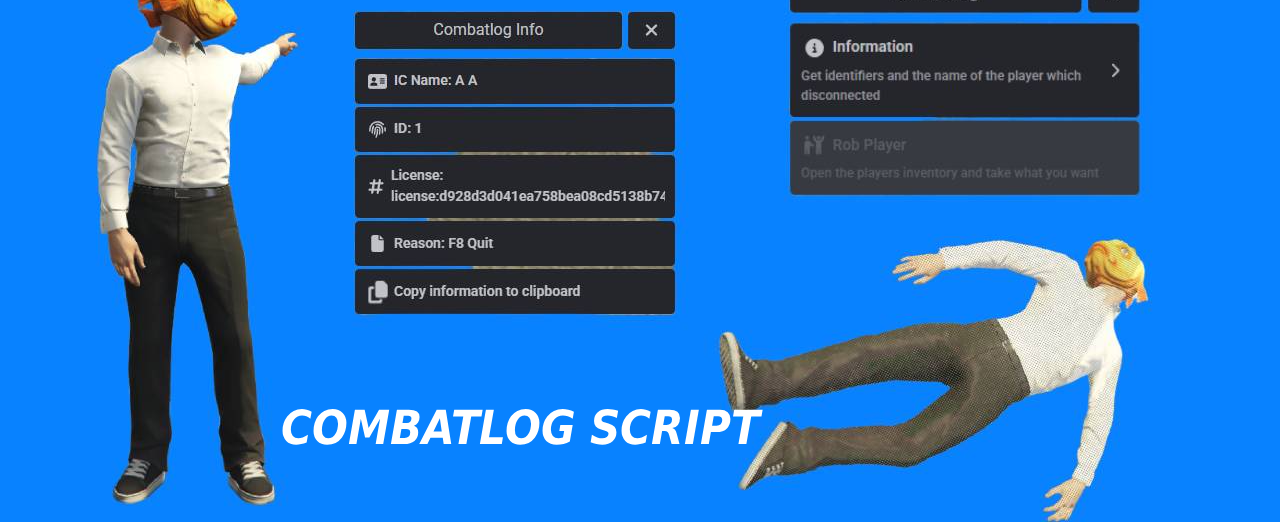
Spawn a ped when a player disconnects from the server for a certain amount of time
View character name and r* license with copy button for Players Info
Other players can rob the ped (which clones the players inventory)
Once the player joins back, the items in the players inventory are set to what remained in the “stash” (clone of the inventory) which could be robbed from
Configure how much time you give the player to join back before players can rob the ped and configure how much time players have to rob the ped
If the player joins back within the time he’s given to join back, his combatlog ped is deleted and the “stash” is cleared so players can no longer steal from it
Combat system, if player isn’t in combat other players cannot rob him
Detection for holding a weapon, taking damage or punching
All options are toggles, so you can turn off robbing or the combat system off if you don’t like it

Contribute to YeeetSK/yetti_combatlog development by creating an account on GitHub.
If video doesn’t work: https://www.youtube.com/watch?v=swK4C_XpQbI
Click to load video from YouTube. By watching, you agree to their privacy policy.
Free download (ad supported)
Free downloads are supported by a brief ad page (Linkvertise) to keep this service running.
Written by the VertexMods editorial team based on the current CitizenFX artifact and each supported framework — not copy-pasted from the upstream post.
resources/[esx]/yetti-combatlog-script on your server. Keep the resource folder name as-is — most manifests reference it verbatim.*.sql), import it into your FiveM database — VertexMods test servers use oxmysql against MariaDB 10.6.ensure yetti-combatlog-script to your server.cfg after es_extended.TriggerEvent("esx:getSharedObject") — some older releases need a one-line patch to use ESX = exports["es_extended"]:getSharedObject().Tirez le meilleur des mods gratuits
Créez un compte gratuit pour les notifications de mises à jour, votre collection de mods et les téléchargements sans publicité.
Premium Alternative
Get premium scripts with dedicated support, lifetime updates, and one-click installation.
D'autres mods gratuits populaires qui pourraient être utiles pour votre serveur.
Réponses rapides basées sur les informations publiées pour Yetti Combatlog Script.
Vous avez une autre question ? Consultez la description du mod ci-dessus pour plus de détails.
Learn more about setting up, configuring, and using this type of resource.
Découvrez plus de ressources pour votre serveur FiveM ou GTA 5.
Free mods are a good starting point. When your server needs stronger support, cleaner installs, and premium systems, move into the commercial hubs below.
Framework hub
Move from free QBCore resources into verified paid systems with support, updates, and cleaner install paths.
Open QBCore hubPremium catalog
See paid scripts, framework labels, bundles, and install-ready products once the free version no longer covers your server needs.
Open premium shopMoney page
Add police, mechanic, gang, and economy systems around this mod with stronger commercial scripts.
See job scriptsLaunch faster
Bundles shorten setup time by grouping the highest-leverage systems into one commercial starting point.
View bundlesensure yetti-combatlog-script in the live console to confirm it loads without red errors. If you hit a dependency error, the mod probably needs ox_lib or ox_inventory — install those first, then retry.resources/[qb]/yetti-combatlog-script on your server. Keep the resource folder name as-is — most manifests reference it verbatim.*.sql), import it into your FiveM database — VertexMods test servers use oxmysql against MariaDB 10.6.ensure yetti-combatlog-script to your server.cfg after the qb-core ensure line.config.lua, open it before your first boot and match the job names, inventory items, and locale to your own qb-core setup — otherwise targets silently fall through.ensure yetti-combatlog-script in the live console to confirm it loads without red errors. If you hit a dependency error, the mod probably needs ox_lib or ox_inventory — install those first, then retry.resources/[ox]/yetti-combatlog-script on your server. Keep the resource folder name as-is — most manifests reference it verbatim.*.sql), import it into your FiveM database — VertexMods test servers use oxmysql against MariaDB 10.6.ensure yetti-combatlog-script to your server.cfg after ox_lib and ox_inventory.config.lua, open it before your first boot and match the job names, inventory items, and locale to your own qbx_core setup — otherwise targets silently fall through.ensure yetti-combatlog-script in the live console to confirm it loads without red errors. If you hit a dependency error, the mod probably needs ox_lib or ox_inventory — install those first, then retry.