Free
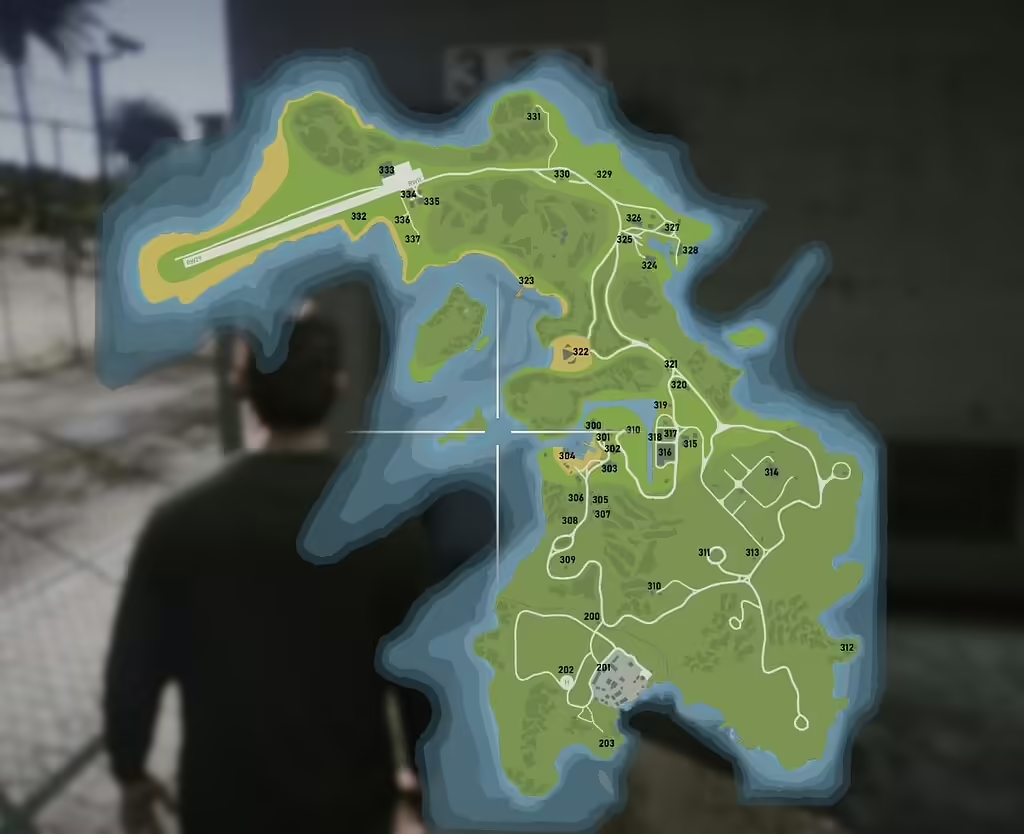
Cayo Perico Postal Map
Description
You read that correctly! I’m excited to share the Cayo Perico Postal Map, complete with Postal Script support. This addition is perfect for enhancing your gaming experience and navigation on the island.
Dependencies to Keep in Mind
Before you start, it’s essential to download a couple of key resources to ensure everything works smoothly:
- Cayo Perico Island: The preferred version can be found here (Free).
- Nearest Postal Script: Download it here (Free).
- While not strictly required, I highly recommend you also download the Postal Code Map & Minimap – New & Improved – v1.3 for an enhanced experience.
Notable Features
This map includes some fantastic features to improve your gameplay:
- Helipads: Two helipads (postal 202 and 306) are added to the minimap for better navigation references.
- Runway Numbers: Accurate heading for runway numbers on the airstrip, eliminating any guesswork while flying.
How to Install the Cayo Perico Postal Map
Once you’ve downloaded the necessary dependencies, follow these simple steps to install the mod:
- Download the Map: Obtain the map file Download (814.0 KB), which is named
Cayo Postal Map.rar. Inside this file, you’ll find a resource calledminimap_cayoand anew-postals.jsonfile. - Add the Map Resource:
- Drag and drop the
minimap_cayofolder into your/resources/directory. - Make sure to add
minimap_cayoto yourserver.cfgfile. Congratulations, you’ve completed the first step!
- Drag and drop the
- Locate and Modify the Nearest Postal Script:
- Go to your
/resources/directory and find the nearest-postal folder. Inside, you’ll see the necessary mod files, including the currentnew-postals.json. - It’s a good idea to back up this file before replacing it. Drag and drop the NEW
new-postals.jsonfrom the Cayo Postal Map download, replacing the existing one in the nearest-postal script.
- Go to your
- Additional Instructions for Other Scripts:
- If you’re using rHud, rename the
new-postals.jsontopostals.jsonand replace the old file in the/rhud/data/folder. - For Mad’s helicam script, open the
config.luafile in the mod’s directory and ensure the following lines are included:Config.ShowPostalCodes = true Config.PostalResource = “nearest-postal” Config.PostalFile = “new-postals.json” - This setup allows the helicam to utilize the new postal information, giving you useful overlays while you fly.
- If you’re using rHud, rename the
That’s it! Enjoy the enhanced postal overlay during your adventures in Cayo Perico.
Special Thanks
A big thank you to everyone who developed the mods mentioned above for free! Your generosity allows us all to enjoy an even better gaming experience. Additionally, special thanks to Hedwig from Map4All for permitting me to re-upload the colored atlas map with postals.