Jakrino Loading Screen
Loading Screens
-38% OFF
Jakrino Loading Screen
Make an unforgettable first impression with this stunning custom loading screen designed specifically for FiveM servers. Jakrino Loading Screen combines sleek modern design with essential functionalit...
$8.64$14.04
Money-Back Guarantee
14-day refund policy
Lifetime Updates
Free updates forever
Open Source
Inspect & modify the code
SSL Encrypted
|Visa, Mastercard, Amex, Apple Pay
|Crypto
Description
Jakrino Loading Screen - Professional FiveM Server Loading Interface
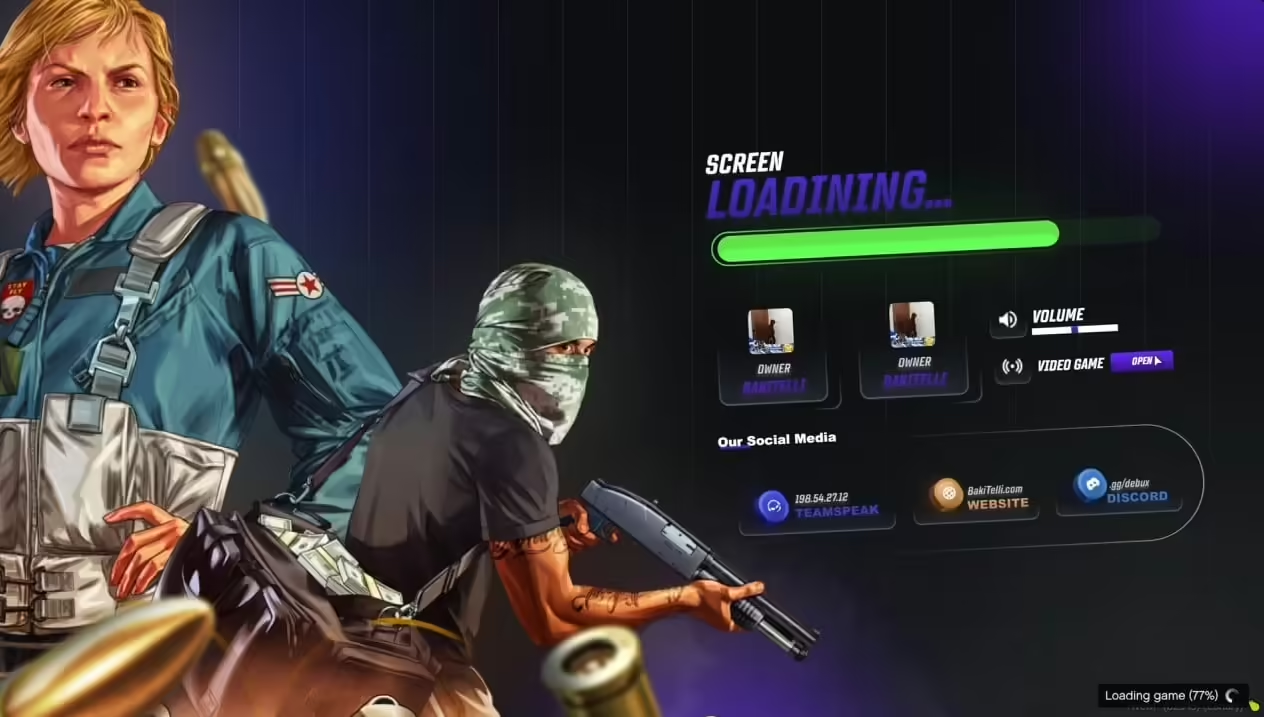
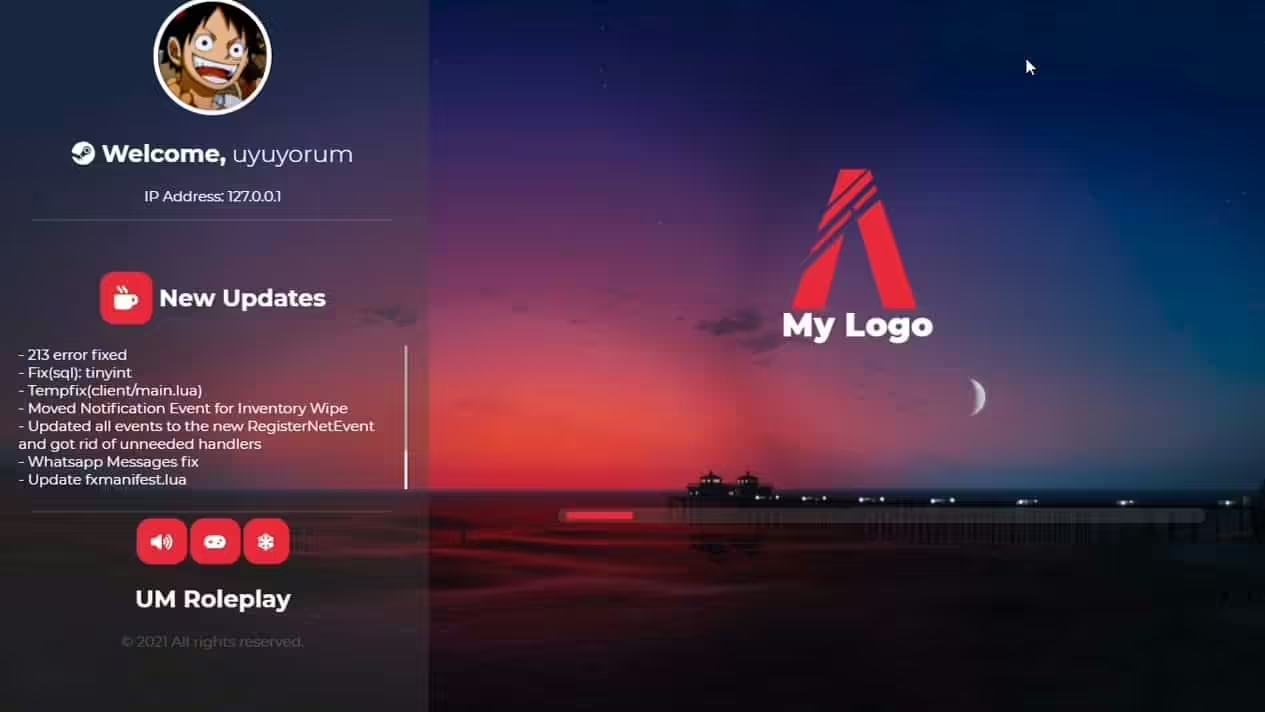
Make an unforgettable first impression with this stunning custom loading screen designed specifically for FiveM servers. Jakrino Loading Screen combines sleek modern design with essential functionality, displaying server rules, community information, loading progress, and promotional content while players connect. This fully customizable loading interface supports music playback, video backgrounds, social media links, and dynamic content updates. Perfect for professional servers wanting to establish brand identity and inform new players before they even spawn into the world.
What's Included
This comprehensive loading screen package provides everything needed for a polished player onboarding experience. The system displays customizable backgrounds (images or videos), server information panels, loading progress indicators, music player, rule sections, staff listings, and social media integration. The interface updates dynamically showing real-time server status, player count, and connection progress. Fully responsive design works flawlessly on all screen resolutions from mobile to ultra-wide displays.
Visual Design Features
- Video Backgrounds - Use custom video footage as animated background creating dynamic first impressions
- Image Slideshows - Rotate through multiple background images showcasing server features and locations
- Parallax Effects - Subtle movement adds depth and visual interest without overwhelming content
- Custom Color Schemes - Match loading screen colors to your server brand and theme
- Logo Display - Prominently feature server logo with customizable positioning and sizing
- Modern UI Elements - Sleek cards, glassmorphism effects, and contemporary design patterns
- Animated Transitions - Smooth fade-ins, slide animations, and element transitions for polish
- Particle Effects - Optional subtle particle systems add ambient visual enhancement
Content & Information Sections
- Server Rules Display - Clear, readable rule sections with categories (General, RP, Combat, etc.)
- Community Information - Server description, story, setting details, and unique features
- Staff Roster - Display administrators, moderators, and support staff with roles
- Social Media Links - Direct buttons to Discord, Twitter, Instagram, TikTok, YouTube, and website
- Server Statistics - Real-time player count, uptime, and server version information
- News & Updates - Announce new features, events, or important changes
- Tutorial Tips - Helpful hints for new players about commands, systems, or roleplay
- Whitelist Status - Indicate if server requires applications or is public access
Loading Progress Features
- Progress Bar - Visual loading bar showing connection and asset download progress
- Percentage Display - Numeric percentage alongside bar for precise status
- Loading Messages - Rotating tips, facts, or humor during load process
- Stage Indicators - Show current loading stage (Connecting, Downloading, Spawning)
- Time Estimate - Approximate time remaining based on connection speed
- Detail Toggle - Technical information for troubleshooting connection issues
Music & Audio System
- Background Music - Play custom soundtrack creating atmosphere while loading
- Music Player Controls - Play, pause, skip, and volume control for player preference
- Multiple Tracks - Rotate through playlist or let players choose preferred track
- Volume Persistence - Remember player volume preference across sessions
- Mute Option - Easy mute toggle for players who prefer silence
- Audio Visualization - Optional visualizer effects synced to music playback
Perfect For
- Professional servers wanting polished first impression and branding
- Roleplay communities needing to communicate rules before player spawn
- Whitelisted servers displaying application and onboarding information
- Growing communities promoting Discord and social media for retention
- Servers with complex rule sets requiring clear presentation
- Communities building brand identity and professional image
Technical Specifications
- File Size: 5-15 MB depending on background media choices
- Load Time: Instant HTML/CSS/JS loading, minimal delay before display
- Compatibility: Works on all screen resolutions (mobile to 4K ultra-wide)
- Browser Support: Compatible with all modern browsers used by FiveM client
- Performance: Optimized code ensures smooth animations without lag
- Video Support: MP4, WebM formats with automatic fallback to images
Installation & Setup
- Extract loading screen files to server resources folder
- Edit config.js to customize server name, descriptions, colors, and content
- Add background images or videos to media folder
- Configure social media links with your community URLs
- Customize server rules in rules.json or directly in HTML
- Upload music files if using audio feature (MP3 format recommended)
- Add loading screen resource to server.cfg
- Set up loadscreen metadata in fxmanifest.lua or __resource.lua
- Test loading screen by restarting server and connecting
- Adjust styling in custom.css to match server branding
Framework Compatibility
- ✅ Universal - Works with all FiveM servers regardless of framework
- ✅ ESX - Compatible with ESX-based servers
- ✅ QBCore - Functions perfectly on QBCore servers
- ✅ QBOX - No conflicts with QBOX framework
- ✅ Standalone - No framework dependency required
- ✅ Custom - Works with any custom framework or vanilla FiveM
Customization Options
- Color Customization - Change all UI colors via simple hex code edits in config
- Font Selection - Use Google Fonts or custom fonts matching server aesthetic
- Layout Variations - Choose from multiple pre-designed layouts or create custom
- Content Sections - Enable/disable specific sections (rules, staff, news) as needed
- Animation Timing - Adjust animation speeds and transitions to preference
- Media Rotation - Configure background change intervals for slideshows
- Language Support - Easily translate all text to any language
- Icon Customization - Replace default icons with custom graphics
What Makes It Stand Out
Unlike basic loading screens that simply display a logo and progress bar, Jakrino Loading Screen creates a comprehensive onboarding experience that informs, entertains, and sets expectations before players enter your world. The multi-section layout efficiently communicates rules, community information, and server features while maintaining visual appeal. The responsive design ensures quality experience across all devices, and the music system adds atmosphere turning mandatory loading time into enjoyable anticipation. This loading screen makes servers appear professional, organized, and welcoming rather than amateur or generic.
Rule Communication
The loading screen is the perfect opportunity to communicate server rules when players are captive and attentive. Organize rules into clear categories (General Conduct, Roleplay Guidelines, Combat Rules, Vehicle Rules, etc.) with concise, scannable formatting. Use icons or color coding to emphasize critical rules. This proactive communication reduces rule breaks from ignorance, gives staff reference for enforcement, and sets community culture from the moment players connect.
Branding & Identity
- Reinforce server name, logo, and visual identity consistently
- Establish tone and atmosphere through design choices and messaging
- Create professional image attracting serious players
- Differentiate from competing servers through unique presentation
- Build recognition and brand recall for community growth
- Showcase server quality and attention to detail immediately
Social Media Integration
The loading screen provides prime opportunity to drive traffic to your Discord, social media, and website. Prominent clickable buttons make joining your community one-click simple during loading time when players cannot do anything else. This drives Discord member growth, social media follows, and website traffic, building your community presence across platforms. Include member counts or activity indicators showing thriving community worth joining.
Dynamic Content Updates
- Server Status - Pull real-time player count and server status from FiveM API
- Event Announcements - Automatically display upcoming events from calendar or database
- News Feed - Show latest announcements fetched from Discord or website
- Version Display - Indicate server version and last update date
- Custom Messages - Update special messages without server restart
Performance Optimization
Despite rich visuals and multiple features, the loading screen is highly optimized for instant loading and smooth performance. Code uses efficient CSS animations rather than performance-heavy JavaScript, images are compressed without quality loss, videos use proper codecs and bitrates, and the system only loads necessary resources. This ensures even players with slower connections see the loading screen immediately and experience smooth animations without stuttering.
Mobile & Resolution Support
- Fully responsive design adapts to any screen size automatically
- Mobile-optimized layouts for smartphone and tablet screens
- Ultra-wide support for 21:9 and 32:9 aspect ratios
- 4K resolution support with crisp text and graphics
- Touch-friendly controls for tablet users
- Maintains readability across all screen sizes
Accessibility Features
- High contrast text for readability on all backgrounds
- Adjustable text sizes through browser zoom support
- Keyboard navigation support for music controls
- Color choices consider color blindness accessibility
- Option to disable animations for motion sensitivity
- Clear typography and sufficient spacing for easy reading
Multi-Language Support
Easily translate the loading screen into multiple languages to serve international player bases. Language files separate from core code allow quick translation without touching HTML or JavaScript. Automatically detect player language from browser settings or allow manual language selection. This expands your potential player base and makes international players feel welcome from their first connection.
Advanced Features
- Player Count Display - Show current server population in real-time
- Queue Position - Integrate with queue systems showing wait position and estimate
- Weather Preview - Display current in-game weather and time
- Economy Stats - Show server economy info (average wealth, most expensive item, etc.)
- Recent Updates - Changelog display for returning players
- Featured Content - Highlight specific server features, factions, or locations
Security Considerations
- No external dependencies reducing security risks
- All media hosted locally preventing privacy concerns
- No tracking or analytics unless explicitly added by server owner
- Secure social media link validation preventing phishing
- HTTPS support for secure connections
Developer Friendly
The loading screen uses clean, well-commented code making customization accessible even for beginners. Modular structure separates concerns (styling, content, functionality) allowing targeted edits without breaking other features. Comprehensive documentation explains every configurable option, and community templates provide inspiration for unique designs. For advanced developers, the system is built with modern web standards enabling deep customization.
Testing & Debugging
- Test mode allows previewing changes without connecting to server
- Console logging helps troubleshoot configuration issues
- Fallback systems prevent blank screens on errors
- Debug panel shows loading stages and timings
- Validation checks catch common configuration mistakes
Support & Updates
Includes comprehensive documentation with installation guide, customization tutorials, troubleshooting section, and example configurations. Video setup tutorial demonstrates the entire process from installation to customization. Regular updates add new features, layouts, and improvements based on community feedback. Lifetime access to all updates, new layouts, and future enhancements ensuring your loading screen stays modern and functional.
Related Loading-Screens
Related Products
Questions & Answers
0 questions
No questions yet
Be the first to ask a question about this product!