izzy HUD V2 - Modern Customizable Interface System
https://www.youtube.com/watch?v=eg_S_5cg78g
Transform your FiveM server's user interface with izzy HUD V2, a sleek and fully customizable heads-up display that modernizes every visual element players interact with. This complete HUD overhaul replaces default GTA status bars with clean, responsive interfaces showing health, armor, hunger, thirst, stamina, stress, oxygen, and vehicle information. Designed for both performance and aesthetics, izzy HUD V2 delivers a professional-grade interface that works seamlessly with ESX, QBCore, and QBOX frameworks while maintaining sub-0.01ms resource usage.
What's Included
You'll receive a comprehensive HUD system featuring customizable status bars, vehicle speedometer with fuel/engine/seatbelt indicators, minimap enhancements, compass navigation, time/location displays, voice indicators for proximity chat, job/gang displays, money counters, and player ID tags. Every visual element is configurable through easy-to-use config files with color pickers, position adjustments, and toggle options. The system includes multiple pre-built themes (modern, minimalist, classic, neon) and supports unlimited custom themes through CSS/HTML editing.
Key Features
- Status Bar System - Displays health, armor, hunger, thirst, stamina, stress, and oxygen with animated icons and smooth percentage transitions. Each bar is independently configurable for color, position, visibility, and animation style.
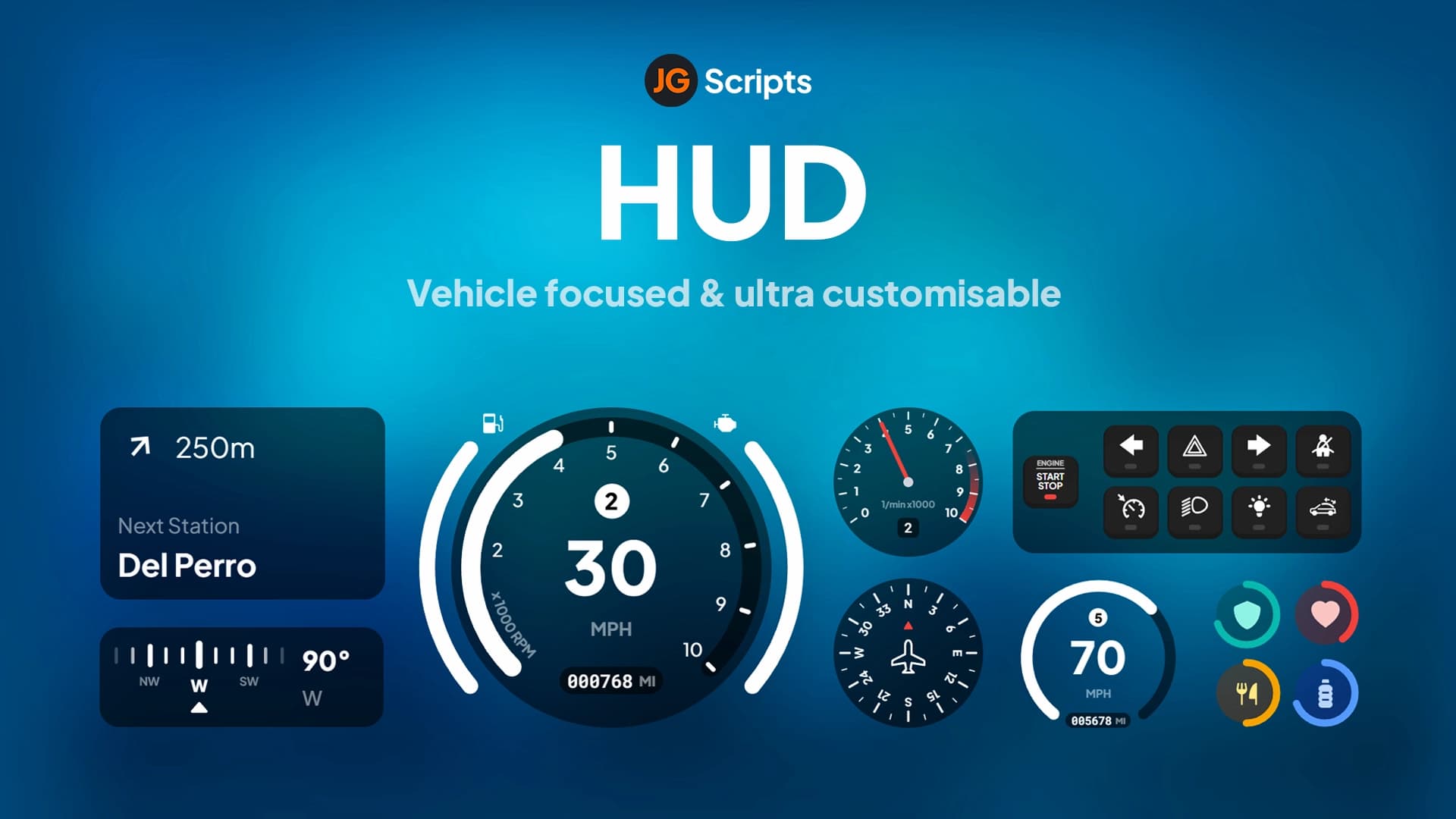
- Vehicle Speedometer - Modern circular or linear speedometer showing speed (MPH/KPH), gear, RPM, fuel level, engine health, and seatbelt status. Includes turn signal indicators, handbrake warning, and customizable redline zones.
- Minimap Customization - Enhanced minimap with adjustable size, shape (circular/square), border styles, and zoom levels. Option to hide during certain activities or show expanded map on keybind.
- Compass & Street Display - Real-time compass showing cardinal directions and current street/area names. Useful for navigation without opening full map, especially during pursuits or deliveries.
- Voice Indicator - Visual feedback for proximity chat, radio, phone calls, and megaphone use. Shows active voice channel and speaking indicator with customizable icons and colors.
- Job & Gang Display - Shows current job, rank, on-duty status, and gang affiliation. Configurable position and visibility based on job type or player preference.
- Money Display - Real-time cash, bank balance, and black money counters with animated updates. Supports society money for gang/job accounts. Can toggle visibility or show only on specific screens.
- Player ID & Server Info - Displays player ID, ping, active players count, and server name. Useful for reporting, admin checks, and server branding.
- Cinematic Mode - Hide all HUD elements with a keybind for clean screenshots, videos, or immersive moments. Configurable elements to keep visible even in cinematic mode.
- Responsive Design - Automatically adjusts for different screen resolutions (1080p, 1440p, 4K) and aspect ratios (16:9, 21:9 ultrawide). Elements scale proportionally without breaking layouts.
- Performance Optimized - Uses modern web technologies (HTML5, CSS3, JavaScript) with optimized rendering loops. Typical resource usage: 0.00-0.01ms resmon, imperceptible impact on FPS.
- Framework Integration - Native support for ESX, QBCore, and QBOX with automatic detection. Pulls player data (hunger, stress, job) directly from framework databases and exports.
- Theme System - Includes multiple pre-built themes (dark mode, light mode, neon, minimalist). Easily create custom themes by editing CSS color variables without touching core code.
- Drag & Drop Editor - Optional in-game editor mode for repositioning HUD elements without editing configs. Save layouts per character or globally for all players.
- Multi-Language Support - Translations for UI text in English, Spanish, French, German, Portuguese, and more. Simple language file structure for adding custom translations.
Perfect For
- Servers wanting a modern, clean interface to replace outdated HUDs
- Roleplay communities needing immersive, non-intrusive displays
- Racing servers requiring detailed vehicle information and speedometers
- Content creators wanting cinematic mode for videos and screenshots
- High-performance servers where resource optimization matters
- Servers with custom branding wanting themed HUD designs
- Communities supporting ultrawide monitors and high resolutions
How It Works
Once installed, izzy HUD V2 automatically detects your framework (ESX/QBCore/QBOX) and begins displaying status information. Players see status bars in their configured positions (default bottom-left) showing current health, armor, and needs. When entering a vehicle, the speedometer appears with real-time speed, fuel, and engine data. The minimap adjusts to configured size and shape, with the compass showing direction and street names.
Voice indicators appear when players use proximity chat, radio, or phone, showing active channel and speaking status. Job/gang info updates when players clock in, switch jobs, or join gangs. Money displays refresh in real-time as players earn, spend, or transfer funds. Admins or players with permissions can access the HUD editor to drag elements to preferred positions and save custom layouts.
The config file allows server owners to enable/disable individual elements, adjust colors using hex codes, set positions with X/Y coordinates, and choose animation styles. Pre-built themes can be activated with a single config change, or custom themes created by editing CSS variable files. All settings apply globally or can be overridden per player using client-side configs.
Technical Details
- Performance: 0.00-0.01ms resmon typical, uses optimized NUI callbacks and event throttling
- Compatibility: ESX Legacy, QBCore, QBOX - Auto-detects framework and adjusts data sources
- Dependencies: None required (optional: ox_lib for enhanced notifications)
- Resolution Support: 1080p, 1440p, 4K, ultrawide (21:9, 32:9) with responsive scaling
- Technology: NUI-based (HTML5/CSS3/JavaScript) with React-style component updates
- Customization: Config.lua for settings, CSS files for themes, HTML for advanced layout changes
- File Size: Lightweight package (~2MB) with minified assets
Installation
- Extract izzy HUD V2 to your resources folder
- Configure framework detection in config.lua (auto-detects by default)
- Adjust HUD element positions, colors, and visibility settings
- Select a pre-built theme or configure custom theme colors
- Optional: Enable drag-and-drop editor mode for in-game customization
- Optional: Configure multi-language settings for your player base
- Add 'ensure izzy-hud-v2' to server.cfg
- Restart server and test HUD elements (on foot and in vehicle)
- Adjust config based on player feedback and server theme
Framework Compatibility
- ✅ ESX - Full integration with ESX player data, jobs, hunger/thirst systems
- ✅ QBCore - Native QB stress, needs, job, and gang systems
- ✅ QBOX - Compatible with QBOX framework architecture and exports
Customizable Elements
- Status Bars - Health, armor, hunger, thirst, stamina, stress, oxygen, custom bars
- Speedometer - Speed, gear, RPM, fuel, engine temp, seatbelt, turn signals
- Minimap - Size, shape, border, zoom level, opacity
- Compass - Direction indicator, street names, area display
- Voice Indicators - Proximity chat, radio, phone, megaphone icons
- Job Display - Job name, rank, duty status, society balance
- Gang Display - Gang name, rank, territory indicators
- Money Counters - Cash, bank, black money, crypto (if enabled)
- Player Info - ID, ping, player count, server name
- Time/Date - In-game time, real time, date display
What Makes It Stand Out
While many HUD scripts offer basic status bars, izzy HUD V2 delivers a complete interface ecosystem with professional design, extreme customization, and imperceptible performance impact. The drag-and-drop editor lets players personalize layouts without editing configs, solving the one-size-fits-all problem of most HUDs. Pre-built themes provide instant visual variety while CSS customization allows unlimited branding. The responsive design means ultrawide and 4K players get proper scaling instead of stretched or broken elements. Framework auto-detection eliminates installation complexity. Combined with the detailed vehicle speedometer, voice indicators, and cinematic mode, this represents the most feature-complete and user-friendly HUD system available for FiveM.
Pre-Built Themes
- Dark Mode - Sleek black/gray interface with neon accent colors, minimal visual noise
- Light Mode - Clean white/light gray for daytime visibility and modern aesthetics
- Neon Cyberpunk - Vibrant purple/blue/pink neon colors for futuristic servers
- Minimalist - Ultra-clean design with hidden elements until needed, maximum immersion
- Classic GTA - Familiar yellow/orange color scheme matching original GTA style
- Military Tactical - Green/olive HUD for military or survival roleplay servers
- Racing Sport - Red/white performance-focused design for racing communities
- Custom - Template for creating your own themed designs with color variables
Use Cases & Benefits
- Branding - Match HUD colors to server logo and theme for cohesive visual identity
- Immersion - Cinematic mode hides UI for screenshots, videos, and dramatic moments
- Accessibility - Adjustable sizes and positions help visually impaired players
- Racing - Detailed speedometer with gear/RPM for competitive racing scenes
- Survival - Prominent hunger/thirst/stamina displays for hardcore survival servers
- Streaming - Clean, professional interface enhances content creator production value
- Multi-Monitor - Responsive scaling ensures proper display on ultrawide setups
- Player Retention - Modern UI creates positive first impressions for new players
Related FiveM HUD