ESX Moveable Premium HUD
ESX Moveable Premium HUD - modern customizable HUD interface for ESX servers Compatible with ESX framework. Fully customizable and optimized.
Video Preview
Click to load video from YouTube. By watching, you agree to their privacy policy.
ESX Moveable Premium HUD - Customizable DRC HUD for FiveM ESX Servers
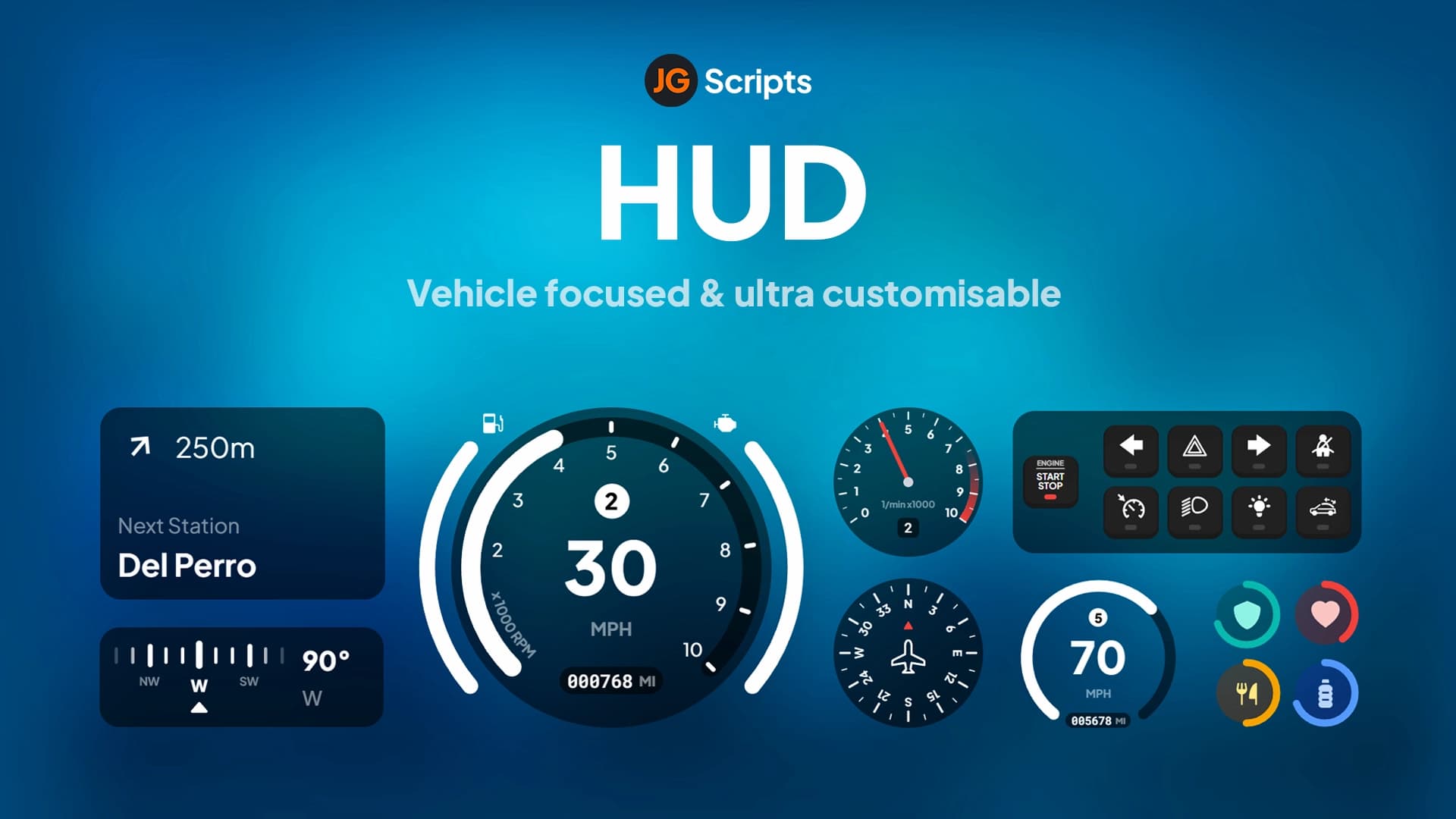
The ESX Moveable Premium HUD (DRC HUD) delivers a modern, fully customizable heads-up display system that players can position anywhere on their screen. This premium HUD script combines essential information displays including health, armor, hunger, thirst, money, and vehicle stats in a sleek, performance-optimized interface. Unlike static HUDs that force players into a single layout, this moveable system lets each player configure their ideal screen setup for maximum comfort and visibility.
Built specifically for ESX framework servers, the DRC HUD integrates seamlessly with ESX's economy, status, and vehicle systems. The color-changing feature allows players to personalize their HUD appearance with custom color schemes, while the optimized codebase ensures minimal performance impact even on lower-end systems. Whether you're on foot managing your character's needs or driving and monitoring vehicle stats, this HUD provides all critical information at a glance without cluttering the screen.
What's Included
You'll receive the complete DRC HUD package with moveable UI elements, in-game settings menu, color customization system, ESX integration scripts, and comprehensive configuration files. The package includes both on-foot HUD displays (health, armor, hunger, thirst, money) and vehicle HUD components (speed, fuel, RPM, gear) that automatically activate based on player context. All UI elements are drag-and-drop moveable with position saving per player.
Key Features
- Fully Moveable Interface - Drag and drop every HUD element to your preferred screen position with automatic position saving
- Color Customization - Change HUD colors to match your preference or server theme with RGB color picker
- In-Game Settings Menu - Access comprehensive settings without editing config files, adjust on the fly
- Multi-Money Display - Shows bank balance, cash wallet, and society/job money separately for complete financial overview
- Hunger & Thirst Bars - Visual status indicators for ESX's needs system with color-coded warnings
- Health & Armor Tracking - Precise numeric and bar displays for current health and armor levels
- Dynamic Car HUD - Speedometer, fuel gauge, RPM meter, and gear indicator that appears when entering vehicles
- Performance Optimized - Efficient rendering at 60+ FPS with minimal resmon impact (typically 0.02-0.05ms)
- Auto-Hide Functions - HUD elements intelligently hide during cutscenes, pause menus, or when not needed
- Profile Saving - Each player's custom layout and color scheme saves automatically across sessions
Perfect For
- ESX roleplay servers wanting modern, professional HUD design
- Servers where player customization and quality of life are priorities
- Communities upgrading from outdated or static HUD scripts
- Streamers who need to position HUD elements around their face cam and overlays
- Multi-framework servers standardizing on ESX for HUD consistency
- Servers with diverse player bases (different screen sizes and resolutions)
How Moveability Works
Players activate edit mode through a configurable keybind (default often F10 or similar), which makes all HUD elements draggable. Click and hold any element to reposition it anywhere on screen, and release to lock it in place. The system saves positions to the database or client-side storage (depending on configuration), ensuring your custom layout persists across server restarts and reconnections. This is especially valuable for players with non-standard screen resolutions or those who use streaming overlays.
Color Customization System
The color changing feature extends beyond simple presets. Players can access an RGB color picker to select exact hues for different HUD elements, or choose from pre-configured themes matching popular server color schemes. You can set different colors for health bars, armor, hunger/thirst, money displays, and vehicle HUD components independently. Server owners can restrict color options or provide server-branded presets if desired.
Installation
- Extract the drc-hud or moveable-hud folder to your server resources directory
- Ensure you have ESX framework properly installed and running
- Add ensure [hud-folder-name] to your server.cfg file
- Import any included SQL files for player settings storage (if database-based saving)
- Configure settings in config.lua (default colors, keybinds, units, etc.)
- Restart your server and press the edit mode key to test positioning
Framework Compatibility
- ✅ ESX Legacy - Full compatibility with ESX Legacy (1.10.x+) with all money, status, and vehicle functions
- ✅ ESX 1.9.x and Earlier - Works with es_extended final and older versions with proper configuration
- ⚠️ QBCore - Designed specifically for ESX framework, requires significant modifications for QBCore compatibility
- ❌ Standalone - Requires ESX framework for money and status data, not standalone-capable
What Makes It Stand Out
The combination of moveability and color customization sets DRC HUD apart from rigid alternatives. Many HUD scripts force a single design vision on all players, but this system respects individual preferences and needs. The clean, modern aesthetic avoids the overly gamified look of some HUDs while still providing all necessary information clearly. The performance optimization ensures that even servers with 64+ players and heavy resource loads can use this HUD without FPS concerns.
Vehicle HUD Details
When entering any vehicle, the car HUD automatically activates, displaying speed (in MPH or KPH based on config), fuel level with range estimation, RPM tachometer, and current gear. The speedometer updates smoothly without jarring number changes, and the fuel gauge color-codes based on remaining fuel (green, yellow, red). The vehicle HUD also supports electric vehicles with appropriate battery displays instead of fuel, and can show damage states for mechanical roleplay servers.
Money Display Breakdown
The three-tier money system shows your cash on hand, bank account balance, and society/job money if you're employed. This is particularly useful for business owners, police officers with department funds, or gang members with shared money. Each money type displays with distinct icons and updates in real-time as transactions occur. Server owners can configure which money types display and whether to show exact amounts or rounded values for cleaner UI.
Configuration Options
Server owners have extensive control over HUD behavior through the config file. Set default positions and colors, configure which elements display, adjust update frequencies (for performance tuning), enable or disable moveability entirely, set minimum/maximum color values, configure money display formatting, customize hunger/thirst thresholds, and adjust vehicle HUD trigger conditions. You can also set job-specific HUD variations or VIP-only customization features.
Performance Specifications
The DRC HUD maintains exceptional performance with typical resmon readings between 0.02-0.05ms when active. The script uses efficient rendering techniques with minimal draw calls and optimized update frequencies. Status bars update only when values change rather than every frame, and the vehicle HUD activates only when needed. Even on servers with 20+ active resources, players report stable 60+ FPS with this HUD enabled.
Updates and Support
The moveable HUD receives regular updates for compatibility with new ESX versions and bug fixes. The clean codebase makes it easy to integrate with custom scripts or modify behavior to match specific server requirements. Documentation typically includes configuration examples, integration guides for custom status scripts, and troubleshooting for common issues.