0R-HUD | Hud Script
0R-HUD | Hud Script - modern customizable HUD interface for ESX servers Compatible with ESX framework. Fully customizable and optimized.
Video Preview
Click to load video from YouTube. By watching, you agree to their privacy policy.
0R-HUD | Hud Script - Customizable Multi-Style Interface System
0R-HUD revolutionizes your FiveM server's user interface with a comprehensive, fully customizable HUD system. This advanced script features multiple style presets, dynamic health and status displays, circular speedometer with gear indicators, hunger/thirst/armor tracking, weapon and ammo display, minimap optimization, microphone and radio status, cinematic mode, and extensive customization options - creating a polished, professional interface that enhances player experience while maintaining clean aesthetics and optimal performance.
https://www.youtube.com/watch?v=bwX2POkPO0MWhat's Included
This complete HUD package includes three distinct info HUD layouts (modern, minimal, classic), three speedometer style options (circular, linear, compact), three status display types for hunger/thirst/armor (bar, circular, icon-based), three bottom-left display styles for microphone/radio (compact, expanded, minimal), dynamic health bars adjusting based on current HP, optimized minimap sizing matching HUD layout, comprehensive weapon and ammunition display, multiple voice/radio indicator styles, cinematic view mode hiding all UI elements, and extensive RGB color customization for every HUD component.
Key Features
- 3 Info HUD Styles - Choose between modern sleek design, minimal clean layout, or classic traditional HUD aesthetics with complete visual redesigns
- 3 Speedometer Styles - Circular speedometer with needle, linear bar speedometer, or compact digital display each with unique animations
- 3 Status Display Types - Status bars showing hunger/thirst/armor as colored bars, circular indicators with percentage, or minimalist icon-based displays
- Dynamic Health System - Health bar scales and changes color based on HP percentage (green → yellow → red) with smooth transitions
- Vehicle Speedometer - Real-time speed display with MPH/KPH toggle, current gear indicator, RPM gauge, and fuel level integration
- Gear Indicator - Shows current gear (R/N/1-6) with reverse warning, neutral indicator, and automatic transmission detection
- Seatbelt System - Visual seatbelt indicator with toggle functionality and crash protection mechanics
- Fuel Integration - Fuel gauge with percentage display, low fuel warning, and integration with popular fuel scripts
- Weapon Display - Current weapon icon with ammunition count, magazine capacity, and ammo type indicator
- Voice Indicators - Multiple microphone display styles showing voice proximity (whisper, normal, shout) with visual levels
- Radio Status - Radio frequency display, talk indicator, and customizable position/style
- Status Needs - Hunger and thirst tracking with visual warnings when low and framework integration
- Armor Display - Armor percentage with visual indicator and low armor warnings
- Minimap Optimization - Customized minimap size and position perfectly aligned with HUD layout for clean appearance
- Cinematic Mode - Toggle to hide all HUD elements for screenshots, videos, or immersive gameplay with configurable hotkey
- Server Info Display - Optional server logo, player count, server ID, time/date display in HUD
- RGB Customization - Full color customization for every HUD element with preset color schemes and custom RGB values
- Responsive Design - Automatically adjusts to different screen resolutions and aspect ratios maintaining proper scaling
- Smooth Animations - Fluid transitions, fade effects, and animated elements creating polished user experience
- Performance Optimized - Minimal FPS impact with efficient rendering and update cycles
Perfect For
- All Server Types - Universal HUD upgrade suitable for roleplay, racing, deathmatch, or casual servers
- Branded Servers - Extensive customization enables perfect matching with server color schemes and branding
- Roleplay Servers - Status displays support hunger/thirst mechanics common in serious RP
- Racing Servers - Detailed speedometer with gear indicators perfect for racing communities
- Content Creators - Cinematic mode and clean aesthetics ideal for video production and screenshots
- Community Servers - Professional appearance elevates perceived quality attracting and retaining players
HUD Style Options Detailed
Modern Style: Sleek contemporary design with rounded corners, gradient effects, and minimalist aesthetics. Features compact element placement, smooth animations, and dark translucent backgrounds. Perfect for modern roleplay servers wanting polished, professional appearance. Elements arranged efficiently in screen corners minimizing center obstruction.
Minimal Style: Ultra-clean design showing only essential information with maximum screen space preservation. Small, discrete elements with high transparency. Status bars condensed to thin lines or small icons. Ideal for immersive gameplay where HUD should be barely noticeable or content creation requiring clean screen capture.
Classic Style: Traditional GTA-style HUD layout familiar to players. Larger elements with solid backgrounds and clear visibility. Status displays more prominent with detailed numerical values. Best for servers wanting comfortable, recognizable interface reducing new player learning curve.
Speedometer Customization
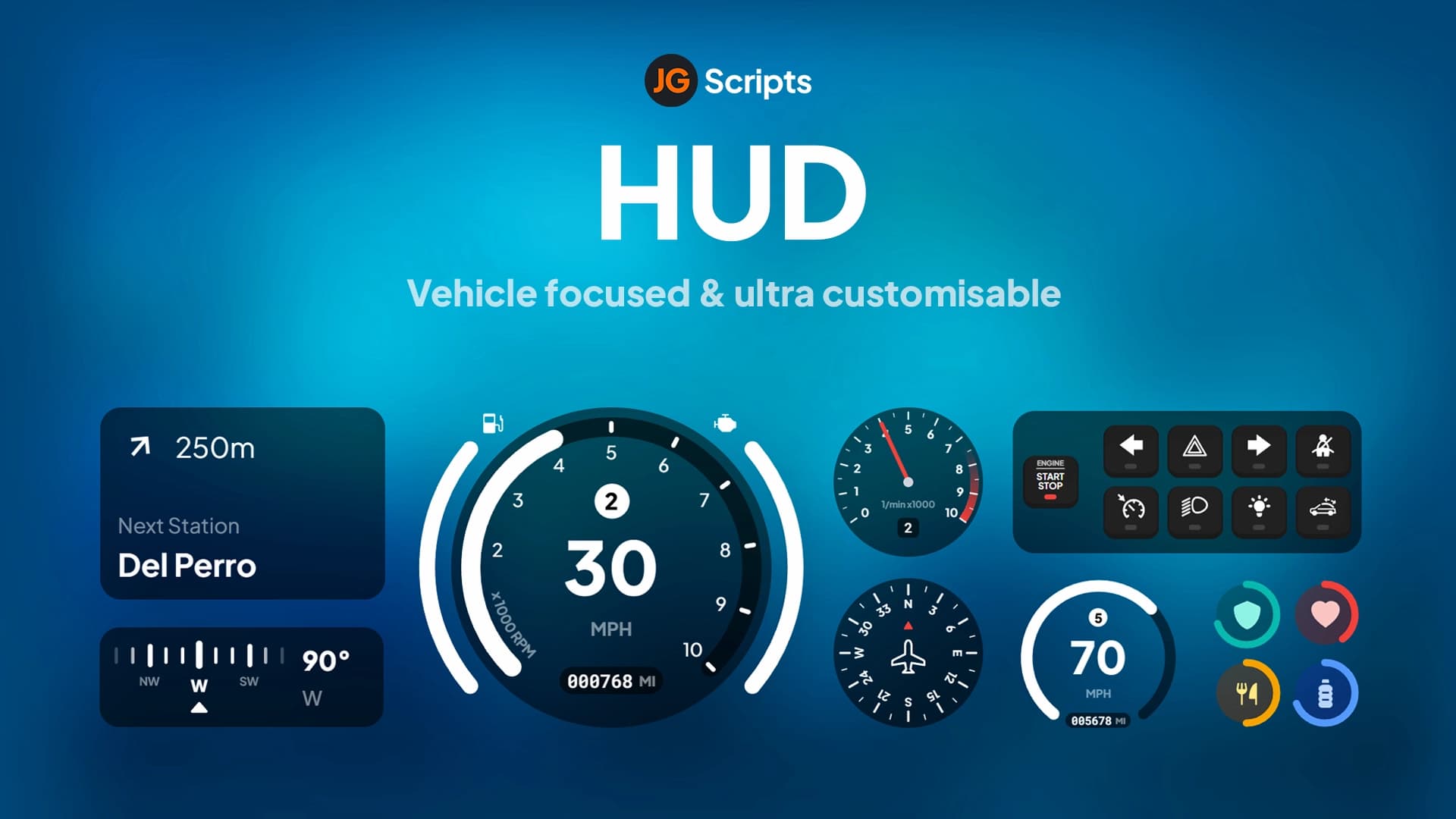
Circular Speedometer: Round gauge with animated needle sweeping across arc. Displays current speed, max speed arc, current gear at center, and RPM ring around outer edge. Fuel level integrated as small bar. Most visually impressive option perfect for racing or vehicle-focused servers.
Linear Speedometer: Horizontal bar filling based on speed with digital speed readout. Gear indicator adjacent with color-coded status (red reverse, blue neutral, white forward). Compact design taking minimal space. Good compromise between information and screen space.
Compact Speedometer: Small digital display showing speed number and gear only. Minimal screen footprint with essential information. Perfect for servers prioritizing maximum visibility or players wanting unobtrusive interface.
Status Display Systems
Bar Display: Traditional colored bars for health, armor, hunger, thirst with percentage text. Each status has unique color (red health, blue armor, orange hunger, cyan thirst). Bars deplete left-to-right with smooth animations. Familiar design most players recognize immediately.
Circular Display: Round indicators with filled arcs showing percentage for each status. Compact arrangement grouping all stats in small area. Modern aesthetic with animated fills. Color changes warn of low values (red when critical).
Icon Display: Minimalist icons with small percentage numbers. Simple symbols (heart, shield, food, water) with adjacent values. Extremely compact taking minimal space. Best for minimal HUD style or experienced players who don't need constant status monitoring.
Vehicle Features
The vehicle HUD activates automatically when entering vehicles providing comprehensive driving information including current speed in MPH or KPH (togglable), current gear position (R/N/1-6) with automatic detection, RPM gauge showing engine revolutions, fuel level with low fuel warnings at configurable threshold, seatbelt indicator with toggle functionality, speedometer needle/bar animations matching acceleration, and turn signal indicators showing active blinkers. All elements position seamlessly within chosen HUD style maintaining consistent aesthetics.
Technical Specifications
- Performance: ~0.01ms client impact, highly optimized rendering with minimal FPS loss
- Resolution Support: Responsive design working on 1920x1080, 2560x1440, 3840x2160, and ultrawide displays
- Framework: Compatible with ESX, QBCore, QBOX, and standalone with automatic detection
- Voice Scripts: Integrates with pma-voice, mumble-voip, saltychat, and TokoVOIP
- Status Scripts: Works with esx_status, qb-core status, ox_lib, and custom hunger/thirst systems
- Fuel Scripts: Compatible with LegacyFuel, ox_fuel, cdn-fuel, and other popular fuel systems
- File Size: Approximately 5 MB including all style assets, fonts, and configuration
Installation
- Download the 0R-HUD package from your purchase confirmation
- Extract the resource to your server's resources directory
- Configure framework in config.lua (ESX/QBCore/QBOX/Standalone)
- Select default HUD style, speedometer type, and status display preferences
- Configure voice script integration (pma-voice, saltychat, etc.)
- Set up fuel script integration if using fuel system
- Customize colors, positions, and sizing to match server branding
- Add
ensure 0r-hudto server.cfg - Restart server and verify HUD displays correctly
- Test all features in vehicle and on foot
Framework Compatibility
- ✅ ESX Legacy - Full integration with ESX status, jobs, and player data
- ✅ QBCore - Complete QB support with status, metadata, and framework features
- ✅ QBOX - Compatible with modern QBOX implementations
- ✅ Standalone - Basic functionality without framework (health, armor, speed, fuel)
Customization Options
- Style Selection: Choose HUD style, speedometer type, and status display independently mixing and matching
- Color Schemes: Preset color palettes (blue, red, green, purple, orange) or full RGB customization per element
- Position Adjustment: Move HUD elements to different screen corners or custom coordinates
- Size Scaling: Adjust element sizes from 50% to 200% maintaining aspect ratios
- Transparency: Set background transparency for each element (0-100%)
- Toggle Elements: Enable/disable individual components (hide fuel, remove radio, etc.)
- Speed Unit: Choose MPH or KPH for speedometer display globally or per-player preference
- Hotkeys: Configure keybinds for cinematic mode, seatbelt toggle, and HUD visibility
Integration Possibilities
- Voice Systems: Deep integration with pma-voice, saltychat, mumble showing talk status and proximity
- Fuel Scripts: Displays fuel level from LegacyFuel, ox_fuel, cdn-fuel with low fuel warnings
- Status Scripts: Pulls hunger/thirst from esx_status, qb-core, or ox_lib systems
- Job Scripts: Can display current job name and grade in HUD (optional)
- Gang Systems: Show gang affiliation and rank in status area
- Banking Scripts: Display account balance in HUD (configurable)
What Makes It Stand Out
0R-HUD's multi-style approach sets it apart from single-design HUD scripts. Servers can choose aesthetics matching their theme rather than adapting around fixed HUD design. The three independent customization categories (info style, speedometer, status display) enable 27 different combination possibilities ensuring unique appearance. The extensive color customization allows perfect branding alignment - servers with blue themes use blue accents, racing servers use red for speed theme, etc. Performance optimization ensures the enhanced visuals don't sacrifice FPS - players enjoy beautiful interface without gameplay impact. The responsive design means all players see properly scaled HUD regardless of monitor resolution or aspect ratio.
Player Experience Enhancement
Professional HUD immediately elevates perceived server quality making servers feel more polished and established. Clear status information reduces gameplay frustration - players know exact health, armor, hunger, thirst without guessing. The speedometer enhances vehicle gameplay showing precise speed for racing or traffic law compliance. Voice indicators improve communication showing who's talking and at what proximity. Seatbelt system adds realism with crash protection mechanics. Cinematic mode enables clean screenshots and videos supporting content creation. All these features combine creating superior user experience that keeps players engaged and satisfied.
Admin Features
Server administrators can configure default HUD settings affecting all players, force specific style choices preventing player customization, disable certain elements server-wide (remove hunger/thirst if not used), adjust performance settings for lower-end server populations, and customize server logo and branding in HUD. Individual players can still customize colors and positions (if allowed) while admins control core functionality and appearance.
Support & Updates
Includes lifetime updates with new HUD styles, framework compatibility updates, new feature additions, and bug fixes. Comprehensive documentation covers installation, all configuration options, troubleshooting common issues, and integration with popular scripts. Active support via ticket system for technical assistance and customization guidance. Regular updates add community-requested features like new speedometer styles, additional status displays, and expanded customization options.