HUD Systems
-34% DTO
izzy HUD v5
izzy HUD v5 - The izzy HUD v5 sets new standards on FiveM - You can fully customize this HUD. Compatible with ESX framework for FiveM servers.
19,00 €29,00 €
Garantía de Devolución
Política de reembolso de 14 días
Actualizaciones de por Vida
Actualizaciones gratuitas para siempre
Código Abierto
Inspecciona y modifica el código
SSL Encrypted
|Visa, Mastercard, Amex, Apple Pay
|Crypto
Vista previa del video
Haz clic para cargar el video de YouTube. Al verlo, aceptas su política de privacidad.
Descripción
izzy HUD v5 - QBCore UI Framework with Progress Bars and Notifications
HUDs are tricky. You want something clean that doesn't dominate the screen, but you also need it to display health, armor, hunger, stress, and notifications without feeling cluttered. izzy HUD v5 handles all of that plus adds progress bars for actions. It's designed specifically for QBCore, with built-in exports that replace the default notification and progress bar systems.
What's Included
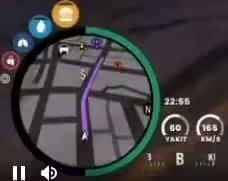
You get a complete HUD replacement with status bars (health, armor, hunger, thirst, stress), a notification system with multiple types (success, error, inform), and progress bars for timed actions. Everything integrates with QBCore's native functions, so you don't have to rewrite your existing scripts. The HUD is fully customizable—colors, positions, visibility—all configurable.
Key Features
- QBCore Integration - Direct replacement for QBCore.Functions.Notify and QBCore.Functions.Progressbar. Your existing scripts work without modifications.
- Multi-Type Notifications - Success, error, and inform notification styles. Supports both simple text notifications and dual-text format (caption + message).
- Progress Bars for Actions - Shows progress for tasks like lockpicking, crafting, or eating. Includes support for animations, props, and cancel functionality.
- Stress System Integration - Built-in stress gain and relief events. Works with QBCore's stress mechanics or can be adapted for custom systems.
- Status Bar Display - Health, armor, hunger, thirst, and other status indicators. Clean visual design that doesn't block gameplay.
- Control Disables - Progress bars can disable player controls during actions. Prevents exploits where players run or shoot while picking locks.
- Prop and Animation Support - Progress bars can trigger animations and spawn props. Makes actions feel more immersive (character holds lockpick while picking).
- Customizable Duration - Set notification duration per-call or use default timing. Gives you control over how long important messages stay on screen.
Perfect For
- QBCore servers that want a cleaner default HUD
- Servers needing better progress bar visuals for jobs and actions
- Roleplay servers that use stress mechanics (police chases, gunfights)
- Developers who want plug-and-play HUD integration (no script rewrites)
Technical Details
- Framework Compatibility: QBCore only. Not compatible with ESX without modification.
- Export Functions: Replaces QBCore.Functions.Notify and QBCore.Functions.Progressbar
- Stress Events: Client-side events for stress gain/relief (izzy-hudv5:client:gainStress, izzy-hudv5:client:relieveStress)
- Performance: Lightweight UI rendering. Minimal resmon impact even with active notifications and progress bars.
Installation
- Add izzy-hudv5 to your resources folder
- Replace QBCore notification function in qb-core/client/functions.lua with the provided export
- Replace QBCore progress bar function with the izzy HUD export
- Configure HUD settings (colors, positions, visibility) in config file
- Test notifications and progress bars with your existing scripts
- Adjust stress event triggers if you're using custom stress mechanics
Integration Example
Replace your existing QBCore notification function with this:
function QBCore.Functions.Notify(text, texttype, length)
    texttype = texttype == success and success or texttype == error and error or inform
    length = length or 5000
    if type(text) == 'table' then
        local ttext = text.text or 'Placeholder'
        local caption = text.caption or 'Placeholder'
        exports['izzy-hudv5']:addNotification(type, ttext, caption, length)
    else
        exports['izzy-hudv5']:addNotification(type, texttype == 'error' and 'Error' or texttype == 'success' and 'Success' or 'Notify', text, length)
    end
end
For progress bars, use:
function QBCore.Functions.Progressbar(name, label, duration, useWhileDead, canCancel, disableControls, animation, prop, propTwo, onFinish, onCancel)
    exports['izzy-hudv5']:Progress({
        name = name:lower(),
        duration = duration,
        label = label,
        useWhileDead = useWhileDead,
        canCancel = canCancel,
        controlDisables = disableControls,
        animation = animation,
        prop = prop,
        propTwo = propTwo,
    }, function(cancelled)
        if not cancelled then
            if onFinish then onFinish() end
        else
            if onCancel then onCancel() end
        end
    end)
end
What Makes It Stand Out
Most HUDs force you to rewrite your scripts. izzy HUD v5 works as a drop-in replacement—you modify two functions in QBCore and everything else just works. The progress bar system is particularly solid because it handles animations, props, and control disables all in one call. That means you can make a lockpicking minigame that freezes player movement, shows a lockpick prop, and plays the picking animation without juggling three different script calls. And since it's designed for QBCore specifically, you don't have to deal with framework compatibility issues.
Related QBOX Scripts
Productos Relacionados

Preguntas y Respuestas
0 preguntas
Aún no hay preguntas
¡Sé el primero en hacer una pregunta sobre este producto!