BakiTelli HUD V1
Elevate your FiveM server's visual experience with BakiTelli HUD V1, a sleek and modern heads-up display designed for both ESX and QBCore frameworks.
39,00 €
Garantía de Devolución
Política de reembolso de 14 días
Actualizaciones de por Vida
Actualizaciones gratuitas para siempre
Código Abierto
Inspecciona y modifica el código
SSL Encrypted
|Visa, Mastercard, Amex, Apple Pay
|Crypto
Vista previa del video
Haz clic para cargar el video de YouTube. Al verlo, aceptas su política de privacidad.
Descripción
BakiTelli HUD V1 - Modern Interface for ESX & QBCore Servers
Elevate your FiveM server's visual experience with BakiTelli HUD V1, a sleek and modern heads-up display designed for both ESX and QBCore frameworks. This comprehensive HUD system provides players with essential information in a clean, unobtrusive interface that enhances gameplay without cluttering the screen. Perfect for servers wanting a professional, contemporary look that improves user experience.
What's Included
The BakiTelli HUD V1 delivers a complete interface overhaul featuring health and armor indicators, status effects, vehicle information, money displays, and player stats. The system uses modern UI design principles with smooth animations, responsive elements, and customizable positioning. Every element is carefully crafted to provide information at a glance while maintaining visual appeal and clarity.
Key Features
- Dual Framework Support - Works seamlessly with both ESX and QBCore without modification
- Modern Design Language - Clean, contemporary interface with subtle animations and smooth transitions
- Player Status Display - Health, armor, hunger, thirst, and stress indicators with color-coded visuals
- Vehicle Speedometer - Integrated vehicle HUD showing speed, fuel, engine health, and seatbelt status
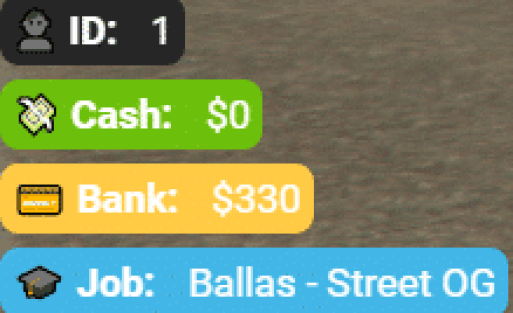
- Money & Bank Display - Real-time cash and bank balance indicators with customizable positioning
- Status Effects - Visual indicators for buffs, debuffs, and active effects (drunk, injured, etc.)
- Minimap Integration - Enhanced minimap with cleaner borders and improved visibility
- Customizable Elements - Adjust colors, positions, and visibility of all HUD components
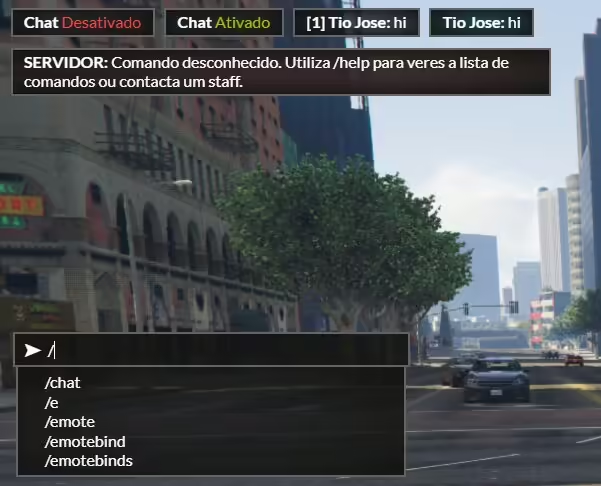
- Voice Indicator - Radio and proximity voice chat indicators with range display
- Optimized Performance - Lightweight code ensures 0.00-0.01ms resource usage
Perfect For
- Roleplay servers wanting a professional, polished interface
- Servers upgrading from outdated or default HUD systems
- Communities seeking consistent visual design across features
- Streamers and content creators who want a clean, attractive HUD
- Servers focused on user experience and visual quality
- Both ESX and QBCore servers looking for framework-agnostic solutions
Design Philosophy
BakiTelli HUD V1 follows a minimalist design approach that prioritizes readability and elegance. The interface uses subtle gradients, rounded corners, and carefully chosen typography to create a modern aesthetic. Information is presented hierarchically, with critical data (health, armor) more prominent than secondary stats. The color scheme is designed to be easily visible against diverse game environments without being distracting or overwhelming.
Installation
- Download and extract the BakiTelli HUD resource to your resources folder
- Choose your framework (ESX or QBCore) in the configuration file
- Add ensure bakitelli-hud to your server.cfg
- Configure colors, positions, and visible elements in config.lua
- Restart your server and enjoy your new modern interface
HUD Components
The system includes several integrated components that work together seamlessly. The health and armor bars use smooth animations and color transitions to indicate status changes. The hunger and thirst system displays with intuitive icons and percentage indicators. When in a vehicle, the speedometer automatically appears with fuel gauge, engine health, and current gear. The money display updates in real-time as transactions occur, and voice indicators show when you're transmitting on radio or proximity chat.
Framework Compatibility
- ✅ ESX Legacy - Full support for ESX 1.9.x and Legacy (1.10.x+)
- ✅ QBCore - Complete compatibility with all QB-Core versions
- ✅ Status Scripts - Works with esx_status, qb-hud, and similar status systems
- ✅ Voice Systems - Compatible with pma-voice, saltychat, tokovoip
Customization Options
The config file provides extensive customization possibilities. Adjust the position of every HUD element to suit your preferences or server theme. Change colors to match your server branding using RGB or hex values. Toggle individual components on or off based on your server's needs. You can even customize which information displays for different player states (on foot, in vehicle, dead, etc.) to ensure the HUD only shows relevant information.
What Makes It Stand Out
BakiTelli HUD V1 stands out through its attention to detail and professional design quality. Unlike many HUDs that feel like disconnected elements placed on screen, BakiTelli creates a cohesive visual system where every component complements the others. The animations are smooth without being distracting, the colors are vibrant without being garish, and the information density is perfect - showing everything you need without clutter. The dual-framework support means you get this quality regardless of your server's core.
Vehicle HUD Features
- Speedometer - KM/H or MPH display with customizable unit selection
- Fuel Gauge - Real-time fuel level with low-fuel warnings
- Engine Health - Visual indicator of vehicle damage and engine condition
- Seatbelt Indicator - Shows seatbelt status with color-coded alerts
- Gear Display - Current gear indicator for manual transmission vehicles
- Lock Status - Vehicle lock indicator showing secured/unlocked state
Status System Integration
The HUD integrates seamlessly with your server's status systems to display hunger, thirst, stress, and other survival mechanics. Each status has its own icon and progress bar, with color changes indicating critical levels. The system can be configured to show or hide specific statuses based on your server's features. Visual and audio warnings alert players when statuses reach dangerous levels, preventing unexpected deaths from ignored needs.
Requirements
- FiveM server with ESX or QBCore framework
- Status script (esx_status, qb-hud, or compatible)
- Optional: Vehicle fuel script (LegacyFuel, ox_fuel, etc.)
- Optional: Voice system (pma-voice recommended)
Performance Optimization
BakiTelli HUD V1 is built with performance as a top priority. The script uses efficient update intervals, only recalculating and redrawing elements when values actually change. Client-side rendering is optimized to minimize frame rate impact, typically showing 0.00ms most of the time with brief 0.01ms spikes during updates. The code is clean, well-commented, and free of performance-draining loops or unnecessary calculations.
Support & Updates
The HUD includes comprehensive documentation with installation guides, configuration examples, and troubleshooting tips. Regular updates ensure compatibility with the latest framework versions and FiveM updates. The developer provides support for installation issues and customization questions. Example configurations are included for common setups, making it easy to get started quickly even if you're new to server customization.
Related ESX Scripts
Productos Relacionados


Preguntas y Respuestas
0 preguntas
Aún no hay preguntas
¡Sé el primero en hacer una pregunta sobre este producto!