Ultimate Drift Server Guide: Top Cars, Mods & Setups for FiveM
You want a clean, fast and fair drift server. This guide gives you a practical blueprint from zero to sideways. You will learn the basics, the essential mods, and the exact steps to set up handling, tracks and tools. You also get sample configs you can drop into your server today.
This guide is part of our complete FiveM content creation guide, covering everything from MLO design to scripting, vehicle modding, and building your creator brand.
Who this guide is for
- You run or plan to run a FiveM server focused on drifting
- You want stable physics, simple admin tools and repeatable setups
- You prefer clear steps over hype
Drift server basics
A good drift server does three things well:
- Predictable physics. Players need consistent traction and power to hold lines. You control this with handling and tire scripts.
- Low friction tooling. Give admins quick spawn menus, easy car setup, and track rotation.
- Performance discipline. Keep resmon low, manage population density, and load only what you need.
Start with a plain FXServer or txAdmin install. Follow the official setup flow and keep your server.cfg minimal during the first boot. (Cfx.re Docs)
Essential mods and resources for drifting
Use a small, proven stack. These cover spawning, stance, handling, and tires.
- Admin and spawn menu
- vMenu. Still widely used, but no longer actively developed. It works and is simple to lock down with ACE permissions. Consider maintained forks if you need updates. (Cfx.re Community)
- Stance and fitment
- VStancer for FiveM. Adjust track width, camber and offset and sync changes to all players. Great for dialing in grip and style. (GitHub)
- Live handling tuning
- Handling Editor. Edit handling values per vehicle, in real time, and sync to clients. Perfect for testing drift presets before you ship them. (GitHub)
- Drift tires
- Drift Tires script. Toggle drift compound on supported cars to lower grip in a controllable way. Good for public lobbies. (Cfx.re Community)
- Reference docs while you configure
- Server commands and controls to bind keys and manage resources. (Cfx.re Docs)
Helpful internal resources on FiveMX you can link for cars, tracks and HUD:
- Cars library and driftable add ons
- Drift Track Playground map
- HUD and performance tuning guides
Use these when you publish your server guide or Discord docs: https://vertexmods.com/en/shop/fivem-cars, https://vertexmods.com/en/blog/ultimate-drift-server-guide-fivem, https://vertexmods.com/en/blog/how-to-install-fivem-hud, https://vertexmods.com/performance, https://vertexmods.com/en/blog/how-to-use-resmon-in-fivem-optimize-resources.
Step by step: build your drift server
1) Prepare a clean base
- Install the server following the official manual.
- Start once with only
chatandspawnmanagerto confirm stability. (Cfx.re Docs)
2) Create a lean
server.cfgUse a minimal config first. Add features only after testing.
- Server commands and controls to bind keys and manage resources. (Cfx.re Docs)
# server.cfg — minimal base for drift
sv_hostname "Your Drift Server"
endpoint_add_tcp "0.0.0.0:30120"
endpoint_add_udp "0.0.0.0:30120"
sv_maxclients 48
sets tags "drift, cars, tracks, stance"
sv_licenseKey "PUT_YOUR_KEY_HERE"

# essentials
ensure spawnmanager
ensure sessionmanager
ensure hardcap

# admin menu (choose one)
ensure vMenu             # or: ensure pf-vmenu

# stance and handling
ensure fivem-vstancer
ensure handling-editor
ensure drift-tires

# map rotation example
# ensure drift_track_playground
3) Lock down permissions
Restrict tuning to admins and trusted roles so public users cannot break physics.
# ACE examples for admin menu
add_ace group.admin "vMenu.Everything" allow
add_principal identifier.discord:YOURID group.admin

# Limit stance or handling editors to staff
add_ace group.staff "vstancer.use" allow
add_ace group.staff "handling.edit" allow
Consult each resource’s README for exact ACE names. (Cfx.re Community)
4) Install and verify resources
- Drop each resource into
resources/andensureit inserver.cfg. - Boot, join alone, test resource load order, check resmon and CPU spikes.
- Only then invite test drivers.
5) Configure drift physics
You can reach stable drift behavior with two approaches:
A) Handling presets. Use Handling Editor to lower traction, bias drive to rear, and smooth yaw response. Start with conservative changes.
<!-- Example handling snippet for a RWD drift preset -->
<handlingName>drift_rwd_base</handlingName>
<fInitialDriveForce>0.3100</fInitialDriveForce>
<fDriveInertia>1.10</fDriveInertia>
<fInitialDriveGears>6</fInitialDriveGears>
<fClutchChangeRateScaleUpShift>3.00</fClutchChangeRateScaleUpShift>
<fClutchChangeRateScaleDownShift>3.00</fClutchChangeRateScaleDownShift>
<fDriveBiasFront>0.00</fDriveBiasFront>     <!-- 0 means full RWD -->
<fTractionCurveMax>1.90</fTractionCurveMax> <!-- peak grip -->
<fTractionCurveMin>1.65</fTractionCurveMin> <!-- lateral grip in slide -->
<fTractionLossMult>1.00</fTractionLossMult>
<fLowSpeedTractionLossMult>0.75</fLowSpeedTractionLossMult>
<fSteeringLock>42.0</fSteeringLock>
<fSuspensionReboundDamp>1.90</fSuspensionReboundDamp>
<fSuspensionCompDamp>1.60</fSuspensionCompDamp>
<fAntiRollBarForce>0.40</fAntiRollBarForce>
Apply and iterate live with Handling Editor, then export final values to your pack so every player gets the same physics. (GitHub)
B) Drift tires. Use a tire script that reduces grip smoothly on toggle or item use. This is easier for public servers and keeps vehicle variety. (Cfx.re Community)
6) Dial stance and steering angle
Use VStancer to set track width, camber and ride height so cars feel predictable at angle without rubbing. Keep presets per car class to speed up events. (GitHub)
7) Build track rotation
Start with one reliable track, then rotate. The Drift Track Playground is a good internal pick to test layouts. Keep props simple and maintain clear clipping. Link your track list in Discord and your website.
8) QA checklist before you open
- No menu actions for regular players that can break physics
- Stable 60 FPS on the server with 20 test drivers
- No heavy MLOs loaded during events
- Clear rules on overtakes and tandem spacing
- One-button car reset and repair
Top drift cars that work well in FiveM
Pick cars with predictable wheelbase and RWD. Offer a short list to keep battles fair.
- Nissan Silvia S13 S14 S15. Balanced and forgiving at mid power.
- Nissan 180SX 350Z 370Z. Easy angle, strong community setups.
- Mazda RX7 FD. Smooth transitions, light front end.
- Toyota Supra A80 and Chaser JZX100. Stable long sweepers.
- BMW E36 and E46. Linear steering feel.
- Toyota AE86. Fun on small technical layouts.
Curate your add on list under 30 cars and publish your handling pack so everyone knows what to expect. Link your car category to help players download single player practice builds too.
Sample configurations you can copy
1) vMenu basics and hints
Even if original vMenu is unmaintained, it remains a solid admin tool. If you want a maintained fork, check PF vMenu’s thread. Lock down categories with ACE and hide anything not needed in drift. (Cfx.re Community)
# vMenu recommended
setr vmenu_use_permissions true
setr vmenu_disable_weapons true
setr vmenu_disable_spawning true
# Let admins spawn only server whitelisted drift cars
add_ace group.admin "vMenu.VehicleSpawner" allow
add_ace group.default "vMenu.NoClip" deny
2) Drift Tires default
Start conservative to keep tandems tight. Adjust in events. (Cfx.re Community)
-- config.lua conceptual example
DriftGripMultiplier = 0.78     -- overall grip reduction
EnableOnlyRWD = true           -- block FWD trolling
WearRate = 0.5                 -- longer sessions
3) Handling preset workflow
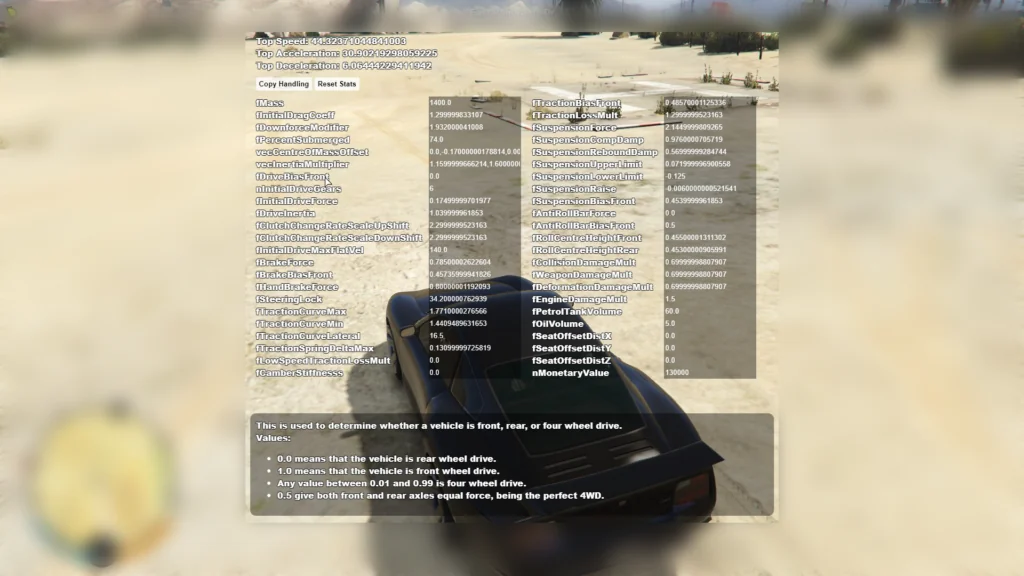
- Join alone, open Handling Editor, change only a few values at a time
- Save snapshot, export to XML, add to your shared handling pack
- Restart resource, test with two more drivers, repeat
Event formats that keep players hooked
- Solo score runs. Simple clipping zones, three tries, best run counts
- Chase battles. Seed bracket, swap lead and chase, final four on stream
- Train laps. Five car lines to teach proximity without pressure
Give people a routine. Publish your weekly schedule and track rotation in Discord and on your site.
Performance and stability tips
- Load maps and large props only when needed
- Keep entity population low during events
- Monitor resmon when cars stack up at spawn
- Prefer simple UI and avoid heavy NUI polling
- Restart resources between brackets if memory creeps
Use the server manual and command references to script resets and quick restarts cleanly. (Cfx.re Docs)
Troubleshooting quick wins
- Car name shows wrong in menu. Check
vehicles.metagameNameand ensure client script load. (Cfx.re Community) - Stance does not sync. Confirm VStancer decorators and the resource is running on both client and server. (GitHub)
- Handling changes do nothing. Restart the vehicle, verify the resource owns the handling, and export to your shared pack. (GitHub)
Recommended internal links for your players
Point players to these pages for cars, maps, and performance guides on FiveMX:
- FiveM Cars to browse options you allow on your server: https://vertexmods.com/en/shop/fivem-cars
- Drift Track Playground to preview one of your base maps: https://vertexmods.com/en/blog/ultimate-drift-server-guide-fivem
- HUD and performance to reduce clutter and boost FPS: https://vertexmods.com/en/blog/how-to-install-fivem-hud and https://vertexmods.com/performance
- Resmon guide to measure script impact: https://vertexmods.com/en/blog/how-to-use-resmon-in-fivem-optimize-resources
These links help players help themselves and cut your support load.
High quality external references
- Official server setup and server.cfg references for accurate install steps and commands. (Cfx.re Docs)
- vMenu thread and fork to understand status and alternatives. (Cfx.re Community)
- VStancer and Handling Editor for stance and physics tuning. (GitHub)
- Drift Tires for an accessible grip toggle. (Cfx.re Community)
Copy this starter kit into your repo
Create a resources/drift folder and add:
resources/
  [admin]/vMenu
  [tuning]/fivem-vstancer
  [tuning]/handling-editor
  [physics]/drift-tires
  [maps]/drift_track_playground
Then add these lines to server.cfg:
ensure vMenu
ensure fivem-vstancer
ensure handling-editor
ensure drift-tires
ensure drift_track_playground
Boot, spawn an S-chassis, apply the drift_rwd_base preset, lower grip with Drift Tires, set mild front camber with VStancer, and run five laps on Playground. Take notes. Export handling when it feels right. (GitHub)
Final checklist
- You can spawn and lock cars with admin roles only
- Drift tires toggle works only for RWD
- Handling presets exist for each allowed car
- One default event track loads without stutter
- Players have a help page with your car list and rules
What to do next
Publish your handling pack and stance presets. Add one more track. Host a 16 driver bracket next weekend. Link your internal FiveMX pages for cars, tracks and HUD so new players onboard fast.
If you want deeper docs while you tweak, keep the official manuals open while you work. They save time and prevent guesswork. (Cfx.re Docs)
You now have a solid, unbiased blueprint to build a reliable FiveM drift server.
Mantente al Día
Recibe los últimos tutoriales de FiveM, lanzamientos de mods y actualizaciones exclusivas en tu correo.
Sin spam. Cancela cuando quieras.