Setting Up fxmanifest.lua (FiveM)
Setting up a resource manifest (fxmanifest.lua) is essential for every FiveM resource, including maps, scripts, and other content types. The fxmanifest.lua file serves as the configuration file for your resource, specifying metadata, files to be loaded, and scripts that should run on the client or server side. This guide will help you transition from the older __resource.lua setup to the more modern and flexible fxmanifest.lua system, which is now the standard for FiveM resources.
Table of Contents
What is fxmanifest.lua?
fxmanifest.lua is the configuration file for FiveM resources. It provides information about the resource, specifies which scripts to load, and defines various settings required for the resource to function correctly in a FiveM server. The manifest replaces the older __resource.lua file with a more structured approach, offering better organization and flexibility.
Why Use fxmanifest.lua?
The fxmanifest.lua system offers several advantages over __resource.lua:
- Better Structure:
fxmanifest.luais more organized and allows you to use different metadata fields. - Compatibility: It supports new game builds and includes backward compatibility options.
- Flexibility: You can define additional data and custom metadata fields.
Basic Structure of fxmanifest.lua
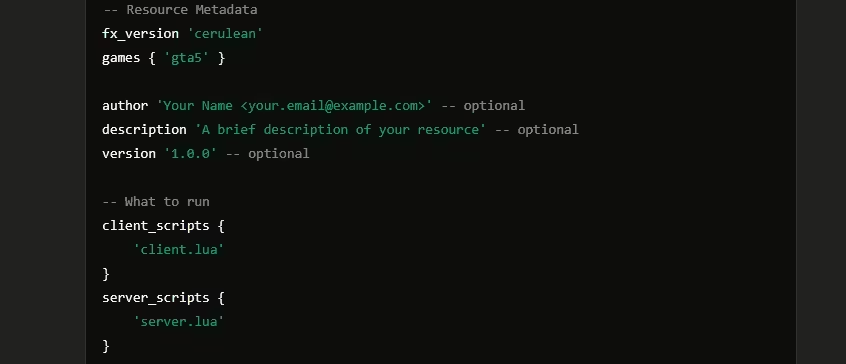
Before diving into the setup, let’s understand the basic structure of an fxmanifest.lua file. Below is a typical example:
Breakdown of the Sections
- Resource Metadata: This section defines the basic information about your resource, such as the FX version and supported games.
- Scripts: Specifies which scripts should run on the client or server.
- Additional Data: Optional section for specifying additional files or data files.
Let’s explore each component in detail.
Step-by-Step Guide to Setting Up fxmanifest.lua
Follow these steps to create an fxmanifest.lua file for your FiveM resource:
Step 1: Define the FX Version
The first line of your fxmanifest.lua should define the FX version. This is required and specifies which version of the FiveM framework your resource is targeting. Currently, the most common versions are:
- bodacious
- cerulean
- adamant
Use the following line to define your FX version:
Step 2: Specify the Supported Games
The games section specifies which games your resource supports. Typically, this will be:
- gta5 for Grand Theft Auto V
- rdr3 for Red Dead Redemption 2
You can specify multiple games if needed:
Step 3: Add Resource Metadata (Optional)
Although optional, adding metadata like the author, description, and version is a good practice as it helps other developers understand what your resource is about. Here’s how you can add metadata:
Step 4: Set Up the Scripts
Client Scripts
Define the scripts that should run on the client’s side. Use client_scripts to list these:
Server Scripts
Define the scripts that should run on the server side. Use server_scripts to list these:
Step 5: Add Files to the Resource
If your resource includes additional files such as images, data files, or audio files, specify them using the files section:
Step 6: Use Data Files
Certain resources require data files for loading map assets, animations, or other custom data. Use the data_file directive to specify these:
Step 7: Specify Additional Metadata (Optional)
You can add custom metadata fields to store extra information about your resource. These fields can be named arbitrarily, and you can add as many as you like:
Special Cases and Additional Options
Setting Up Maps in fxmanifest.lua
For maps, it’s essential to specify that the resource is indeed a map. Use the this_is_a_map directive:
Using Multiple Game Versions
If your resource needs to support multiple games (e.g., GTA V and Red Dead Redemption 2), specify them in the games section:
Setting Dependencies
If your resource depends on other resources, you can specify these dependencies using the dependencies field:
Complete Example of fxmanifest.lua
Here is a complete example of an fxmanifest.lua file that includes all the aspects we discussed:
Troubleshooting Common Issues
Issue 1: Resource Not Loading
- Check the FX Version: Make sure the
fx_versionis specified correctly and matches a valid version. - Ensure Proper File Paths: Double-check that all paths in the
client_scripts,server_scripts, andfilessections are accurate.
Issue 2: Custom Data Not Working
- Ensure Correct Syntax: Verify that custom metadata fields and data files are set up using the correct syntax. For example, make sure you are using curly braces
{}where necessary.
Issue 3: Map Not Loading
- Set
this_is_a_mapProperly: Make sure you have includedthis_is_a_map 'yes'in yourfxmanifest.lua. - Use Correct Data Files: If you are loading custom map assets, ensure that the
data_filedirectives are set up accurately.
FAQ
Q: What must fxmanifest.lua include?
A: fx_version, game, your client/server/shared scripts, and files you stream.
Q: What’s client vs server vs shared?
A: Client runs on players, server runs on the host, shared loads on both.
Q: How do I declare dependencies?
A: Use dependency ‘name’ or dependencies {‘a’,’b’} and ensure order in server.cfg.
Q: How do I stream assets?
A: Put assets in /stream and list files as required by the resource type.
Q: Why add lua54 ‘yes’?
A: Enables Lua 5.4 features and performance improvements.
Q: Common manifest errors?
A: Wrong paths/names, missing commas, invalid fx_version, or incorrect folder name.
Q: How to export/import functions?
A: Use exports/server_exports in the manifest and call via exports[‘resourcename’]:function().
Q: What about maps/MLOs?
A: Use this_is_a_map ‘yes’ and declare data_file entries for YTYPs if needed.
Conclusion
Setting up fxmanifest.lua is a straightforward yet crucial step in creating and running resources for a FiveM server. By following the structure and recommendations outlined in this guide, you can ensure that your resources are well-organized, flexible, and compatible with the latest FiveM updates. Make sure to test your setup after making changes and double-check for any errors to keep everything running smoothly.
With the tips and examples provided, you should now be equipped to create or convert an fxmanifest.lua file for any FiveM resource with ease.
Mantente al Día
Recibe los últimos tutoriales de FiveM, lanzamientos de mods y actualizaciones exclusivas en tu correo.
Sin spam. Cancela cuando quieras.