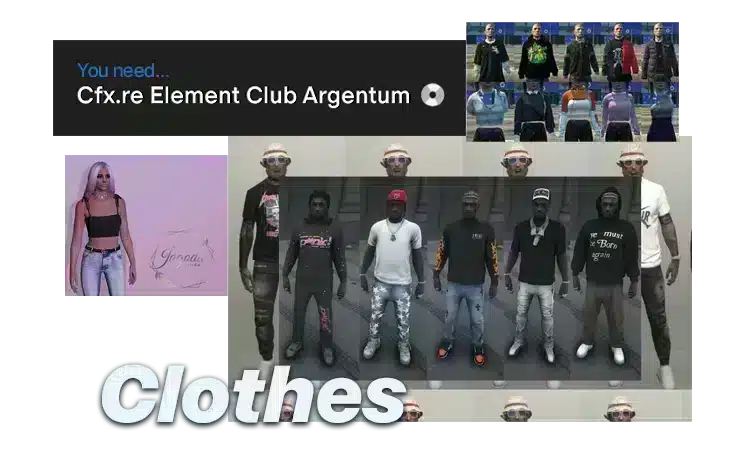
How to Stream Custom Clothing in FiveM
Custom Clothing Best Must‑Have Guide for FiveM Servers
Custom clothing is more than just a visual upgrade; it is the heartbeat of a thriving FiveM community. Whether you’re looking to deepen immersion, boost daily active users, or create a revenue stream, the right apparel can transform the player experience. This guide takes you through everything you need to know to bring high‑quality outfits to your FiveM server: from acquiring the proper license and organizing folders, to optimizing performance for hundreds of concurrent players, troubleshooting common hiccups, and even teaching you how to craft your own garments.
This guide is part of our complete FiveM content creation guide, covering everything from MLO design to scripting, vehicle modding, and building your creator brand.
Why Streaming Custom Clothing Matters
– Player Engagement: Fresh looks give users a reason to return each day.
– Role‑Play Depth: Uniforms and themed attire create authentic scenarios and lore.
– Monetization: Premium packs can be sold through subscriptions or in‑game stores.
– Server Identity: A unique wardrobe reinforces your server’s branding.
In 2026, over 30 000 FiveM servers are active and collectively serve more than 3 million players each month. Custom clothing remains the most popular mod category, with a staggering 68 % of servers adding new outfits seeing measurable lifts in daily active users.
—
1. Prerequisites Checklist
| Item | Description |
|——|————-|
| FiveM Server | Latest stable build (1.3.0+ recommended). |
| Patreon Licence | Argentum tier or higher; know how to add a key. |
| File Management Skills | Ability to unzip archives, edit text files, and navigate Windows or Linux. |
| Text Editor | VS Code, Notepad++, or Sublime Text. |
| Optional – Git | For version control of custom packs. |
—
2. Understanding Custom Clothing
2.1 What Is Custom Clothing?
Custom clothing packs in FiveM consist of `.ytd` (texture) and `.ytyp` (model) files that replace or extend the vanilla GTA V wardrobe. Unlike the limited default options, these packs can introduce thousands of outfits, dynamic textures, and brand‑new clothing lines.
2.2 Why It Matters
| Benefit | How It Helps |
|———|————–|
| Player Retention | Fresh outfits keep players logged in daily. |
| Role‑Play Depth | Uniforms and themed apparel create believable worlds. |
| Monetization | Premium packs can be sold via subscriptions or stores. |
| Community Identity | Unique clothing reinforces server lore and branding. |
2.3 Legal & Licensing Basics
FiveM’s Patreon licence requires a valid key stored in `server.cfg` or as an environment variable, strict adherence to the FiveM Terms of Service (no unlicensed copyrighted content), and a documented ledger of paid packs. Non‑compliance can lead to bans or legal action.
—
3. Preparing Your Server Environment
3.1 Minimum Hardware Requirements
– RAM: 4 GB (8 GB recommended for servers >200 players).
– CPU: Dual‑core 2.5 GHz or better.
– Storage: SSD for fast asset streaming.
– Network: 10 Mbps upload for 200 players (~1 Mbps per 20 players).
3.2 FiveM Version Compatibility
Always use the latest stable release unless you have a very specific downgrade requirement. Older builds may lack new streaming APIs and can trigger load errors.
3.3 Adding a Patreon Key
1. Create a CFX portal account and purchase your desired tier.
2. Open `server.cfg` and add:
“`lua
# Patreon key
set sv_patreon YOUR_PATREON_KEY
“`
3. Save and restart the server.
3.4 Organizing the File System
Keep a clean `resources` directory. Each pack should live in its own clearly named folder.
“`
server/
├─ resources/
│ ├─ admin_staff_vests/
│ ├─ backpack_collection/
│ └─ be_eazy_clothing_pack_v5/
├─ server.cfg
“`
—
4. Sourcing Clothing Packs
4.1 Paid Resources
| Pack | Price | Link |
|——|——-|——|
| Admin Staff Vests | $9.99 | View |
| Backpack Collection | $9.99 | View |
| Be Eazy Clothing Pack V5 | $24.00 | View |
Paid packs usually offer full documentation, support, and higher quality textures.
4.2 Free Resources
– Cyberpunk Glasses – 3‑pack set
– Benny’s Workwear Set – 2‑pack set
– Bandana with Physic – 1‑pack set
Always verify the license; some free packs require attribution.
4.3 Quality Assessment Checklist
1. Texture size < 2 MB each.
2. Consistent naming (e.g., `helmet_01.ytd`).
3. Complete `.ytyp` files with model IDs.
4. Documentation of `.meta` files if needed.
5. Clear license statement.
4.4 Managing Multiple Packs
Track each pack in a spreadsheet: name, source, license type, release date, expiry. Use Git for version control.
—
5. Installing and Configuring Clothing Packs
5.1 Folder Structure & Naming
1. Unzip the pack into a temporary folder.
2. Rename the folder to a lowercase, underscore‑separated name (e.g., `admin_staff_vests`).
3. Copy the entire folder into `resources/`.
5.2 Resource Manifest Basics
If the pack lacks a manifest, create a new `fxmanifest.lua`:
“`lua
fx_version ‘cerulean’
games { ‘gta5’ }
author ‘Your Name’
description ‘Custom Clothing Pack’
version ‘1.0.0’
files {
‘data/.ytyp’,
‘data/.ytd’,
‘data/.meta’,
}
data_file ‘DLC_Clothing_Keys’ ‘data/clothes.meta’
“`
Adjust paths to match the pack’s structure.
5.3 Server Config Integration
Add an `ensure` line for each pack in `server.cfg`:
“`lua
ensure admin_staff_vests
ensure backpack_collection
ensure be_eazy_clothing_pack_v5
“`
5.4 Resolving Cross‑Resource Conflicts
If multiple packs share a `clothes.meta`, keep only one copy to avoid collisions. For overlapping model IDs, rename one set or use a custom script to resolve conflicts.
5.5 Optional Scripts for Menu Integration
Expose new outfits in an ESX menu with a Lua callback:
“`lua
ESX.RegisterServerCallback(‘custom:wear’, function(source, cb)
local xPlayer = ESX.GetPlayerFromId(source)
local outfits = {
{name=’Police Uniform’, model=’police_uniform’, price=1000}
}
cb(outfits)
end)
“`
Adapt the script to fit your framework.
—
6. Testing & Validation
6.1 In‑Game Workflow
1. Launch FiveM and join your server.
2. Open the character menu (default `F4`).
3. Navigate to the Clothing tab and scroll through the list. Verify that each new item appears and renders correctly.
6.2 Asset Integrity
Use the FiveM Asset Manager in `resources/asset_manager` to scan for missing or corrupted files.
6.3 Server Log Monitoring
Look for messages during startup:
“`
Loaded resource admin_staff_vests
Loaded resource backpack_collection
[ERROR] Resource be_eazy_clothing_pack_v5 failed to load: missing ytyp file
“`
Resolve all errors before proceeding.
—
7. Performance & Optimization
7.1 Streaming vs. Preloading
– Streaming – Assets load when a player is within a 200‑meter radius.
– Preloading – All assets load at server start, raising RAM usage.
Recent packs use streaming; include the streaming flag in your `fxmanifest.lua` if not present:
“`lua
client_scripts {
‘client.lua’,
}
“`
7.2 Texture Size & Compression
High‑resolution textures can spike draw‑call count. Optimize by:
1. Lowering resolution to 1024 × 1024 or below.
2. Using PNG8 compression.
3. Removing unused mip‑maps.
7.3 Resource Load Order
Load high‑priority packs first in `server.cfg`. Load shared `clothes.meta` files before dependent packs.
7.4 Monitoring Resources
Use `htop` (Linux) or Task Manager (Windows) to track memory usage. FiveM’s status console (`/status`) displays RAM usage.
7.5 Profiling Tools
– FiveM Profiler – Visualize frame time.
– GTAV Tools – Inspect textures.
– Custom debug.lua scripts – Log load times.
—
8. Troubleshooting Common Issues
| Symptom | Likely Cause | Fix |
|——–|————–|—–|
| Missing Textures | `.ytd` files misplaced or typos in `.ytyp` | Ensure `.ytd` files are in the same folder; verify names in `clothes.meta`. |
| Duplicate Model IDs | Two packs use the same hash | Rename the hash in `clothes.meta` and update the `.ytyp` file. |
| Licensing Errors | Expired or missing Patreon key | Double‑check the key in `server.cfg`; confirm subscription status. |
| Conflicting Pack Names | Two resources share folder names | Rename one folder and update the `ensure` line. |
| Server Crashes | Missing `fxmanifest.lua` or corrupted files | Ensure a valid `fxmanifest.lua` exists; re‑zip the pack if necessary. |
Step‑by‑Step Fix Example
“`
ensure admin_staff_vests
[ERROR] Resource admin_staff_vests failed to load: missing ytyp file
Fix: Move the correct ytyp file into the folder and restart
restart admin_staff_vests
“`
—
9. Advanced Customisation
9.1 Creating Your Own Pack
1. Modeling: Use Blender or 3ds Max to design the garment.
2. Exporting: Export as `.ytyp` through the GTA V Mod Exporter.
3. Texturing: Paint in Substance Painter or Photoshop.
4. Packaging: Bundle `fxmanifest.lua`, `data/.ytd`, `data/.ytyp`, and `data/clothes.meta`.
5. Uploading: Place the folder in `resources/` and add an `ensure` line in `server.cfg`.
9.2 Scripting with FiveM’s Clothing API
Dynamic outfit changes can be scripted with `SetPedComponentVariation` and `SetPedPropIndex`:
“`lua
function setUniform(player, uniform)
SetPedComponentVariation(GetPlayerPed(player), 3, uniform.body, 0, 2)
end
“`
Link the function to chat commands or menu items for a seamless experience.
—
Conclusion
Streaming custom clothing opens a world of creative possibilities for any FiveM server. By following this Custom Clothing Best Must‑Have Guide*, you’ll ensure your outfits load smoothly, stay fully compliant, perform optimally, and keep your community engaged. Now that you’re equipped to drop new outfits each week and watch your player base grow, it’s time to dive in, tweak your packs, and let the fashion run through the streets of Los Santos with unparalleled realism.
Mantente al Día
Recibe los últimos tutoriales de FiveM, lanzamientos de mods y actualizaciones exclusivas en tu correo.
Sin spam. Cancela cuando quieras.