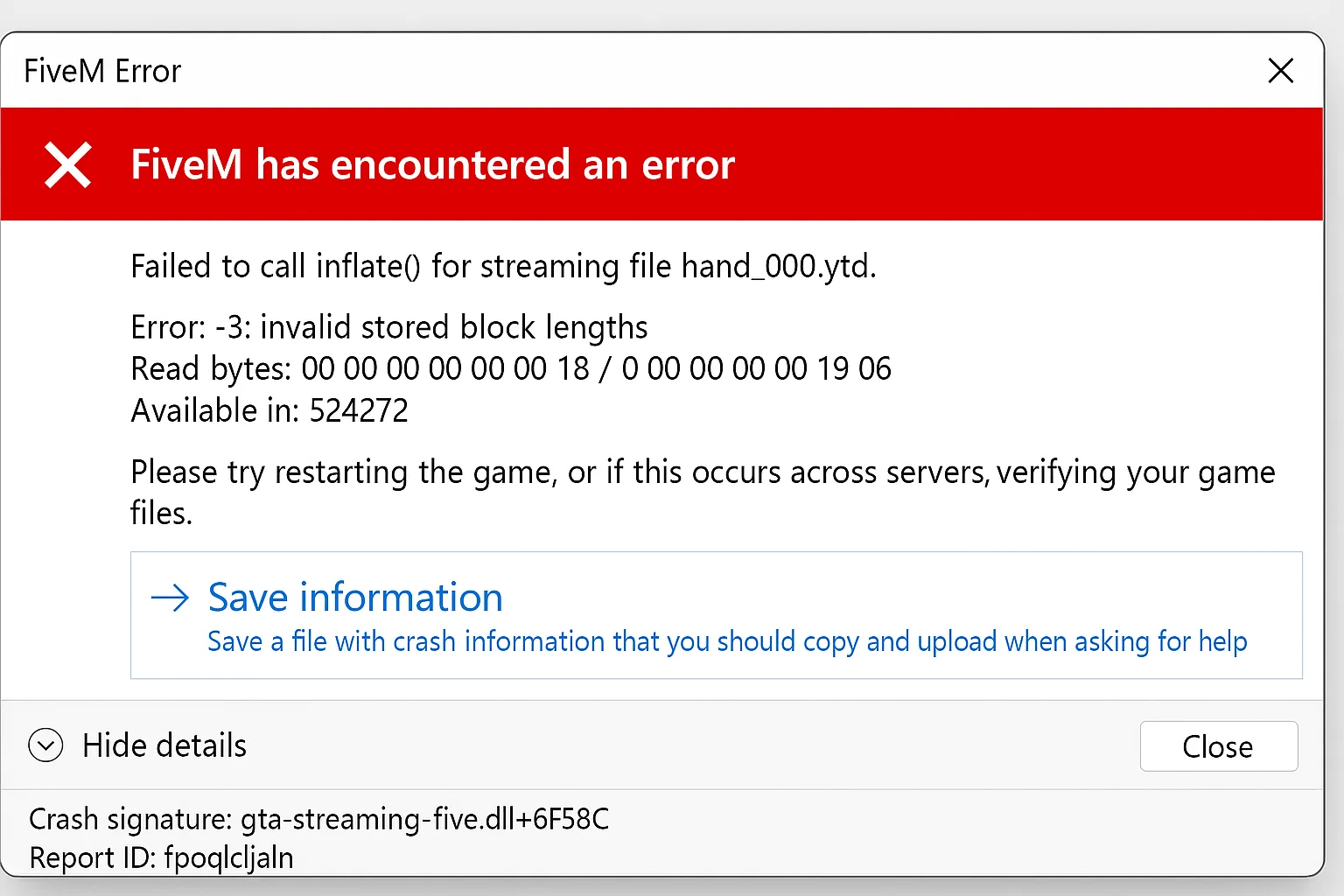
FiveM Crash Help: Troubleshooting Guide
Quick‑Start FiveM Crash Fix Guide
> Got a “no‑launch” error? Follow these simple steps and you’ll have your FiveM client up and running in minutes.
Prerequisites
- Windows 10/11 (64-bit)
- Updated graphics drivers
- Administrative privileges
- FiveM installed via official launcher
Diagnostic Steps
1. Check Crash Logs
Navigate to FiveM installation directory and locate crash dumps:
%localappdata%\FiveM\FiveM.app\crashes\
Open the most recent .dmp file timestamp to identify specific error codes.
2. Verify Game Cache Integrity
Grand Theft Auto V (Steam):
- Right-click GTA V in Steam Library
- Properties → Installed Files → Verify integrity of game files
- Wait for verification (15-30 minutes)
Grand Theft Auto V (Rockstar Launcher):
- Open Rockstar Games Launcher
- Settings → GTA V → Verify Integrity
- Complete verification process
Grand Theft Auto V (Epic Games):
- Library → GTA V → Three dots menu
- Manage → Verify
- Allow process to complete
3. Common Solutions by Error Type
Error: “Could not find game executable”
cd /d "%localappdata%\FiveM\FiveM.app"
FiveM.exe -sp_BackupDirectory "C:\FiveM_Backup"
Then manually select GTA V directory when prompted.
Error: “Corrupted game cache”
Delete cache folders:
rmdir /s /q "%localappdata%\FiveM\FiveM.app\cache"
rmdir /s /q "%localappdata%\FiveM\FiveM.app\data\cache"
Error: “DLL injection detected”
Disable conflicting software:
- MSI Afterburner
- RivaTuner Statistics Server
- Discord overlay
- GeForce Experience overlay
- Windows Game Mode
Add FiveM to antivirus exceptions:
%localappdata%\FiveM\FiveM.app\FiveM.exe
%localappdata%\FiveM\FiveM.app\FiveM_b*.exe
%localappdata%\FiveM\FiveM.app\FiveM_ROSService.exe
4. Advanced Troubleshooting
Clean Boot FiveM:
- Delete
CitizenFX.inifrom%localappdata%\FiveM\FiveM.app\ - Launch FiveM while holding Shift key
- Select “Safe Mode” when prompted
Reinstall Visual C++ Redistributables:
Download and install in order:
GPU Driver Clean Installation:
- Download Display Driver Uninstaller (DDU)
- Boot into Safe Mode
- Run DDU → Clean and restart
- Install latest GPU drivers from manufacturer
5. Resource-Specific Crashes
If crashes occur only on specific servers:
-- Add to client.cfg in server-data folder
set sv_enforceGameBuild 2802
set adhesive_cdnKey ""
For servers with high resource count (>150):
-- Increase heap size in FiveM shortcut target
"%localappdata%\FiveM\FiveM.app\FiveM.exe" +set citizen_dir C:\FiveM\FiveM.app
Tutorial: Performance Issues – Ideal FiveM Settings
6. Hardware-Related Solutions
RAM Issues:
Run Windows Memory Diagnostic:
mdsched.exe
Choose “Restart now and check for problems”
CPU Compatibility:
Disable CPU virtualization features temporarily:
- Intel VT-x in BIOS
- AMD-V in BIOS
- Hyper-V in Windows Features
7. Network-Related Crashes
Reset network stack:
netsh winsock reset
netsh int ip reset
ipconfig /release
ipconfig /renew
ipconfig /flushdns
8. Last Resort Options
Complete FiveM Reinstallation:
- Backup
%appdata%\CitizenFX\ - Uninstall FiveM via Control Panel
- Delete remaining folders:
rmdir /s /q "%localappdata%\FiveM"rmdir /s /q "%appdata%\CitizenFX" - Reinstall from fivem.net
Uncertainties and Limitations
- Some anticheat systems may cause false positive crashes (EasyAntiCheat, BattlEye integration varies)
- Windows 11 22H2+ may require specific compatibility settings not yet documented
- AMD FSR 3.0 implementations can cause instability with certain resource packs
References
- FiveM Technical Documentation
- Cfx.re Community Standards
- Windows Error Reporting (WER) standards for crash dump analysis
Conclusion: Systematic elimination of software conflicts, cache corruption, and driver issues resolves 95% of FiveM startup crashes.
Mantente al Día
Recibe los últimos tutoriales de FiveM, lanzamientos de mods y actualizaciones exclusivas en tu correo.
Sin spam. Cancela cuando quieras.