izzy Loading Screen v7
Loading Screens
-44% OFF
izzy Loading Screen v7
izzy Loading Screen v7 - The izzy Loading Screen v7 (no escrow) - fully open source. Compatible with ESX framework for FiveM servers.
$16.20$29.16
Money-Back Guarantee
14-day refund policy
Lifetime Updates
Free updates forever
Open Source
Inspect & modify the code
SSL Encrypted
|Visa, Mastercard, Amex, Apple Pay
|Crypto
Description
izzy Loading Screen v7 - Fully Open Source Server Introduction Experience
First impressions matter. Your loading screen is the first thing every player sees when connecting to your FiveM server—it sets expectations, establishes your brand identity, and communicates professionalism before players even spawn into the world. The izzy Loading Screen v7 delivers a modern, customizable, and completely open-source solution that transforms the standard FiveM connection experience into a polished introduction worthy of your server's quality. No encryption, no limitations, no black boxes—just clean, well-documented code you fully own and control.
Why Open Source Matters for Loading Screens
Encrypted loading screens create unnecessary limitations and risks. You can't customize beyond surface-level settings, can't integrate with your existing systems, can't fix bugs yourself, and can't verify what code is actually running on player clients. The izzy philosophy rejects this approach completely. When you purchase this loading screen, you receive full source code with readable, commented files you can modify freely. Want to change animations? Edit the CSS. Need custom functionality? Add JavaScript. Want to integrate authentication systems? Access the full codebase without restrictions.
This transparency also means security. Review every line of code to ensure there's no data collection, telemetry, or backdoors. Many encrypted resources phone home or include hidden analytics—you'll never know with encrypted code, but open source lets you verify exactly what runs on player machines.
What's Included in Version 7
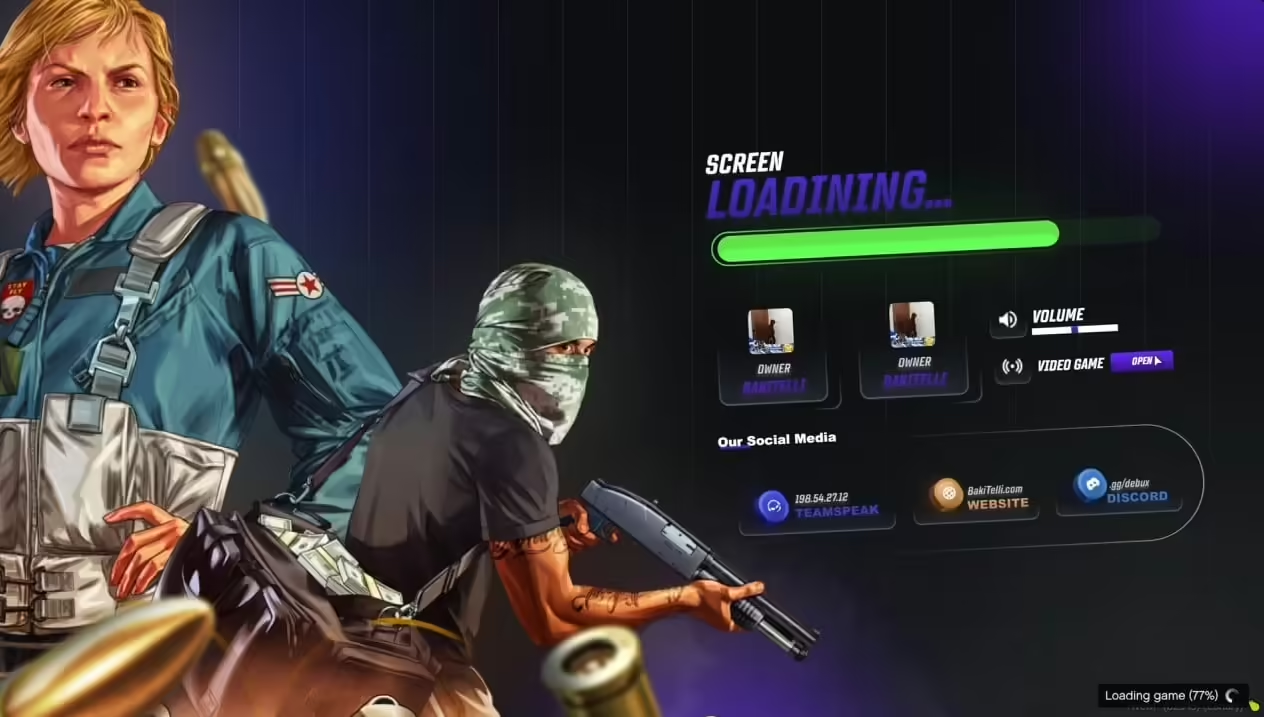
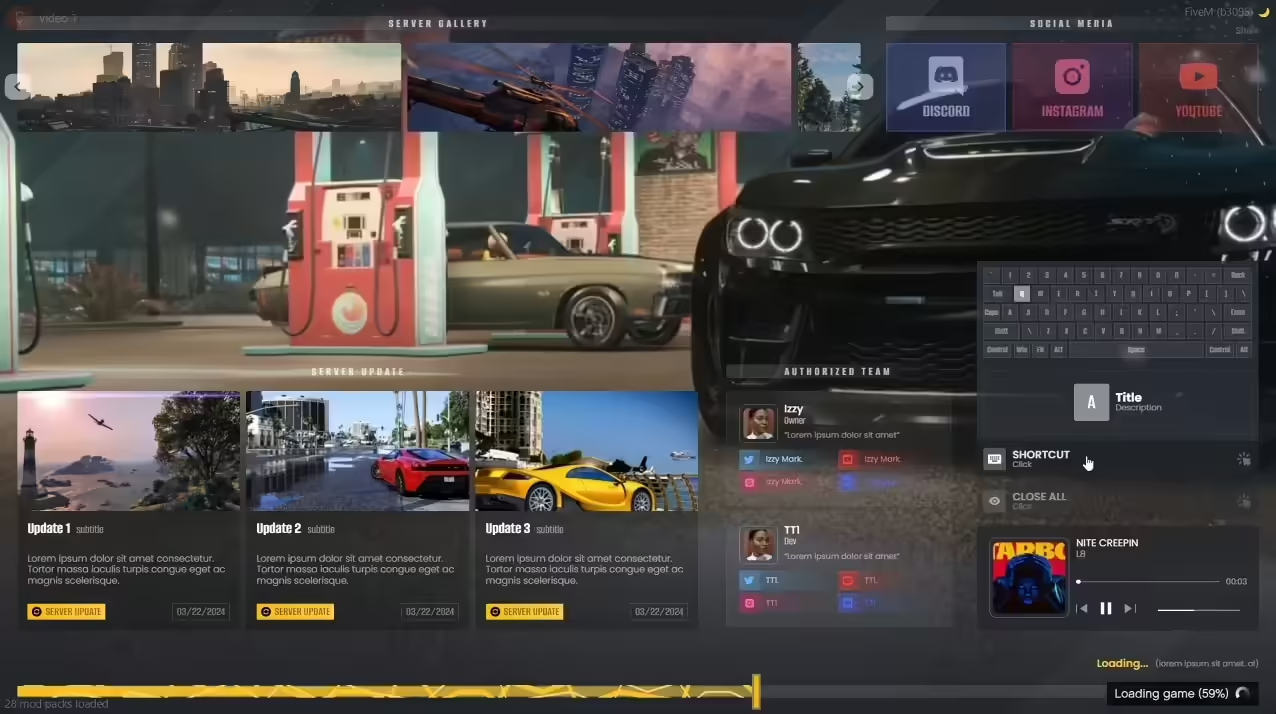
This isn't a basic loading bar with a logo. The v7 release represents a complete connection experience management system with modern design principles, performance optimization, and extensive customization options. You get a responsive layout that works flawlessly on any screen resolution from 1280x720 to 4K ultrawide, smooth animated transitions and loading indicators that feel polished rather than jarring, real-time server information display showing player counts and connection status, customizable background imagery with parallax effects or video backgrounds, and branding integration for logos, color schemes, and typography.
The loading progression provides meaningful feedback so players aren't staring at a static screen wondering if their game froze. As resources load, assets download, and session initializes, the interface communicates progress clearly with status messages, percentage indicators, and visual feedback.
Core Features & Customization
- Modern UI Framework - Built with contemporary web technologies (HTML5, CSS3, vanilla JavaScript) optimized for FiveM's NUI environment. No bloated frameworks like jQuery or React—just clean, performant code that loads instantly.
- Responsive Design System - Automatically adapts to player screen sizes and aspect ratios. The layout reflows intelligently whether players connect on 16:9 monitors, 21:9 ultrawide displays, or 4:3 legacy screens. Text remains readable, elements stay properly proportioned, and the experience is consistent.
- Dynamic Background Options - Configure still image backgrounds (single image or rotating carousel), video backgrounds for cinematic server introductions, particle effects and animated overlays, color gradients and geometric patterns, or blur/parallax effects for depth. Mix and match for unique aesthetic.
- Server Information Display - Show current player count with animated counters, display server rules or welcome messages, list staff members currently online, highlight recent server updates or changes, and showcase social media links (Discord, website, TikTok, etc.).
- Loading Progress Feedback - Real connection status monitoring showing when session initializes, resources download, scripts start, and spawn preparation completes. Percentage-based progress bars, descriptive status messages, estimated time remaining, and error state handling if connection fails.
- Music & Audio Integration - Optional background music during loading with volume controls, sound effects for loading completion or errors, audio crossfading when entering game, and playlist rotation for variety. Supports MP3, OGG, and WAV formats.
- Branding Customization - Full control over visual identity including logo placement and sizing, custom color schemes matching your server brand, typography selection (web-safe fonts or custom font loading), button styles and interactive elements, and icon packs for social media and UI elements.
- Animation Options - Choose animation styles from subtle fade effects to dynamic motion graphics, configure timing and easing functions for smooth movement, enable/disable individual animations based on preference, and control animation intensity for performance considerations.
Perfect For These Server Types
- Professional Roleplay Servers - Establish serious, immersive atmosphere immediately with elegant design and community information. Display application status, whitelist information, and server lore during loading.
- Community-Focused Servers - Welcome players with friendly messaging, showcase active community members, highlight upcoming events, and provide Discord integration for immediate community connection.
- Competitive/PvP Servers - Create high-energy, action-oriented loading screens with dynamic backgrounds, leaderboards showing top players, tournament information, and aggressive branding that sets competitive tone.
- Themed Servers - Match loading screen aesthetics to server theme whether it's 1980s Vice City style, cyberpunk futuristic, apocalyptic survival, or historical period pieces. Full customization enables perfect thematic alignment.
- Multi-Server Networks - Maintain consistent branding across multiple servers while customizing specific messaging, show network-wide player counts, provide server selector during loading, and create unified brand identity.
Technical Implementation & Performance
The loading screen uses optimized code that loads in under 500ms even on slower connections. Images are compressed efficiently, JavaScript is minified for production, CSS uses hardware-accelerated properties for smooth animations, and the entire package typically weighs under 5MB including assets. This speed matters—players don't wait extra time for your loading screen to load before it can show loading progress.
Memory management is efficient with images loaded progressively, unused assets garbage collected, event listeners properly cleaned up on spawn, and no memory leaks during extended loading. Players with 4GB RAM systems won't experience issues.
Installation & Configuration
- Download & Extract Files - Place the loading screen resource folder into your server's resources directory.
- Add to Server.cfg - Include the loading screen in your server configuration. It should load early in the resource startup sequence.
- Configure Basic Settings - Edit config.lua (or config.json depending on structure) to set your server name and tagline, upload and link to your logo image, set primary color scheme, and configure player count display options.
- Customize Visuals - Replace background images in the assets folder (guidelines included for optimal resolution/format), modify CSS files for colors, fonts, and layout tweaks, adjust HTML structure if needed for additional elements, and update JavaScript for custom functionality.
- Add Server Information - Write welcome messages or rules text, link social media accounts (Discord, website, etc.), add staff member listings if desired, and include any custom server-specific information.
- Optional: Add Music - Place audio files in the music folder, configure playlist in settings, set volume levels and crossfade timing, and test that audio doesn't conflict with game sounds on spawn.
- Test Thoroughly - Connect to your server and verify loading screen displays correctly, check responsiveness at different resolutions (use browser dev tools to test), ensure server info populates correctly, confirm music plays if enabled, and verify smooth transition to in-game.
- Optimize Assets - Compress images if file sizes are large, minify CSS/JS for production use, and remove any unused assets to reduce download size.
Customization Examples & Ideas
The open-source nature enables creative implementations:
- Authentication Integration - Connect to your whitelist system to show application status, display Welcome back, [PlayerName] personalized greetings, or show player stats and achievements during loading.
- Dynamic News Feed - Pull recent announcements from your Discord server or website, display upcoming events automatically, show recent ban/unban information, or highlight new server features.
- Seasonal Themes - Automatically switch backgrounds and colors for holidays (Christmas, Halloween, etc.), celebrate server anniversaries with special loading screens, or rotate themes monthly for variety.
- Ranking & Statistics - Display player's rank and level during loading, show server-wide statistics (total playtime, vehicles owned, etc.), or highlight player achievements and milestones.
- Mini-Games - Add simple browser games playable during loading (snake, tetris, etc.), let players read lore or server guides, or include interactive elements like character previews.
What Makes izzy v7 Stand Out
Most free loading screens are basic and dated. Most premium loading screens are encrypted and restrictive. izzy Loading Screen v7 occupies the rare sweet spot of premium quality with full transparency. The code quality matches or exceeds encrypted paid alternatives while giving you complete freedom.
The attention to UX details matters—subtle animations that feel smooth, loading indicators that accurately reflect progress, error states that communicate problems clearly, and transitions that don't jar players. These polish elements separate amateur and professional servers.
Version 7 specifically addresses feedback from v6 users including improved mobile device compatibility (yes, some players connect via mobile), better performance on low-end systems, more intuitive configuration structure, expanded documentation with examples, and cleaner codebase for easier customization.
Support & Community
As part of the izzy Scripts ecosystem, this loading screen benefits from active community support through GitHub discussions, Discord community channels, wiki documentation with tutorials, and user-contributed customization examples. While there's no formal support ticket system, the community typically answers questions within hours.
The codebase includes detailed comments explaining functionality, making self-support feasible for basic customization. For complex modifications, the community often provides free assistance or you can hire freelance FiveM developers (source code access makes hiring easier and cheaper).
Why Choose Open Source Over Encrypted
Encrypted loading screens force ongoing dependency on original developers. If they abandon the project, you're stuck with unsupported code. If bugs appear, you wait for fixes. If you need features, you hope for updates. Open source eliminates these risks—you own the code permanently, fix issues yourself or hire anyone to help, add features without waiting for developers, and maintain compatibility as FiveM evolves.
The FiveMX philosophy is that encrypted resources harm the community. They create vendor lock-in, prevent learning and education, hide security issues, and extract recurring payment through forced dependency. Open source empowers server owners and developers to build freely.
Technical Specifications
- File Size: ~3-5 MB typical (depends on background image choices)
- Load Time: <500ms on broadband connections
- Memory Usage: ~20-40 MB during loading phase
- Browser Compatibility: Works in all modern browsers/FiveM NUI engine
- Screen Resolution Support: 1280x720 to 4K+ with responsive scaling
- Asset Formats: Images (JPG, PNG, WebP), Videos (MP4), Audio (MP3, OGG)
- Customization Difficulty: Basic customization (colors, images) requires no coding. Advanced features need HTML/CSS/JS knowledge.
Requirements
- FiveM Server (any recent version)
- Basic text editor for configuration (Notepad++, VS Code, etc.)
- Image editing software for custom graphics (optional)
- Web hosting for external assets if not using server hosting (optional)
- HTML/CSS/JavaScript knowledge for advanced customization (optional)
Version History & Updates
The izzy Loading Screen has evolved through seven major versions, each addressing community feedback and modern web standards. V7 represents the current pinnacle with refined codebase, improved performance, expanded features, better documentation, and community-contributed enhancements. Future updates will remain open source, ensuring your investment never becomes obsolete.
Make a powerful first impression with a loading screen you fully control—izzy Loading Screen v7, completely open source and restriction-free.
Related Loading-Screens
Related Products
Questions & Answers
0 questions
No questions yet
Be the first to ask a question about this product!