Yoda Tasks – Task UI System – Free FiveM Job Scripts | Fi…
Free
Yoda Tasks – Task UI System – Free FiveM Job Scripts | Fi…
Description
Yoda Tasks – Modern Task UI System for FiveM
Transform Your Job Scripts with a Sleek Task Interface
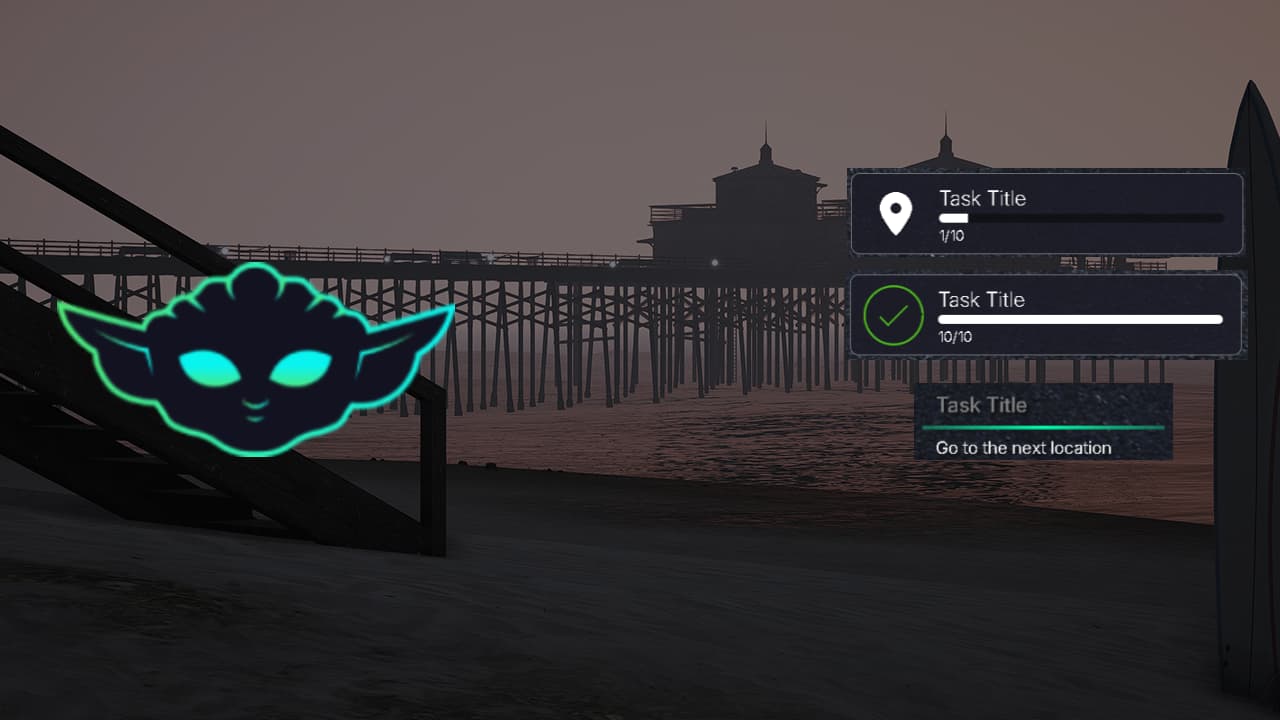
Give your FiveM job systems a professional, modern interface that players will actually enjoy using. Yoda Tasks is a free, standalone task UI system that makes managing jobs, objectives, and missions more intuitive and visually appealing. Whether you’re running delivery jobs, collection tasks, or multi-step missions, this script provides a clean, organized way to display progress and objectives.
Unlike cluttered, text-heavy interfaces that overwhelm players, Yoda Tasks uses a minimal design philosophy. Players see exactly what they need – current task, progress, and next steps – without distracting elements. The smooth animations and responsive design make it feel polished and professional, elevating your server’s overall quality.
What Makes Yoda Tasks Different?
This isn’t just another notification system. Yoda Tasks is specifically designed for job-based gameplay, providing persistent task tracking that stays visible while players work. The system supports both simple single-task displays and complex multi-objective missions, adapting to whatever your job scripts require.
The UI is built with customization in mind. Server owners can adjust colors to match their branding, modify positioning to fit their HUD layout, and configure display styles to suit different job types. Everything is controlled through a straightforward config file – no coding expertise required for basic customization.
Key Features
- Clean, Modern Interface – Minimalist design that doesn’t clutter the screen or distract from gameplay
- Fully Customizable Colors – Adjust gradient colors and borders to match your server theme
- Standalone Framework – Works with ESX, QBCore, QBOX, VRP, or any custom framework
- Simple Setup Process – Install in minutes with clear documentation
- Multiple Display Modes – Choose between simple (title/message) or detailed (title/task/amount/icon) views
- Progress Tracking – Visual progress indicators for collection and delivery tasks
- Smooth Animations – Polished transitions when tasks update or complete
- Icon Support – Display custom icons for different task types
- Performance Optimized – Lightweight UI with minimal resource usage (0.00-0.01ms)
- Responsive Design – Adapts to different screen resolutions and aspect ratios
- Easy Integration – Simple exports for triggering task displays from any script
- Active Development – Regular updates from Yoda Things development team
Perfect For
- Delivery job scripts (package delivery, food delivery, postal service)
- Collection tasks (garbage collection, farming, mining, fishing)
- Multi-step missions (heists, investigations, tutorial sequences)
- Crafting systems (showing required materials and progress)
- Achievement tracking (displaying objectives and completion status)
- Quest systems (RPG-style objective tracking)
- Any job that needs clear, persistent task display
Compatibility
Yoda Tasks is built as a standalone resource, meaning it works independently of specific frameworks. This universal compatibility is one of its biggest strengths:
- ✅ ESX – Fully compatible with all ESX versions and job scripts
- ✅ QBCore – Works seamlessly with QBCore framework and jobs
- ✅ QBOX – Supports QBOX implementations
- ✅ VRP – Compatible with VRP-based servers
- ✅ Custom Frameworks – Easy to integrate with any custom framework
- ✅ No Dependencies – Doesn’t require specific libraries or frameworks
Installation Guide
Step 1: Download the Resource
Click the download link below to get the latest version from GitHub. Extract the ZIP file to access the resource folder.
Step 2: Install to Your Server
Copy the yoda-tasks folder to your server’s resources directory (usually server-data/resources/). Make sure all files are present in the folder.
Step 3: Add to server.cfg
Open your server.cfg file and add this line:
ensure yoda-tasksStep 4: Configure Settings (Optional)
Open the config.lua file to customize colors, positioning, and display options. The default settings work great, but customization options include:
- Gradient color values (primary and secondary colors)
- Border color and thickness
- UI position on screen
- Animation speed and style
- Display mode (simple or detailed)
Step 5: Restart Your Server
Restart your FiveM server to load the new resource. You can verify it loaded by checking the server console for any errors.
Step 6: Integrate with Job Scripts
Use the provided exports to trigger task displays from your existing job scripts. Basic usage example:
exports['yoda-tasks']:ShowTask({
    title = "Delivery Job",
    task = "Deliver package to Vinewood",
    amount = "3/10",
    icon = "fa-box"
})
Integration Examples
Here’s how to integrate Yoda Tasks with common job types:
Delivery Jobs
-- Show delivery task
exports['yoda-tasks']:ShowTask({
    title = "Package Delivery",
    task = "Drop off at marked location",
    amount = deliveriesComplete .. "/" .. totalDeliveries,
    icon = "fa-truck"
})
Collection Tasks
-- Show garbage collection progress
exports['yoda-tasks']:ShowTask({
    title = "Garbage Collection",
    task = "Collect from marked bins",
    amount = binsCollected .. "/15",
    icon = "fa-trash"
})
Simple Message
-- Show simple task without progress
exports['yoda-tasks']:ShowTask({
    title = "Welcome",
    message = "Check your map for the next objective"
})
Common Issues & Solutions
Issue: UI not appearing on screen
Solution: Check F8 console for errors. Verify the resource is started (type ensure yoda-tasks in server console). Make sure you’re using the correct export syntax. Try restarting the resource with restart yoda-tasks.
Issue: Colors not changing after config edit
Solution: After editing config.lua, you must restart the resource completely. Use restart yoda-tasks in the server console. Clear your FiveM cache if changes still don’t appear.
Issue: UI position conflicts with other HUD elements
Solution: Adjust the position settings in config.lua. You can move the task UI to different corners or sides of the screen to avoid overlapping with other interfaces.
Issue: Icons not displaying
Solution: Yoda Tasks uses Font Awesome icons. Make sure you’re using valid Font Awesome 5 icon names (e.g., “fa-box”, “fa-truck”). Check the Font Awesome documentation for available icons.
Customization Tips
- Match Your Server Theme: Use your server’s brand colors in the gradient settings for a cohesive look
- Icon Library: Browse Font Awesome for hundreds of free icons to represent different task types
- Position Testing: Test different positions with various screen resolutions to ensure visibility
- Animation Speed: Adjust animation timing to match your server’s overall UI feel
- Contrast: Ensure text is readable against your chosen background colors
FAQ
Q: Does this work with my existing job scripts?
A: Yes! Yoda Tasks integrates with any job script using simple exports. You just need to add the export calls where you want tasks to display.
Q: Can I have multiple tasks showing simultaneously?
A: The current version shows one task at a time (the most recent). For multiple concurrent tasks, you’d need to modify the script or check for updates from Yoda Things.
Q: Is this script still being updated?
A: Yes, Yoda Things actively maintains their free resources on GitHub. Check the repository for the latest updates and new features.
Q: How do I hide/remove the task UI?
A: Use the hide export: exports['yoda-tasks']:HideTask() to remove the UI when tasks complete or are canceled.
Q: Does this work on all screen resolutions?
A: Yes, the responsive design adapts to different resolutions. Test on your target resolutions to ensure optimal placement.
Q: Can I use this commercially on my server?
A: Yes, this is a free resource available for use on any FiveM server, including commercial ones. Check the license in the GitHub repository for specific terms.
Get It Now
Ready to upgrade your job system UI? Download Yoda Tasks and give your players a modern, polished task tracking experience.
Related Resources
- Explore other Yoda Things free resources – notification systems, clipboards, and more
- Check out free FiveM job scripts that pair perfectly with task UI systems
- Browse our tutorials for guides on integrating UI systems with your scripts
Support Note: For issues, features requests, or questions, visit the Yoda Things GitHub repository or join their Discord community. The development team is active and responsive to community feedback.