Wheel Clamp Script – Immobilize Vehicles
Free
Wheel Clamp Script – Immobilize Vehicles
Description
Wheel Clamp Script – Free Download for FiveM
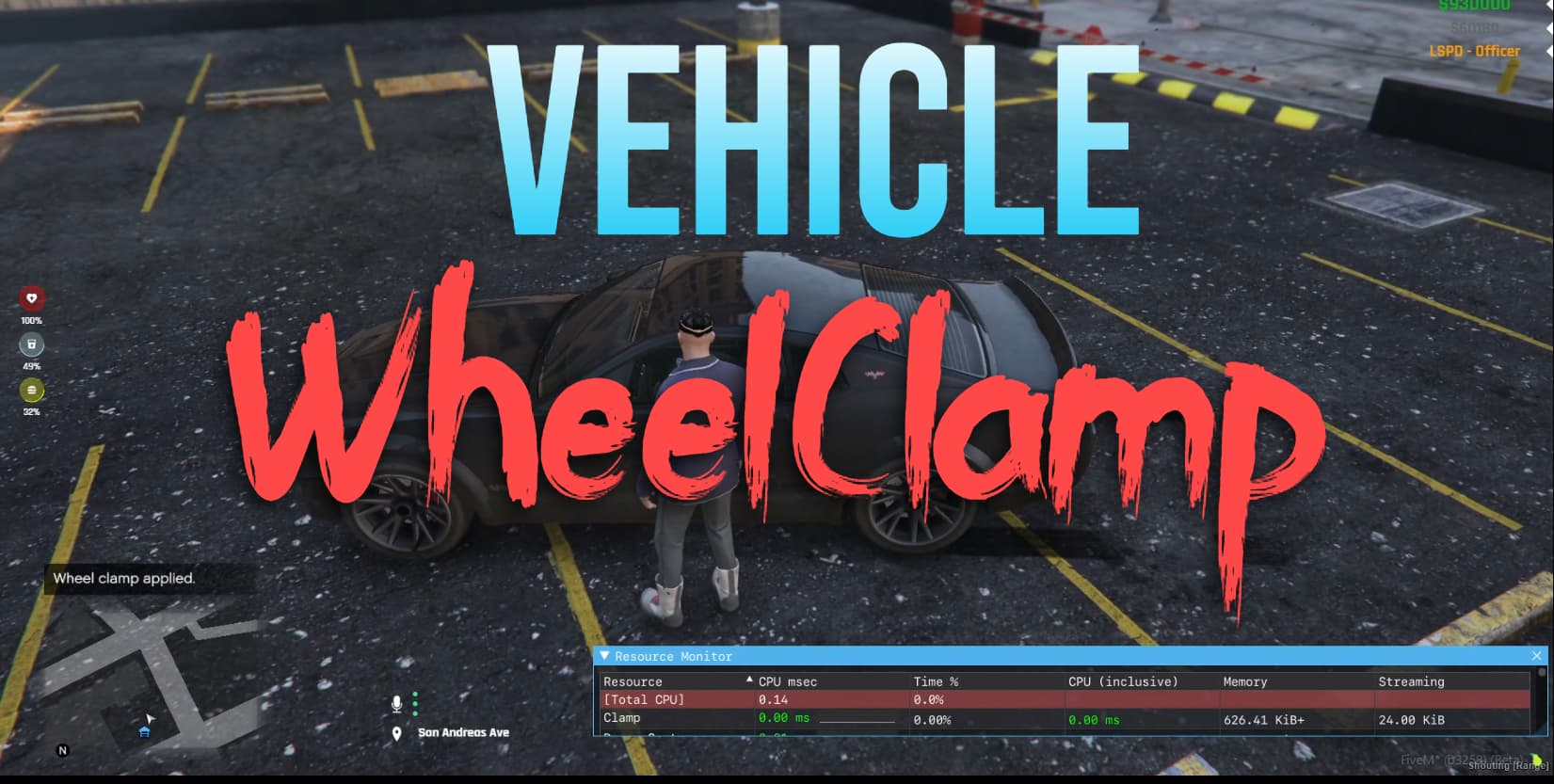
Want to add realistic vehicle immobilization to your FiveM roleplay server? The Wheel Clamp Script by PerfQ is a lightweight, free solution that brings authentic parking enforcement mechanics to your server. Perfect for law enforcement roleplay, this script allows police officers and other authorized jobs to apply and remove wheel clamps on vehicles, creating immersive scenarios for parking violations, vehicle seizures, and traffic enforcement.
This isn’t just another basic script – it’s a performance-optimized tool that runs at 0.00ms idle and only 0.15ms when players interact with clamped vehicles. With database persistence through oxmysql, clamps survive server restarts, ensuring your parking enforcement stays consistent even after maintenance.
What’s Included
The Wheel Clamp Script comes as a complete, ready-to-use resource with everything you need to get started. You’ll get the full Lua source code (client.lua, server.lua, and config.lua), a comprehensive configuration system, and database integration for persistent clamp tracking. The script includes visual feedback with the prop_spot_clamp model attached to vehicles, and it’s fully customizable to fit your server’s needs.
Key Features
- Job-Based Restrictions – Control who can apply or remove clamps based on ESX jobs (default: police). Only authorized personnel can manage vehicle immobilization, preventing abuse.
- Database Persistence – Clamps are saved to oxmysql database and persist through server restarts. No more lost clamp data when your server goes down for updates.
- Visual Feedback System – A realistic wheel clamp prop (prop_spot_clamp) attaches to the vehicle’s front-left wheel at precise coordinates, giving clear visual indication of immobilized vehicles.
- Command or Export Integration – Use built-in commands (/wheelclamp and /removewheelclamp) or integrate with police tablets/menus using the provided exports.
- Performance Optimized – Runs at 0.00ms when idle, only 0.15ms when players attempt to brake a clamped vehicle. Won’t impact your server performance.
- Inventory Item Support – Optional inventory integration lets you add wheel clamps as physical items. Works with ox_inventory and other systems.
- Framework Flexible – Supports ESX and Standalone modes. QBCore support is planned for future updates.
- Anti-Exploit Protection – Prevents vehicles from moving when clamped. Players attempting to drive will be stopped automatically.
- Configurable Everything – Enable/disable commands, set job requirements, toggle debug mode, and customize all aspects through config.lua.
- MIT Licensed – Open source with MIT license. Modify freely to match your server’s unique requirements.
Perfect For
- Serious roleplay servers with active law enforcement departments
- Parking enforcement and traffic control scenarios
- Vehicle seizure and impound mechanics
- Servers running ESX framework or standalone setups
- Communities wanting realistic vehicle immobilization without performance impact
- Server owners who need police tablets/menu integration
Framework Compatibility
- ✅ ESX – Full support for all ESX versions (Legacy and 1.9.x)
- ✅ Standalone – Works without any framework dependency
- ⏳ QBCore – Support planned for future release (currently in development)
Installation Guide
- Download the Script – Get it from GitHub using the link below and extract to your server’s resources folder
- Database Setup – Ensure oxmysql is installed, then run this SQL to create the required table:
CREATE TABLE IF NOT EXISTS `wheel_clamps` ( `plate` VARCHAR(50) NOT NULL, PRIMARY KEY (`plate`) ); - Configure the Script – Open config.lua and set:
- Config.ESX = true (or Config.Standalone = true)
- Config.EnableCommands = true (or false for tablet-only)
- Config.JobName = “police” (or your preferred job)
- Add to server.cfg – Add these lines in order:
ensure oxmysql
ensure es_extended  # If using ESX
ensure Clamp
- Restart Server – Restart your server or use “refresh” then “start Clamp”
- Test It Out – Log in with a police character and use /wheelclamp near a vehicle
How to Use
Command Method
If Config.EnableCommands is set to true, authorized players can use:
/wheelclamp– Apply a clamp to the nearest vehicle/removewheelclamp– Remove a clamp from the nearest vehicle
Police Tablet/Menu Integration
For advanced servers with police tablets or custom menus, use these exports:
-- Apply a clamp
exports['Clamp']:ApplyClamp()

-- Remove a clamp
exports['Clamp']:RemoveClamp()
Inventory Item Integration
Want wheel clamps as physical items? Add this to your inventory system (ox_inventory example):
['wheelclamp'] = {
    label = 'Wheel Clamp',
    weight = 10,
    stack = false,
    close = true,
    description = 'A device to clamp vehicle wheels.'
}
Common Issues & Solutions
Issue: Script Won’t Start
Solution: Make sure oxmysql is started before the Clamp script. Check your server.cfg order – oxmysql should come first, then your framework (if using ESX), then Clamp.
Issue: Commands Not Working
Solution: Check that Config.EnableCommands = true in config.lua. Also verify that your player has the correct job set in Config.JobName (default is “police”).
Issue: Clamps Disappear After Restart
Solution: This means the database table wasn’t created properly. Re-run the SQL CREATE TABLE command and ensure oxmysql is configured correctly in your server.
Issue: “Not Authorized” Message
Solution: Your character doesn’t have the required job. Check Config.JobName in config.lua and make sure your ESX job matches. For testing, you can temporarily set Config.Standalone = true.
Issue: Clamp Visual Not Appearing
Solution: The prop_spot_clamp model might not be loaded. Try restarting your server. If it persists, check that the prop coordinates in the script match your vehicle models.
Issue: Performance Problems
Solution: This script should run at 0.00ms idle. If you’re seeing higher usage, make sure Config.DebugMode is set to false and check for conflicts with other vehicle-related scripts.
Configuration Options
The config.lua file gives you complete control:
- Config.DebugMode – Enable debug logs for troubleshooting (set to false for production)
- Config.ESX / Standalone / QBCore – Choose your framework (only enable one)
- Config.EnableCommands – Turn commands on/off (useful if you prefer tablet-only access)
- Config.JobName – Set which job can use clamps (e.g., “police”, “sheriff”, “state”)
- Config.EnableItems – Allow wheel clamps as inventory items
Performance Specifications
- Idle Usage: 0.00ms (zero impact when not in use)
- Active Usage: 0.15ms (only when player brakes in clamped vehicle)
- File Size: Under 50KB (lightweight installation)
- Database Impact: Minimal (single table with plate as primary key)
- Memory Footprint: Low (efficient Lua code)
FAQ
Q: Does this work with QBCore?
A: QBCore support is currently in development and listed on the TODO list. For now, use ESX or Standalone mode.
Q: Can I integrate this with my police MDT?
A: Yes! Use the exports (ApplyClamp and RemoveClamp) to integrate with any police tablet, MDT, or custom menu system.
Q: Will clamps persist through server restarts?
A: Absolutely. All clamps are saved to the oxmysql database with the vehicle plate as the key. They’ll remain until manually removed.
Q: Can I change which wheels get clamped?
A: Yes, but you’ll need to edit the client.lua file. The current position is front-left wheel at x = -0.1, y = 0.0, z = 0.4. Adjust these coordinates for different wheels.
Q: Does this affect vehicle performance?
A: The script prevents clamped vehicles from moving, but doesn’t modify vehicle handling files. It uses native controls to stop movement when a clamp is detected.
Q: Can players remove clamps without authorization?
A: No. Only players with the configured job (default: police) can apply or remove clamps. The script checks job authorization before allowing any actions.
Q: Is this resource encrypted or escrow?
A: No! It’s fully open source with an MIT license. You have complete access to all code and can modify it freely for your server.
Q: What dependencies do I need?
A: You only need oxmysql (for database). If using ESX, you’ll need es_extended. Standalone mode requires nothing else.
Q: Can I use this for repo/towing businesses?
A: Definitely! Just set Config.JobName to your tow/repo job name and it works perfectly for civilian vehicle recovery operations.
Q: Will this conflict with my existing vehicle scripts?
A: Unlikely. The script uses minimal natives and only affects clamped vehicles. If you experience conflicts, enable Config.DebugMode to identify the issue.
Download
Ready to add realistic vehicle immobilization to your server? Download the Wheel Clamp Script for free from GitHub:
Credits & Support
Developed by PerfQ and released under MIT License. The GitHub repository has 4 stars and active development. For issues, questions, or feature requests, visit the GitHub repository’s issues page.
Related Resources
- Free FiveM Job Scripts – More free scripts for law enforcement and civilian jobs
- Free FiveM Scripts – Browse our complete collection of free resources
- Free FiveM Mods – Discover more free modifications for your server