QB-Menu: Modern Cyberpunk Edition
Free
QB-Menu: Modern Cyberpunk Edition
Description
QB-Menu: Modern Cyberpunk Edition – Free Download for FiveM
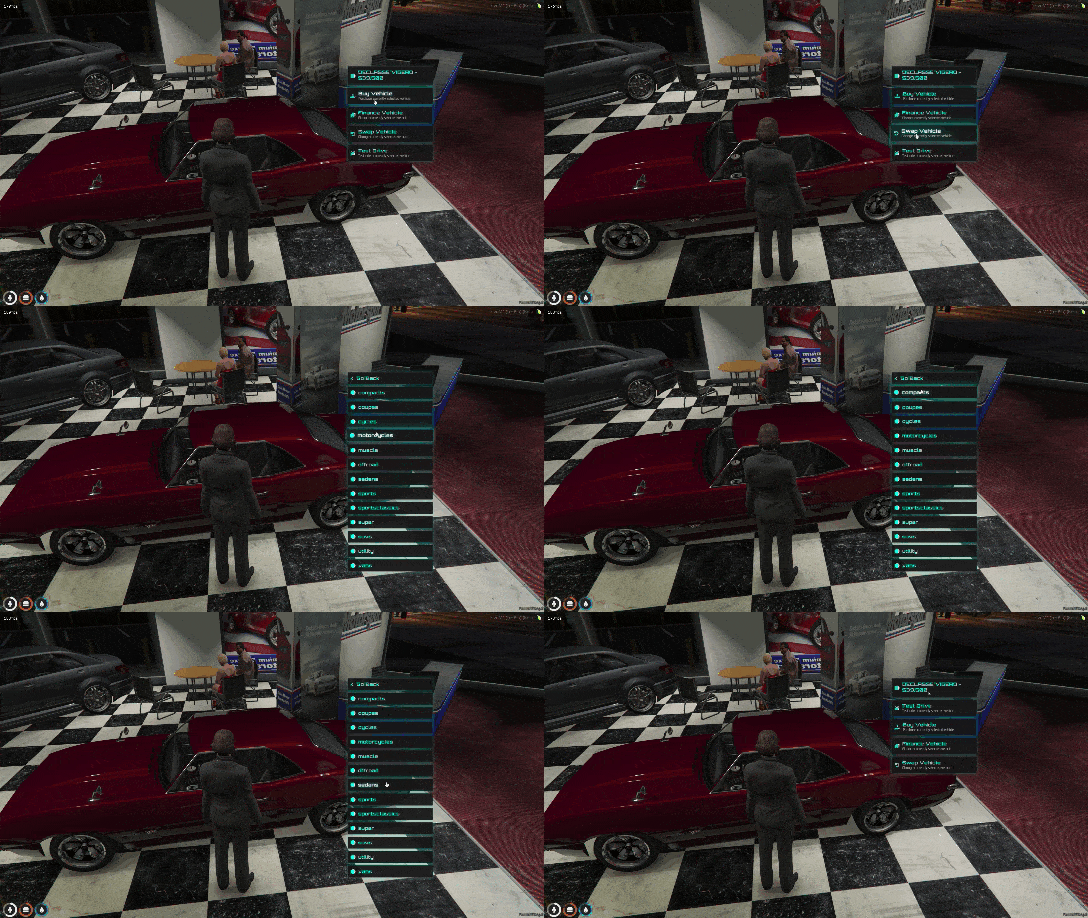
Transform your QBCore server’s user interface with this stunning cyberpunk-inspired QB-Menu redesign. If you’re tired of the default QBCore menu and want something that screams futuristic style without sacrificing performance, this modern cyberpunk edition is exactly what you need. It brings a visually striking, neon-drenched interface to your server while maintaining smooth animations and zero performance impact.
This isn’t just a color swap – it’s a complete visual overhaul featuring sleek modern design, smooth transitions, enhanced visuals with depth effects, and a unique glass-effect aesthetic that makes every interaction feel premium. Best of all? It’s performance-friendly, meaning your players get the eye candy without the frame drops.
What’s Included
The Modern Cyberpunk Edition of QB-Menu is a complete UI replacement that integrates seamlessly with your existing QBCore setup. You get the redesigned menu files with cyberpunk-themed styling, custom CSS for the glass effect and neon accents, smooth animation scripts, and compatibility with all standard QBCore features. Installation is straightforward – just replace your existing qb-menu files and you’re good to go.
Key Features
- Sleek Cyberpunk Design – Neon color scheme with dark backgrounds and vibrant accents that create an immersive futuristic atmosphere. Perfect for cyberpunk-themed servers or modern urban roleplay.
- Smooth Fluid Animations – Every interaction features buttery-smooth transitions and animations. Menu opens, closes, and navigates with professional-grade fluidity that enhances the user experience.
- Enhanced Visual Depth – Layered UI elements with shadows, glows, and depth effects create a three-dimensional feel. The interface doesn’t just look flat – it has visual hierarchy that guides player attention.
- Unique Glass Effect – Translucent panels with blur effects give the menu a modern glass-morphism look. It’s like looking through frosted glass with neon lights shining through.
- Zero Performance Impact – Optimized CSS and minimal JavaScript ensure this beautiful UI doesn’t slow down your server. Players with lower-end systems won’t see frame drops.
- QBCore Native Integration – Drop-in replacement for qb-menu. Works with all existing QBCore scripts that use the menu system – no compatibility issues.
- Responsive Design – Scales properly across different screen resolutions. Whether your players are on 1080p, 1440p, or ultrawide monitors, it looks great.
- Easy Customization – CSS-based styling means you can easily adjust colors, transparency, and effects to match your server’s brand. No complex coding required.
- Modern Typography – Clean, readable fonts with proper hierarchy. Important information stands out, making menus easier to navigate quickly.
- Accessibility Options – High contrast elements and clear visual feedback ensure all players can use the menu effectively, even in bright or dark environments.
Perfect For
- QBCore servers wanting a modern, futuristic aesthetic
- Cyberpunk-themed roleplay communities (Night City, Neo Tokyo, etc.)
- Servers looking to stand out with unique UI design
- Communities who value both style and performance
- Server owners wanting an easy visual upgrade without recoding scripts
- Streamers and content creators who want eye-catching gameplay footage
Framework Compatibility
- ✅ QBCore – Fully compatible with all modern QBCore versions. Direct replacement for qb-menu resource.
- ❌ ESX – Not compatible (this is QBCore-specific). ESX servers would need a different menu system.
- ❌ Standalone – Requires QBCore framework to function properly.
Installation Guide
- Download the Resource – Get the Modern Cyberpunk Edition from the link below and extract the files
- Backup Original – Before replacing, backup your current qb-menu folder in case you want to revert later
- Replace Files – Navigate to your resources folder and replace the existing qb-menu with the cyberpunk version
- Check Dependencies – Ensure qb-core is up to date. This menu works best with recent QBCore versions
- Restart Resource – Restart qb-menu or use “ensure qb-menu” in your server console
- Test In-Game – Join your server and open any menu (inventory, job menu, etc.) to see the new design
- Customize (Optional) – Edit the CSS file to adjust colors, transparency, or effects to match your server theme
Customization Options
Changing Color Scheme
The cyberpunk theme uses neon colors, but you can easily modify them:
- Open the CSS file in your qb-menu folder
- Look for color variables (usually at the top)
- Change hex color codes to your preferred palette
- Common changes: accent color (neon blue/pink), background darkness, text colors
Adjusting Transparency
Want more or less glass effect?
- Find the backdrop-filter properties in CSS
- Increase blur values for more frosted glass effect
- Adjust opacity values (0.0 = fully transparent, 1.0 = fully opaque)
- Test different combinations until you find your sweet spot
Animation Speed
If animations feel too fast or slow:
- Locate transition and animation properties
- Modify duration values (e.g., 0.3s = 300 milliseconds)
- Shorter = snappier, longer = smoother/dramatic
Performance Optimization Tips
- Keep blur effects moderate – extreme blur can impact lower-end systems
- Use CSS transforms instead of changing position/size (GPU accelerated)
- Avoid excessive box-shadows if you have many menu elements
- Test on different hardware to ensure all players get smooth performance
- Consider offering a “lite” version for players with performance concerns
Common Issues & Solutions
Issue: Menu Not Showing at All
Solution: Make sure qb-core is running before qb-menu. Check your server.cfg order – qb-core should start first. Also verify all files were copied correctly.
Issue: Broken Visual Elements
Solution: This usually means CSS files didn’t load. Check file paths in the HTML and ensure all CSS/JS files are in the correct directories. Clear your FiveM cache and reconnect.
Issue: Menu Works But Looks Normal
Solution: You might have cached the old menu. Press F8 in-game and type “resmon” to verify qb-menu is the new version. Try clearing your FiveM cache (delete cache folder in FiveM directory).
Issue: Performance Drops
Solution: Reduce backdrop-filter blur intensity in the CSS. Lower blur values or remove blur entirely if needed. Also check for conflicts with other UI scripts.
Issue: Colors Look Wrong
Solution: Check your game’s visual settings. Some graphics mods or ReShade presets can alter UI colors. Try adjusting saturation or disabling visual mods temporarily.
Issue: Text Hard to Read
Solution: Increase text color contrast in the CSS. Make sure text colors have enough difference from background colors. Consider adding text shadows for better readability.
Design Philosophy
The Modern Cyberpunk Edition follows these principles:
- Form Follows Function – Every visual element serves a purpose. Beauty shouldn’t compromise usability.
- Consistency – Design language remains consistent across all menu types and interactions.
- Visual Hierarchy – Important information is emphasized through size, color, and positioning.
- Accessibility – High contrast, clear fonts, and logical structure ensure all players can navigate easily.
- Performance First – Stunning visuals mean nothing if they cause lag. Optimization is built-in.
FAQ
Q: Will this work with ESX?
A: No, this is specifically designed for QBCore’s qb-menu system. ESX uses a different menu structure and would require a different modification.
Q: Can I use this on my streaming/content creation server?
A: Absolutely! The cyberpunk aesthetic looks fantastic on stream and in videos. It’ll make your content stand out visually.
Q: Does this affect my existing QBCore scripts?
A: No. It’s a visual replacement only. All functionality remains identical – your scripts that use qb-menu will work exactly as before, just prettier.
Q: Can I combine this with other UI mods?
A: Yes, as long as they don’t also modify qb-menu. This pairs well with custom HUDs, inventory UIs, and phone scripts that don’t touch the menu system.
Q: Is this resource encrypted?
A: No! All files are open source and fully editable. Customize colors, effects, and layout however you want.
Q: Will future QBCore updates break this?
A: Possibly. Major qb-menu updates might require updating this theme. Always backup before updating QBCore, and check for compatibility updates.
Q: How do I revert to the original menu?
A: Just restore your backup of the original qb-menu folder and restart the resource. That’s why we recommend backing up first.
Q: Can I sell this or include it in paid server packages?
A: Check the original creator’s license. Many free resources allow commercial use with attribution, but verify the specific terms.
Q: Does this work with custom themes/color schemes?
A: Yes! The CSS is easy to modify. You can change it from cyberpunk blue/pink to any color scheme – red/black, green/purple, etc.
Q: Will this increase my server resource usage?
A: No. UI rendering happens client-side, not server-side. Your server’s performance won’t be affected at all.
Download
Ready to give your QBCore server a stunning cyberpunk makeover? Download QB-Menu: Modern Cyberpunk Edition now:
Screenshots & Preview
Before installing, we recommend checking out preview images and videos to see if the cyberpunk aesthetic fits your server’s theme. The neon colors and futuristic design work best for modern urban or cyberpunk-themed servers, but can be customized for any style.
Related Resources
- Free FiveM HUD – More UI modifications to enhance your server’s visual experience
- Free FiveM Mods – Browse our collection of free server enhancements
- QBCore Scripts – Explore more resources specifically designed for QBCore