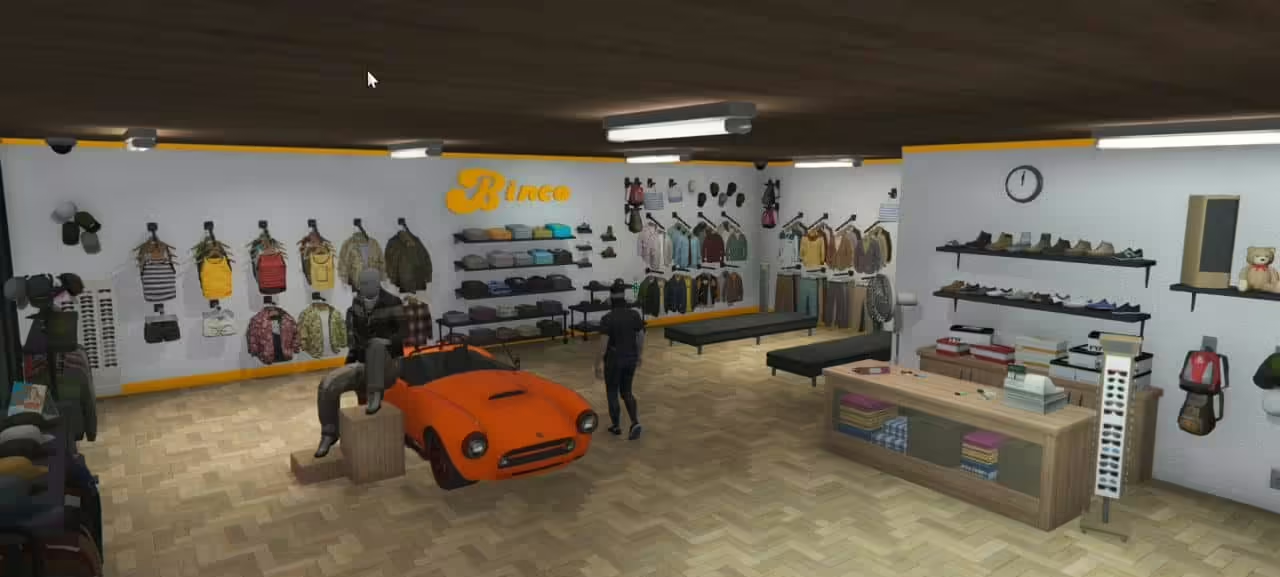
All Bincos Reworked
Free
All Bincos Reworked
Description
Welcome to a fresh enhancement for your gaming environment! This new mod, created by Moreo Design, transforms all Binco stores into a beautifully reworked map, bringing a refreshing look to your FiveM experience. Let’s jump right into how to install this exciting mod so you can start enjoying it right away.
Installation Instructions
For Single Player (SP)
- Download the Mod: Begin by obtaining the “moreo_binco” folder from the provided link below.
- Copy the Folder: Locate the
dlcfolder and copy the “moreo_binco” folder. - Paste the Folder: Navigate to the following directory on your PC:
mods > update > x64 > dlcpacksPaste the “moreo_binco” folder here.
- Modify the dlclist.xml:
- Open OpenIV.
- Go to:
mods > update.rpf > common > data - Open the
dlclist.xmlfile and add the following line:dlcpacks:/moreo_binco/This step ensures the game recognizes the new content.
For FiveM
- Download the Mod: Get the “moreo_binco” folder via the link below.
- Copy the Folder: Copy the “moreo_binco” folder from the downloaded files.
- Paste the Folder: Go to your FiveM server’s resources folder and paste the “moreo_binco” folder there.
- Update Server Configuration: Open your
server.cfgfile and add the following line:ensure moreo_bincoThis step makes sure the server knows to load the new content.
After you’ve followed these steps, you are all set to dive into the reworked Binco stores!
Enjoy the New Experience
You’re now ready to explore this stunning reworked map that brings a new vibe to the in-game shopping experience. Moreo Design hopes you enjoy this exciting enhancement!
Make your gameplay more engaging with this fantastic mod!