Plane Menu: Autopilot Mod for FiveM Aircraft
Plane Menu Mod for FiveM
Elevate Your Virtual Airborne Experience
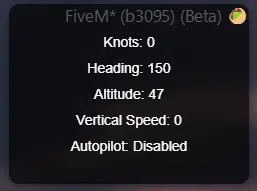
If you’re ready to bring professional‑grade flight display and control to your FiveM sessions, the Plane Menu Mod is the perfect upgrade. This script equips pilots with real‑time flight data, precise speed settings, and an intuitive autopilot system, eliminating guesswork and letting you focus on navigating the skies.
Key Features
Custom Speed Control
Adjust your aircraft’s velocity in knots to match any flight plan or specific altitude. Whether you’re doing a low‑altitude runway approach or a high‑level cruise, the speed control lets you fine‑tune your descent or ascent without tearing into the controls manually.
Vertical Speed Adjustment
Change the vertical speed to precisely control how fast your plane climbs or descends. This feature is vital during the take‑off phase and during precise landings or airbrake operations.
Autopilot Functionalities
The autopilot gives you a hands‑free experience. Set desired altitude and speed, and let the system maintain steady flight, leaving you free to buddy‑up, navigate or simply enjoy the view.
Compatibility
The Plane Menu Mod works flawlessly with ox_lib, making it an effortless addition to any FiveM server that already uses ox_lib. No additional setup drags, just a few clicks and you’re ready to fly.
Getting the Mod
Ready to take your flight role‑playing to the next level? Click the button below to download the latest build of the Plane Menu Mod and smoother, more realistic aviation adventures.
Download Plane Menu Mod
How Autopilot Works
Autopilot is one of the standout features of this mod. It lets you set and manage flight parameters with ease, giving you confidence even in high‑stress situations.
Enabling Autopilot
1. Access the Menu – Open the main menu and navigate to the Autopilot Options submenu. 2. Set Parameters –
- Altitude: Click the button, then type your desired height in feet.
- Speed: Click the speed button, then enter your desired speed in knots.
3. Send to Autopilot – Click Send to Autopilot to transmit your settings. 4. Activate – Use `/autopilot` or toggle the in‑game menu option to let the plane climb to the set altitude and maintain a vertical speed of zero once it reaches cruising altitude.
With autonomous level‑keeping, you can focus on navigation or network communication while aircraft performance remains consistent.
Disabling Autopilot
If you need to take full manual control:
1. Deactivate – Either enter `/autopilot` again or disable the feature from the menu. 2. Cancel Tweaks
Title
Description
No Spam
* Als Amazon-Partner verdiene ich an qualifizierten Käufen. Die Preise können sich geändert haben.