Best FiveM Business Scripts 2026 — Run Shops, Restaurants & More
Every serious roleplay server reaches a point where standard jobs are not enough. Players finish the grind, accumulate cash, and start looking for something more meaningful to do…
Disclosure: This article links to products sold on VertexMods. Product order is based on editorial judgment, not paid placement.

Why Player-Owned Businesses Matter
Every serious roleplay server reaches a point where standard jobs are not enough. Players finish the grind, accumulate cash, and start looking for something more meaningful to do with their time and money. That is where business scripts come in. A good fivem business script transforms passive players into active economic participants — owners who manage employees, negotiate supply deals, set prices, and compete with other player-run enterprises.
Businesses create a natural economic cycle that no amount of NPC job scripting can replicate. When a player buys a restaurant, hires a cook and a waiter, sources ingredients from a farmer, and sells meals to other players, you have four people engaged in interconnected roleplay. Multiply that across a dozen businesses and your server economy becomes self-sustaining.
This guide covers the best business scripts available in 2026, with honest assessments of features, pricing, and framework compatibility. Whether you run ESX, QBCore, or QBox, there are solid options here.
Types of Businesses You Can Run
Before diving into specific scripts, it helps to understand the categories of businesses most scripts support. The best fivem business script solutions cover multiple types out of the box:
Retail Shops
General stores, clothing shops, electronics stores, and 24/7 convenience stores. Players stock shelves with items, set prices, and customers (NPCs or other players) purchase goods. Revenue depends on location, pricing strategy, and inventory management.
Restaurants & Bars
Food and drink establishments ranging from fast food joints to upscale restaurants. These typically require cooking mechanics, ingredient sourcing, and table service workflows. Bars add drink mixing and nightlife atmosphere.
Gas Stations
Fuel businesses that generate consistent passive income. Players manage fuel supply, set pump prices, and maintain the station. Gas stations pair well with vehicle scripts that implement fuel consumption.
Nightclubs & Entertainment
Music venues, strip clubs, and entertainment venues with DJ systems, bouncer roles, and VIP areas. These businesses thrive during peak server hours and create natural gathering points for roleplay.
Car Washes & Service Businesses
Lower-investment businesses that provide essential services. Car washes, laundromats, and similar service businesses offer steady income with lower management overhead.
Custom Enterprises
Advanced scripts let server owners define entirely custom business types — from drug labs (see our crime scripts guide) to real estate agencies, import/export operations, and manufacturing facilities.
Top 7 FiveM Business Scripts
1. okokBusiness
Framework: ESX, QBCore, QBox Price: Paid (~$25) Developer: okok Scripts
okokBusiness is one of the most widely adopted business management scripts in the FiveM ecosystem. It provides a clean, modern UI and covers the core business ownership loop well.
Key features:
- Player-owned businesses with purchase/sale system
- Employee management with salary configuration
- Inventory and stock management per business
- Configurable business types (unlimited)
- Revenue tracking and financial reports
- Compatible with ox_inventory and other major inventory systems
- Boss menu with role-based permissions
Pros: Polished UI, active development, strong multi-framework support, good documentation. Cons: Some advanced features (like supply chains between businesses) require additional configuration or companion scripts.
2. qb-businesses
Framework: QBCore, QBox Price: Free Developer: QBCore Community
The default business system included with QBCore. It covers the basics and integrates natively with the QBCore ecosystem.
Key features:
- Pre-configured business locations (shops, restaurants, gas stations)
- Employee hiring and firing
- Boss menu with financial overview
- Stash storage per business
- Grade-based access control
- Native integration with qb-inventory and qb-banking
Pros: Free, zero-config for QBCore servers, reliable, well-documented. Cons: Limited customization compared to premium options. Adding new business types requires manual Lua editing. No built-in supply chain mechanics.
3. esx_business
Framework: ESX Price: Free Developer: ESX Community
The ESX counterpart for business management. While more basic than premium alternatives, it provides a stable foundation that many servers have used for years.
Key features:
- Business ownership registration
- Employee management with job grades
- Business-specific storage
- Revenue collection mechanics
- Integration with ESX banking and inventory
Pros: Free, battle-tested, lightweight resource usage. Cons: Dated UI, fewer features than modern alternatives, limited business types without modification.
4. Renewed Businesses
Framework: QBCore, QBox Price: Free Developer: Renewed Scripts
Part of the Renewed Scripts ecosystem (the team behind Renewed-Banking and Renewed-Phone), this business script brings a modern approach to business management with a focus on clean code and ox_lib integration.
Key features:
- ox_lib based UI and interactions
- Multi-business ownership per player
- Dynamic pricing system
- Employee scheduling and shift management
- Integration with Renewed-Banking for business accounts
- Supply ordering system with delivery mechanics
- Detailed transaction logging
Pros: Modern codebase, excellent ox_lib integration, active community, free. Cons: Requires ox_lib and ox_inventory as dependencies. Smaller ecosystem than okok or Quasar.
5. qs-shops
Framework: ESX, QBCore Price: Paid (~$20) Developer: Quasar Store
Part of the Quasar Store ecosystem, qs-shops focuses on retail business management with a Quasar-branded UI.
Heads up: Quasar Store has a mixed reputation for post-sale support and stability on populated servers. See our review of Quasar Mods before committing to the ecosystem.
Key features:
- Player-owned shop system with location management
- Dynamic item pricing based on supply/demand
- Restocking mechanics with supplier NPCs
- Employee management with wage system
- Modern Quasar UI design
- Integration with qs-inventory
Best for: Servers already running the Quasar stack (qs-inventory, qs-hud, qs-banking).
Pros: Modern Quasar-branded UI, tight Quasar ecosystem integration. Cons: Best experience requires other Quasar scripts. Focused on retail — restaurants and gas stations need separate scripts.
6. wasabi_businesses
Framework: ESX, QBCore, QBox Price: Paid (~$30) Developer: Wasabi Scripts
A comprehensive business management solution from the Wasabi team, known for their quality scripts across multiple categories.
Key features:
- Full business lifecycle (purchase, manage, sell)
- Employee management with customizable roles
- Supply chain system between businesses
- Business upgrades and expansion mechanics
- Detailed analytics dashboard
- Custom business creation via config
- Tax system integration
- Multi-location support per business
Pros: Feature-rich, supply chain mechanics are unique, solid multi-framework support. Cons: Higher price point. Configuration can be complex for servers with many custom business types.
7. jg-business
Framework: ESX, QBCore, QBox Price: Paid (~$20) Developer: JG Scripts
A focused business script that prioritizes simplicity and ease of setup while still providing the core features servers need.
Key features:
- Quick setup with pre-configured business templates
- Employee management with boss menu
- Revenue and expense tracking
- Business storage system
- Configurable business hours
- NPC customer system for off-peak revenue
Pros: Easy to install, good for servers that want business ownership without complexity, affordable. Cons: Fewer advanced features than wasabi_businesses or okokBusiness. Limited supply chain mechanics.
Business Script Comparison Table
| Script | Framework | Employee System | Supply Chain | Price | Business Types |
|---|---|---|---|---|---|
| okokBusiness | ESX/QBCore/QBox | Yes (roles) | Basic | ~$25 | Unlimited (config) |
| qb-businesses | QBCore/QBox | Yes (grades) | No | Free | Pre-configured |
| esx_business | ESX | Yes (grades) | No | Free | Limited |
| Renewed Businesses | QBCore/QBox | Yes (shifts) | Yes (orders) | Free | Configurable |
| qs-shops | ESX/QBCore | Yes (wages) | Basic (restock) | ~$20 | Retail focused |
| wasabi_businesses | ESX/QBCore/QBox | Yes (custom roles) | Yes (full) | ~$30 | Unlimited (config) |
| jg-business | ESX/QBCore/QBox | Yes (boss menu) | No | ~$20 | Template-based |
How Businesses Drive Server Economy
A well-implemented fivem business script does more than add a feature — it fundamentally changes how money flows through your server. Understanding this is critical for server owners who want a healthy, engaging economy.
The Business Economy Loop
Without businesses, most server economies follow a simple pattern: players do NPC jobs, earn money, buy items or vehicles, and eventually run out of things to spend on. This leads to inflation, boredom, and player churn.
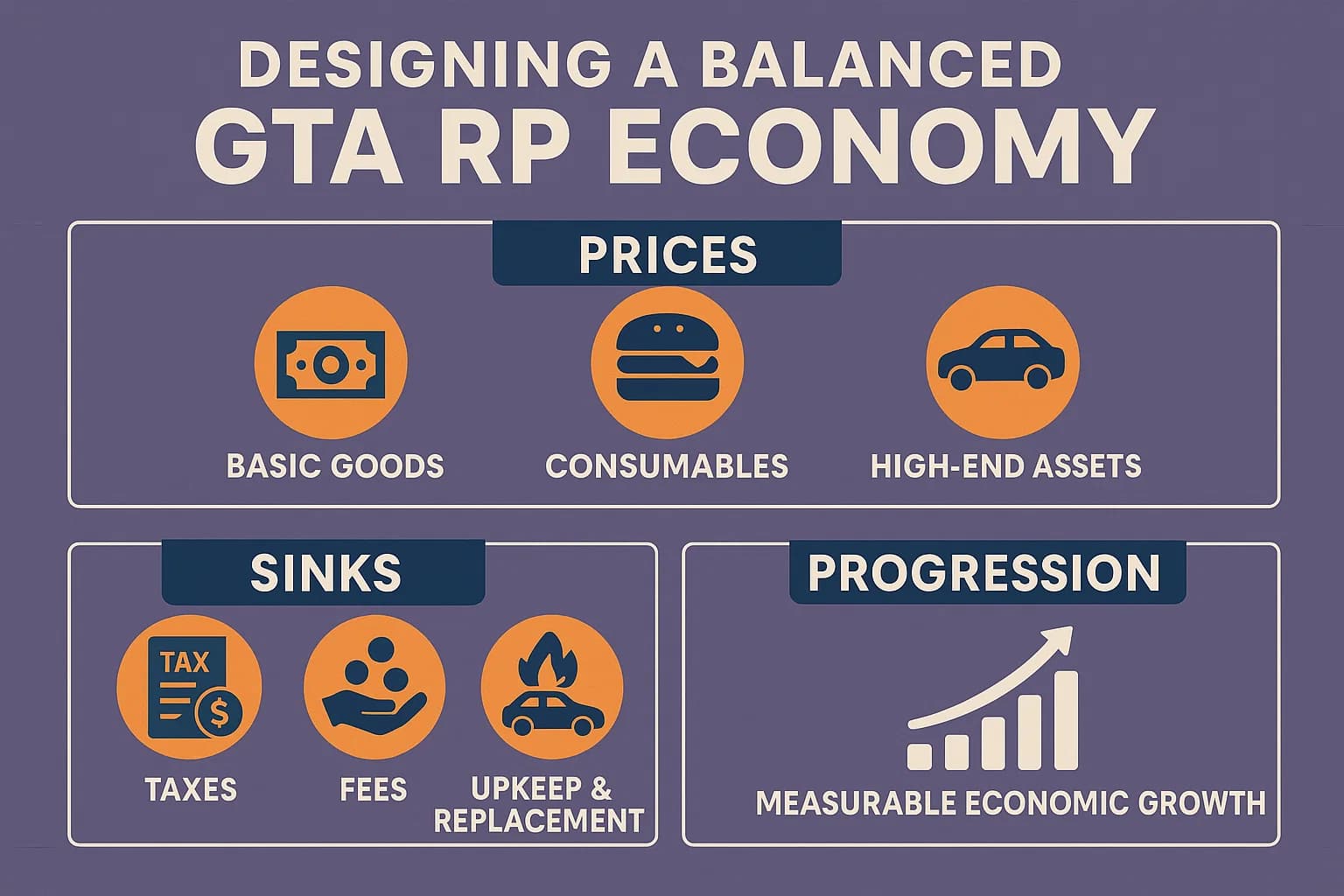
Businesses introduce a circular economy:
- Investment: Players spend savings to purchase a business (money leaves circulation)
- Operating costs: Owners buy supplies, pay employees, cover taxes (ongoing money sinks)
- Revenue generation: Customers pay for goods and services (money enters the business)
- Employee wages: Business owners pay other players (money redistribution)
- Competition: Multiple businesses in the same category compete on price and quality
This loop creates natural money sinks and sources that balance each other. For a deeper dive into economic systems, see our economy script comparison guide.
Balancing Business Income
The most common mistake server owners make is setting business income too high. When a gas station owner earns $50,000 per hour passively, the economy breaks. Follow these guidelines:
- Business income should be 1.5-2x what a standard job pays, reflecting the investment and risk
- Require active management for peak earnings — passive income alone should be modest
- Implement operating costs (rent, supplies, maintenance) that scale with revenue
- Use tax systems to create additional money sinks tied to business success
Pair your business scripts with a solid banking system for the best results.
MLO Integration: Elevating Business Roleplay
Default GTA V interiors work for basic businesses, but custom MLO interiors take business roleplay to the next level. A restaurant with a custom kitchen layout, a nightclub with a proper DJ booth and VIP section, or a mechanic shop with realistic bays — these details make businesses feel real.
Pairing Businesses with MLOs
When choosing MLO interiors for your businesses, consider:
- Performance impact: Each MLO adds to client-side streaming. Cluster businesses geographically to minimize the load
- Script compatibility: Verify that your business script's interaction points (registers, storage, employee zones) can be repositioned to match the MLO layout
- Player count: High-traffic businesses (restaurants, nightclubs) need MLOs with enough space for multiple players simultaneously
- Theme consistency: Match MLO quality and style to your server's visual identity
Many business scripts allow you to define custom interaction coordinates per business location, making MLO integration straightforward.
Setup and Configuration Tips
Installation Best Practices
- Start with fewer businesses: Launch with 5-8 business locations. Expand as demand grows. Too many empty businesses dilute the economy and reduce competition
- Test the economy offline: Before opening businesses to players, simulate the economy with test accounts. Run a business for a full in-game week and verify that income, expenses, and taxes balance correctly
- Configure employee limits: Cap employees per business based on your server's average player count. A 64-slot server does not need businesses with 15 employee slots
- Set purchase prices deliberately: Business purchase prices should represent a significant investment — typically 2-4 weeks of regular job income. This ensures only committed players become business owners
Framework-Specific Notes
ESX servers: Make sure your banking script supports business accounts separately from personal accounts. esx_addonaccount or a modern banking replacement handles this well.
QBCore/QBox servers: Most business scripts integrate with qb-banking or Renewed-Banking out of the box. Verify that business transactions appear in banking logs for admin oversight.
Multi-framework: If you are using ox_core or a hybrid setup, prioritize scripts that depend on ox_lib for their interaction layer — they tend to have the best cross-framework compatibility.
Common Pitfalls to Avoid
- No admin oversight: Always configure admin commands to inspect business finances. Players will exploit any system without monitoring
- Ignoring supply chains: Businesses that generate money from nothing break immersion. Require supply purchases, even if simplified
- Static pricing: Let players set their own prices within configurable min/max bounds. Fixed prices remove the competitive element that makes businesses engaging
- No business failure: Businesses should have running costs. If an owner goes inactive, the business should accumulate debt and eventually become available for purchase again
Finding the Right Business Script
The best fivem business script for your server depends on your framework, budget, and how central you want businesses to be in your economy. For servers just starting out, qb-businesses or Renewed Businesses provide solid free foundations. For established servers looking for a premium experience, okokBusiness and wasabi_businesses offer the depth and polish that keep players invested long-term.
Browse business scripts and economy resources on VertexMods to find options that match your server's needs, or check out our guides on job scripts and housing scripts to build a complete roleplay ecosystem.
Frequently Asked Questions
What is the best FiveM business script?
For QBCore servers, qb-businesses and okokBusiness are popular choices. For ESX, esx_business offers solid functionality. Premium options on [VertexMods](/shop) provide advanced features like employee management and custom interiors.
Can players own businesses in FiveM?
Yes, with business scripts players can purchase, manage, and profit from businesses like shops, restaurants, gas stations, and custom enterprises. Most scripts include employee hiring and inventory management.
How do business scripts affect server economy?
Business scripts create natural money circulation — players invest to buy businesses, hire employees (player salaries), purchase supplies, and earn revenue. This creates a self-sustaining economy loop.
Do I need MLO interiors for businesses?
Not always. Many business scripts work with default GTA V interiors. However, custom MLO interiors significantly enhance the RP experience. Check our [MLO collection](/fivem/fivem-mlo-interiors) for options.