Free
Garbage Job – Free FiveM Job Scripts
Description
If you’re looking to enhance your gaming experience with an immersive garbage collection job, you’re in the right place! This guide will take you through the steps to install and get started with the free Garbage Job mod for ESX.
Overview of the Garbage Job Mod
The Garbage Job mod allows players to engage in a realistic trash collection role-play experience. You will have dynamic collection points, realistic trash props, player interactions, and even vehicle integration to make your virtual garbage collection feel authentic!
How to Install the Mod
Step 1: Prerequisites
Before you get started, ensure that you have the following installed on your server:
- ESX
- ox_target
Step 2: Download the Script
You can download the Garbage Job script from the link here: Garbage Job Download.
Step 3: Add the Script to Your Server
- Place the downloaded script files into your server’s resources folder.
- Open your
server.cfgfile and add a line to start the Garbage Job script. Use the command:start Garbage-Job
Step 4: Configure the Script
You’ll need to configure collection locations and the coordinates for the vendor NPC. You can do this within the Config table of the script. Adjust these settings to fit your server’s layout and gameplay style.
How to Start the Garbage Collection Job
Once everything is set up, you can start your garbage collection job:
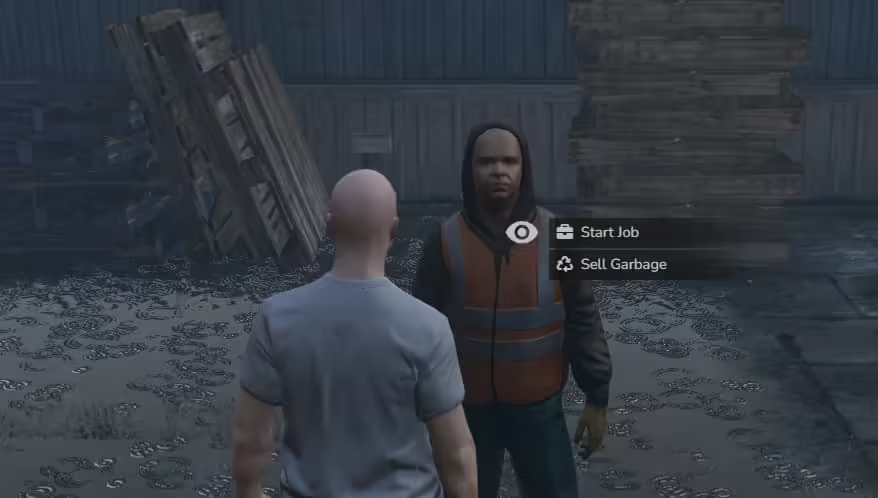
- Find and interact with the NPC (garbage vendor) to kick off your job.
- Head to the designated locations marked for trash collection.
- As you collect the trash, you will receive notifications about your progress.
- After filling up your truck, return to the vendor to dispose of the trash and receive your rewards.
Features of the Garbage Job Mod
- Dynamic Collection Points: Randomly generates points for a varied gameplay experience.
- Realistic Props: Utilizes the
prop_ld_rub_binbag_01for an authentic feel. - Player Interaction: Smooth interactions using ox_target that notify you when you perform actions.
- Vehicle Integration: Spawn a trash truck at the start of your job to enhance role-play.
- Animations: Experience realistic animations while picking up and throwing away trash.
- Server Events: Track your collected trash and keep players informed about returning for payment.
This mod not only adds fun and engagement to your gameplay but also enhances the role-playing aspect with its multiple features. Dive into your new job and enjoy the experience!
If you encounter any issues or need further assistance, don’t hesitate to reach out to the mod’s community for support. Happy gaming!